
What Is SCORM in Simple Terms?

SCORM stands for Sharable Content Object Reference Model, a set of technical specifications defining how online courses are packaged and tracked across different LMS platforms.
In practice, you get:
-
- A .zip file containing your course content, media, and a manifest file (imsmanifest.xml)
- Standardized communication between course and LMS via JavaScript API
-
- Tracking of completion status, scores, time spent, and bookmarking data
- The ability (in theory) to upload the same package to SimpliTrain, Moodle, Cornerstone, TalentLMS, or Docebo
The catch: “SCORM-compliant” means platforms implement the specification, not that they implement it identically.
If you’ve ever tried to migrate a course from Moodle to Adobe Learning Manager and watched your tracking data vanish, you’ve met the “SCORM ghost.” While marketed as a universal standard enabling seamless content portability, the reality of SCORM is far more nuanced. Different LMS platforms interpret the specifications differently, “SCORM-compliant” doesn’t guarantee plug-and-play compatibility, and migration often uncovers unexpected data loss or behavior changes. Therefore, you need to learn what is SCORM?
SCORM (Sharable Content Object Reference Model) is a technical interoperability standard developed by Advanced Distributed Learning (ADL) that defines how e-learning content communicates with learning management systems. Understanding SCORM matters because it shapes content portability, tracking capabilities, and long-term maintenance requirements. This article examines what SCORM actually is, how it compares to alternatives like xAPI and cmi5, and, critically, where the marketing promises diverge from implementation reality.
Why Was SCORM Created in the First Place?
Early e-learning suffered from fragmentation. You’d build a course for Blackboard, and it wouldn’t function in WebCT. Organizations investing thousands in course development faced vendor lock-in, switching platforms meant rebuilding entire content libraries from scratch. SCORM emerged from U.S. Department of Defense and government initiatives addressing this e-learning interoperability crisis. ADL developed SCORM to enable:
- Content reusability: Create once, deploy across systems
- Vendor neutrality: Avoid platform-specific content dependencies
- Portability: Move content between LMS platforms without reconstruction
The driving forces behind adoption included:
- Corporate compliance training requiring consistent delivery across divisions using different LMS platforms
- Academic content sharing between institutions with varied systems
- Government training programs needing standardized content distribution
SCORM provided technical specifications ensuring content creators and LMS vendors could implement compatible systems. However, as we’ll see, practical interoperability introduced nuances that marketing materials consistently understate.
How Does SCORM Actually Work Behind the Scenes?
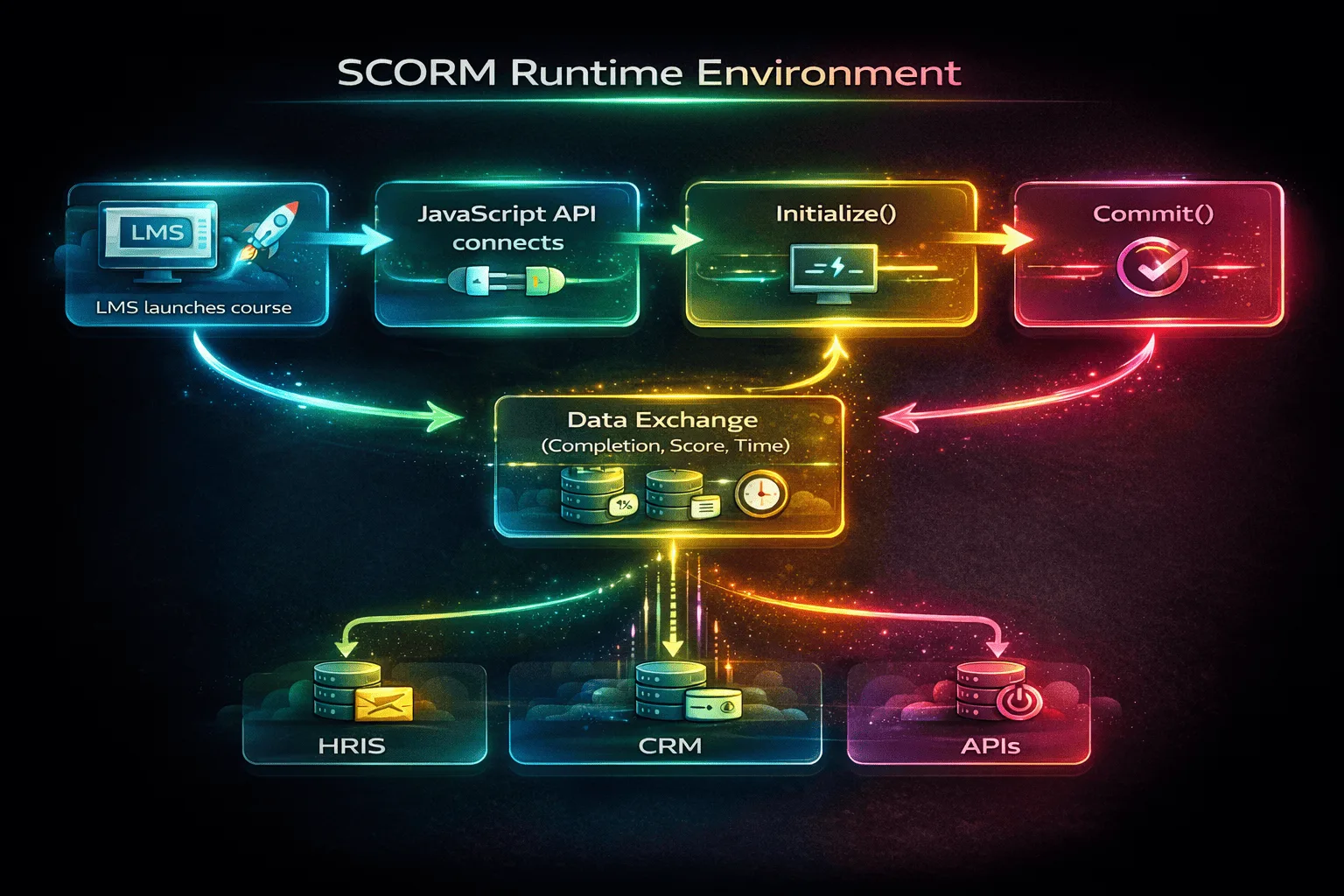
SCORM functions through browser-based JavaScript API communication between your course content and the LMS. The workflow you’ll encounter:
- LMS launches course: System reads the manifest file, identifies the launch point, opens content in a browser frame or new window
- API connection established: Your course’s JavaScript locates the SCORM API object provided by the LMS
- Communication initiated: Course calls Initialize() to start the session
- Data exchange begins: Course sends tracking data, completion status, assessment scores, time spent, suspend data for bookmarking position
- LMS stores data: System writes this information to its database
- Session terminates: Course calls Terminate() to close the connection properly
The SCORM data model defines standardized variables your course can read and write. These include completion status, scores, session time, and suspend data for resuming where learners left off.
🔧 Technical Deep Dive: SCORM API Communication
For developers implementing SCORM, the data model uses specific variables:
- cmi.core.lesson_status (completed, incomplete, passed, failed)
- cmi.core.score.raw (assessment scores)
- cmi.core.session_time (time spent in current session)
- cmi.suspend_data (course state for resuming, critical limitation: 4,096 characters in SCORM 1.2)
This SCORM runtime environment operates entirely within the browser during active sessions. The LMS doesn’t track activity between API calls, only data explicitly sent through SCORM communication gets captured. This is why closing a browser mid-course can result in lost progress if the course didn’t call Commit() to save data.
SCORM 1.2 vs SCORM 2004 – What’s the Real Difference?
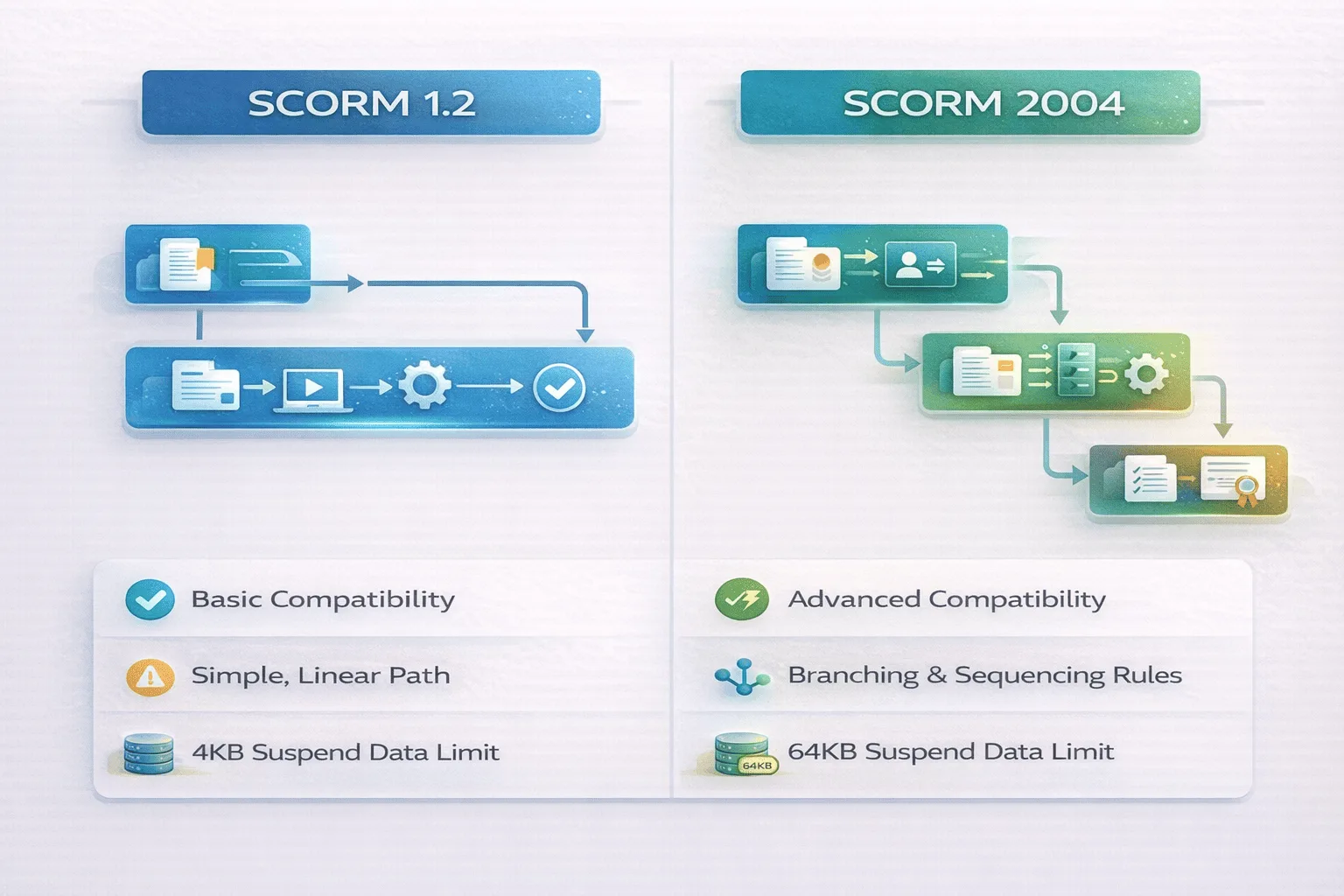
SCORM 1.2 (released 2001) established the foundation and remains the most widely adopted version. The SCORM 2004 (multiple editions from 2004-2009) added sophisticated sequencing and navigation rules enabling adaptive learning paths. In my experience evaluating LMS implementations across 50+ organizations, SCORM 1.2 still dominates production environments in 2026. Why? The sequencing features that make SCORM 2004 theoretically superior create practical headaches. SCORM 2004 introduced:
- Sequencing rules: Conditional navigation based on learner performance
- Rollup rules: Aggregating completion/success across multiple SCOs
- Advanced navigation controls: Branching scenarios and prerequisite enforcement
The implementation reality we’ve observed:
Different LMS platforms interpret SCORM 2004 sequencing specifications inconsistently. A branching scenario working perfectly in Moodle might loop infinitely in Cornerstone. The same course uploaded to TalentLMS might disable navigation controls that function in Adobe Learning Manager. This creates exactly the cross-platform compatibility challenges SCORM was designed to prevent.
| Dimension | SCORM 1.2 | SCORM 2004 | When to Choose This |
|---|---|---|---|
| Adoption Level | Near-universal LMS support | Broad support but implementation varies | SCORM 1.2: Choose this 90% of the time for maximum stability and predictability |
| Sequencing Support | None (linear navigation only) | Advanced conditional sequencing | SCORM 2004: Only if branching is essential and you can test across all target LMS platforms |
| Complexity | Straightforward implementation | Significantly more complex | SCORM 1.2: When development timeline matters and you need reliable delivery |
| LMS Compatibility | Consistent behavior across platforms | Sequencing interpretation varies by vendor | SCORM 1.2: When deploying to multiple LMS platforms without extensive testing budget |
| Typical Use Cases | Compliance, certification, simple courses | Complex adaptive learning, branching scenarios | SCORM 1.2: Compliance and certification programs prioritizing consistency over sophistication |
My recommendation: Unless you absolutely need SCORM 2004’s branching capabilities and have budget for cross-platform testing, default to SCORM 1.2. You’ll avoid 80% of the troubleshooting calls we receive about courses behaving differently across LMS platforms.
SCORM vs xAPI vs cmi5 vs AICC — How Are These E-Learning Standards Different?
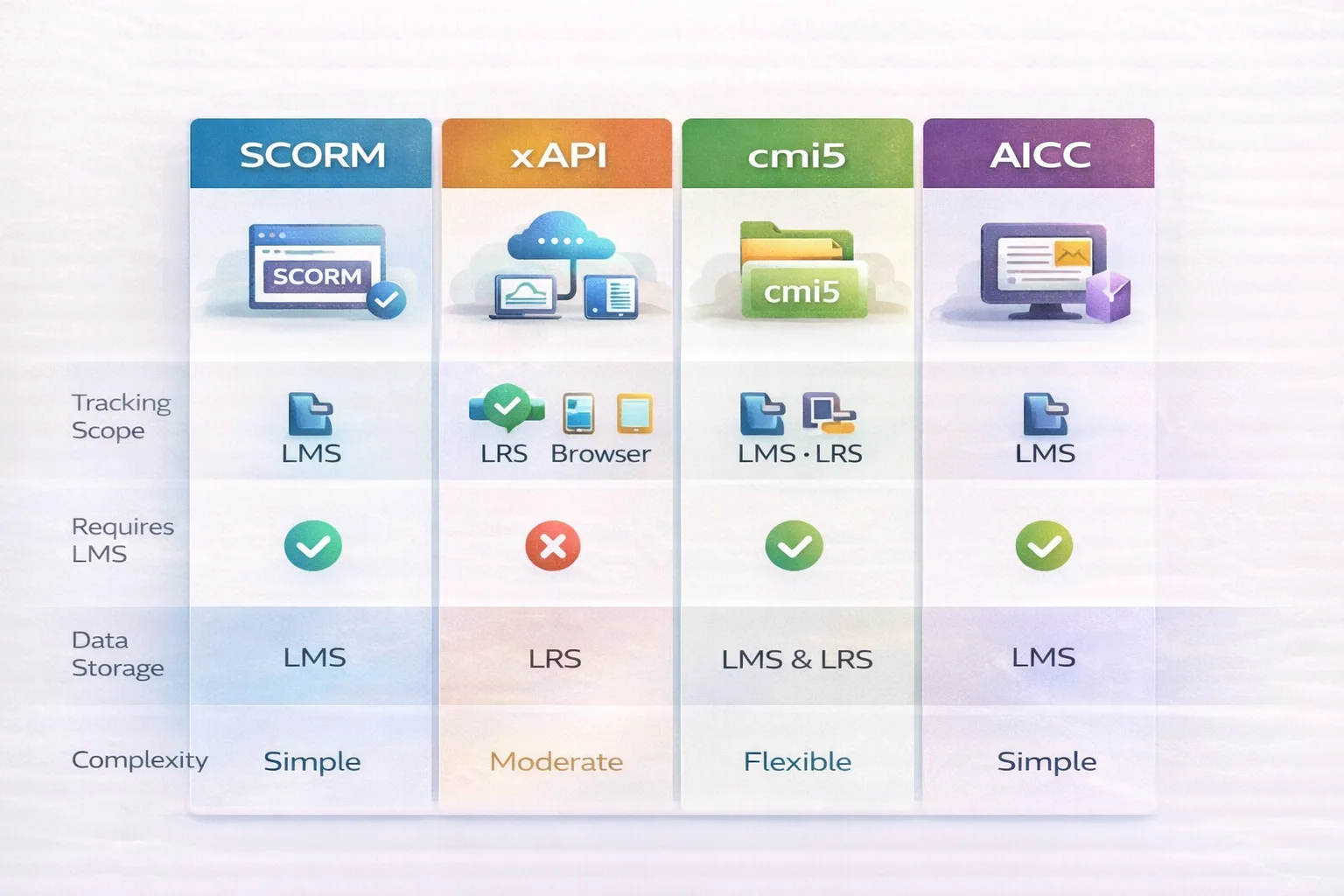
E-learning standards evolved addressing different tracking requirements and technological contexts. Understanding when each makes sense requires looking beyond marketing materials to implementation realities.
SCORM:
- Tracking scope: LMS-based structured courses
- What you actually track: Completion, scores, time within formal training sessions
- Architecture: Browser-based JavaScript API communication with LMS
- Data lives in: LMS database
- Real-world strength: Mature ecosystem with universal compatibility
xAPI (Experience API / Tin Can):
- Tracking scope: Any learning experience, formal courses, mobile apps, simulations, on-the-job performance
- What you actually track: Granular activity statements like “John watched video from 2:15 to 3:42” or “Sarah failed quiz question 7 on second attempt”
- Architecture: HTTP-based statements sent to Learning Record Store (LRS)
- Data lives in: LRS (separate system from or integrated within LMS)
- Real-world strength: Tracks learning beyond LMS boundaries, enables sophisticated analytics
cmi5:
- Tracking scope: Combines structured course sessions with broader xAPI tracking
- What you actually track: Course structure managed by LMS + detailed xAPI statements
- Architecture: LMS launches course and defines structure; xAPI handles granular tracking
- Data lives in: LRS
- Real-world strength: Bridges SCORM-like course management with xAPI’s tracking depth
AICC (Aviation Industry Computer-Based Training Committee):
- Tracking scope: Similar to SCORM but predates it
- What you actually track: Basic completion and scoring
- Architecture: HTTP-based communication (works across domains unlike SCORM)
- Data lives in: LMS database
- Current status: Legacy standard, largely superseded but still supported for backward compatibility
Trade-offs you’ll encounter:
- Tracking depth: SCORM captures high-level completion; xAPI tracks every interaction
- Implementation complexity: SCORM plugs into existing LMS; xAPI requires LRS infrastructure and data strategy
- Analytics capability: SCORM gives you completion reports; xAPI enables behavior pattern analysis
- Ecosystem maturity: SCORM has universal authoring tool support; xAPI tooling remains fragmented
- Offline capability: SCORM requires browser connection; xAPI supports offline with later synchronization
| Standard | Tracking Scope | Requires LMS? | Data Storage | Complexity | When to Choose This |
|---|---|---|---|---|---|
| SCORM | Structured courses; completion, scores, time | Yes | LMS database | Low to moderate | 90% of compliance training and certification programs. Choose this for maximum compatibility. |
| xAPI | Any learning activity; granular interactions | No (uses LRS) | Learning Record Store | Moderate to high | Only if you need to track offline mobile learning, simulations, or informal learning. Implementation complexity often exceeds value for basic training. |
| cmi5 | Structured courses + detailed tracking | Yes (launches from LMS) | LRS | Moderate | When you want SCORM-like structure but need xAPI’s detailed analytics. Requires LMS supporting cmi5 natively. |
| AICC | Basic courses; completion, scores | Yes | LMS database | Low | Legacy content or cross-domain delivery only. Choose SCORM for new development. |
The SCORM Lies: What Salespeople Won’t Tell You
“SCORM-compliant” appears on every LMS vendor’s feature list. In practice, compliance doesn’t mean compatibility.
The Suspend Data Limit Nobody Mentions
SCORM 1.2 limits suspend data (the information storing where learners left off) to 4,096 characters. For simple courses, this suffices. For complex simulations or branching scenarios with dozens of variables to track, you’ll hit this limit and discover the course can’t save progress properly. We’ve debugged courses that worked perfectly during development but failed in production because the authoring tool’s suspend data exceeded the limit. The course appeared to function, until learners closed the browser and returned to find their progress gone. The vendor response: “Oh, you’ll need to upgrade to SCORM 2004, which supports 64,000 characters.” True, but now you’re back to the sequencing compatibility issues discussed earlier.
“Plug and Play” Is Marketing Fiction
Different LMS platforms interpret the SCORM specification’s ambiguities differently:
- Completion logic: Some platforms mark courses “completed” when the SCO sets status to “completed.” Others require status “passed” with a minimum score. Your course might show as incomplete in Cornerstone but completed in Moodle with identical tracking calls.
- Session time calculation: LMS platforms calculate total time differently. Some sum all session_time values. Others use first Initialize() to last Terminate() timestamps. Time reports vary across platforms for the same learner behavior.
- API window location: SCORM specifies the API should be “findable” but doesn’t mandate exactly where. Courses using non-standard API detection logic fail on certain LMS platforms.
The Migration Data Loss Problem
You built 200 courses in SCORM 1.2 on Platform A. You’re migrating to Platform B. Both claim “full SCORM compliance.” What actually happens:
- Historical completion data doesn’t migrate, SCORM defines content packaging, not data portability standards
- Suspend data formats differ between platforms, learners lose progress on in-progress courses
- Custom fields storing additional tracking don’t transfer, platform-specific data is lost
You can move the SCORM packages, but learner records require separate migration processes with substantial data mapping and transformation.
What Are the Pros and Cons of SCORM Today?
Advantages in 2026:
- Wide LMS support: Virtually every enterprise and academic LMS handles SCORM packages, you won’t find yourself locked out of platforms
- Content portability: Create once, deploy across platforms with reasonable consistency (understanding the caveats above)
- Stable and predictable: Mature standard with established authoring tools (Articulate Storyline, Adobe Captivate, iSpring) and extensive troubleshooting resources
- Compliance training fit: Tracks the essential data compliance programs require, completion, scores, attempts, timestamps
Limitations you’ll encounter:
- Limited analytics depth: You get completion and scores, but not detailed learner behaviors, struggle points, or interaction patterns needed for continuous improvement
- LMS-bound tracking: Only records activity during active browser sessions within the LMS, can’t track mobile app usage outside the LMS, offline learning, or informal experiences
- Not designed for modern contexts: Mobile-first learning, social learning platforms, microlearning ecosystems, simulations requiring complex state management, and on-the-job performance support fall outside SCORM’s architectural assumptions
- Sequencing inconsistencies: SCORM 2004’s advanced features behave unpredictably across LMS platforms despite standardization goals
These aren’t flaws, they’re reflections of SCORM’s origins in early 2000s browser-based e-learning. The standard serves its design purpose effectively within its constraints.
Where Does SCORM Still Make Sense — and Where Does It Struggle?
SCORM Fits When You Need:
- Corporate compliance training: Mandatory regulatory courses requiring documented completion across your workforce
- Certification programs: Professional credentials with defined curricula and assessment requirements
- Structured course delivery: Traditional instructional design with modules, assessments, and linear progression
- Multi-LMS portability: Organizations using multiple LMS platforms across divisions, acquisitions, or partnerships
Platforms like Moodle (academic contexts), Cornerstone, SimpliTrain and TalentLMS (corporate training), and Adobe Learning Manager (extended enterprise) handle SCORM upload and tracking reliably for these use cases.
SCORM Struggles With:
- Experiential learning capture: Simulations requiring complex state, on-the-job training, mentoring relationships, project-based learning
- Microlearning ecosystems: Just-in-time performance support accessed outside formal LMS sessions, mobile-first content snippets
- Offline/mobile-first environments: Field workers needing learning access without reliable connectivity
- Advanced performance analytics: Identifying exactly where learners struggle, analyzing behavior patterns to improve content, correlating specific training interactions with business outcomes
Organizations needing these capabilities increasingly implement xAPI tracking alongside SCORM or migrate to xAPI-based architectures, though migration complexity and cost often exceed initial expectations.
FAQ
Q1. What does SCORM stand for?
SCORM stands for Sharable Content Object Reference Model, a technical standard defining how e-learning content packages communicate with learning management systems to enable tracking and portability across platforms. Developed by ADL (Advanced Distributed Learning), it’s maintained as a public specification.
Q2. Is SCORM still used today?
Yes, extensively. SCORM remains the dominant standard for corporate compliance training, certification programs, and structured courses in 2026. Most LMS platforms continue supporting SCORM because existing content libraries use it and migration to alternatives requires significant investment. While adoption of newer standards like xAPI grows, SCORM hasn’t been replaced universally, and likely won’t be for organizations prioritizing stability and compatibility over cutting-edge tracking.
Q3. What is the difference between SCORM and xAPI?
SCORM tracks structured courses within an LMS browser environment, capturing completion, scores, and time spent during active sessions. xAPI tracks any learning experience, mobile apps, simulations, informal learning, on-the-job performance, using detailed activity statements stored in a Learning Record Store. SCORM prioritizes simplicity and universal compatibility; xAPI prioritizes tracking depth and flexibility at the cost of increased implementation complexity. In practice, choose SCORM for traditional</p>
Q4. Do all LMS platforms support SCORM?
Most commercial and open-source LMS platforms support SCORM, but not universally or identically. Enterprise systems (SimpliTrain, Cornerstone, SAP SuccessFactors, Workday Learning) and academic platforms (Moodle, Canvas, Blackboard) typically include SCORM compliance as standard. Smaller or specialized platforms may support only SCORM 1.2, offer SCORM 2004 as a premium add-on, or implement the specification with platform-specific quirks. Always verify LMS SCORM compatibility and test your actual content during evaluation, “SCORM-compliant” doesn’t guarantee your specific course will work identically across platforms.
Q5. What is a SCORM file?
A SCORM file is a .zip package containing your course content (HTML pages, videos, images, JavaScript, assessments), a manifest file (imsmanifest.xml) describing the course structure and metadata, and the files needed for SCORM API communication. When you upload this package to a SCORM-compliant LMS, the system unpacks the file, reads the manifest to understand course organization, and delivers the content with tracking enabled according to SCORM specifications. The package format enables you to upload the same .zip file to different LMS platforms without rebuilding content.