Key Takeaways

Definition
A learning management system is a software platform that centralizes course creation, delivery, tracking, and assessment, eliminating the need for scattered spreadsheets and manual training logistics.
Cost Reduction
Eliminate travel, facility rentals, and printed materials companies report 40-60% savings vs. in-person training
Compliance Automation
Automated tracking and expiration alerts ensure regulatory requirements are met without manual oversight.
Scalability
Deliver the same course to 10 or 10,000 learners without increasing instructor hours.
Industry Standards
SCORM and xAPI (Tin Can) enable content portability across platforms, preventing vendor lock-in.
A learning management system (LMS) is software that stores training content, assigns it to specific people, and records what each person completed, when, and with what score. Three functions define it: content delivery, user management, and progress tracking. Everything else, including assessments, certificates, reporting and integrations, is built on top of those three.
This guide covers the full definition, how the LMS workflow runs from both the administrator and learner side, what an LMS is actually used for, and how it differs from an LXP, an LCMS, and a TMS.
What Is a Learning Management System?
An LMS solves a logistics problem and an evidence problem at the same time.
The logistics problem is how to deliver identical training to people in different locations without putting everyone in the same room on the same day. The evidence problem is how to prove afterwards that it happened: who took the training, when they finished, and whether they passed.
Content delivery solves the first. Progress tracking solves the second. This is why regulated industries such as aviation, pharmaceuticals, healthcare and financial services were among the earliest adopters, and why “did they complete it, and can we prove it” remains the question most LMS purchases are made to answer.
Before comparing platforms, it helps to understand the differences between LMS and LCMS platforms, because the two are frequently confused during vendor evaluation.
What Does LMS Stand For?
LMS stands for learning management system. The abbreviation is used identically in corporate, academic and compliance contexts, and refers to the software itself rather than to any particular vendor or product.
You will also encounter learner management system, which is not the same thing, although search engines and buyers often treat the two as interchangeable. A learner management system focuses on records about people: enrolment, progress and credentials. A learning management system covers both the people and the content delivered to them. Most commercial platforms sold today do both, which is why the distinction rarely survives a sales conversation.
What Is LMS Software Used For?
LMS software is used wherever training has to be repeatable and provable. The most common applications are:
- Compliance and regulatory training: mandatory safety, data privacy and industry-specific certification, with automatic expiry reminders and audit trails.
- Employee onboarding: standardised new-hire orientation and role-specific training available from day one.
- Skills development: upskilling within a role and reskilling into a new one, delivered as structured learning paths.
- Customer and partner education: product training and certification for people outside your organisation.
- Academic course delivery: syllabus management, assignments, assessment and gradebooks.
The term LMS training simply refers to training delivered through one of these systems rather than in a classroom: self-paced modules, online assessments, and blended programmes where digital content supports live instruction.
💡 Pro-Tip: Implementation Pitfall to Avoid
Don’t assume “SCORM-compliant” guarantees seamless integration. During vendor demos, ask: “Can we see a live import of an xAPI module from a third-party provider?” Many systems claim compatibility but fail with complex interactions or mobile-optimized content.
How Does an LMS Work? The LMS Workflow Step by Step
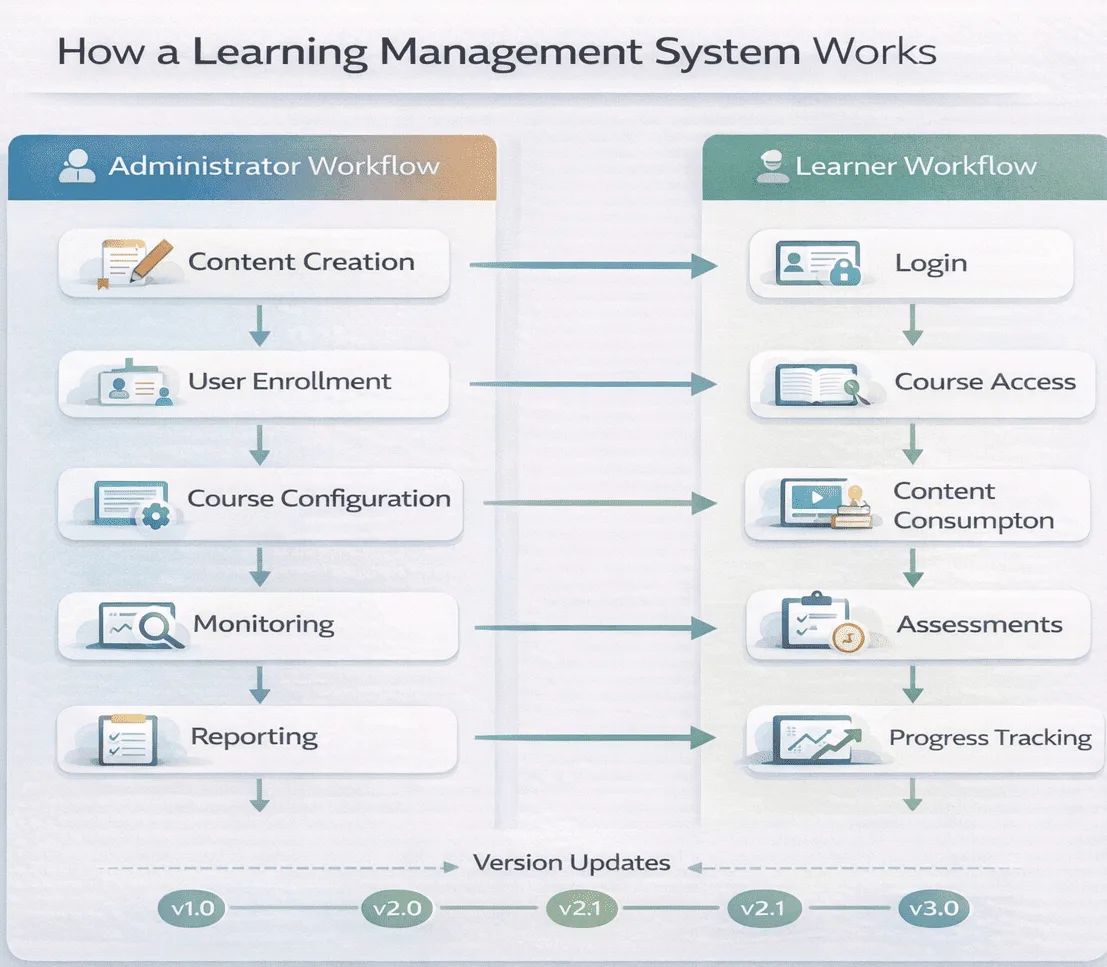
An LMS runs two workflows in parallel. Administrators build and monitor; learners consume and complete. A third process, the tracking layer, runs underneath both and is where most implementation problems actually surface.
The Administrator Workflow
- Content creation and upload: Course materials are authored inside the LMS or built externally and imported. Formats include video, documents, presentations, interactive modules and assessments, packaged to a technical standard such as SCORM or xAPI so the LMS can read completion data back from them.
- User management: Administrators enrol learners, assign roles and permissions, and organise users into groups by department, location, job role or learning path. In larger organisations this step is usually automated from an HR system rather than done by hand.
- Course configuration: Settings define whether learning is self-paced or instructor-led, which assessments are mandatory, what the passing score is, how long a certificate remains valid, and what counts as completion. Getting completion criteria wrong here is the most common cause of “the course won’t mark complete” support tickets later.
- Delivery and monitoring: Once live, administrators track enrolment numbers, completion rates, assessment scores and time spent through dashboards, and chase the people who haven’t finished.
- Reporting and analysis: The system produces individual and group reports, which are used both to evidence compliance to auditors and to identify where content is failing learners.
The Learner Workflow
- Access and enrolment: Learners sign in, ideally through single sign-on rather than a separate password, and are either auto-enrolled based on their role or free to choose from a catalogue.
- Content consumption: They work through video, reading material, simulations or live sessions, at their own pace or on a fixed schedule.
- Assessment and feedback: They complete quizzes, tests or assignments. Automated assessments are scored instantly; open-response work is routed to an instructor for manual grading.
- Progress tracking: A personal dashboard shows completed modules, outstanding requirements, and certification status with expiry dates.
- Collaboration: Many platforms add discussion forums, peer review or messaging so learners can work through material together.
What Happens Behind the Scenes: The Tracking Layer
The part of the LMS process nobody sees is the conversation between the course content and the platform. It runs roughly like this:
- The learner clicks a course. The LMS launches the content package and opens a communication session with it.
- As the learner moves through the material, the content sends status messages back: current location, time spent, interaction results, completion status and score.
- The LMS writes each of those values against that learner’s record. A bookmark value lets them resume in the right place next time.
- When completion criteria are met, the LMS updates the enrolment status, triggers any certificate or notification rules, and makes the record available to reporting.
- If an integration is configured, that completion is pushed onward to an HR system, a compliance register or a data warehouse.
Almost every “the LMS isn’t tracking properly” problem lives in step 2 or step 3: content that never sends a completion status, a session that closes before the final value is committed, or completion criteria configured to expect something the content never reports. For a deeper technical treatment of how these values are defined and exchanged, see our guide to SCORM and how it works.
What Are the Core Components of an LMS?
Every LMS, regardless of vendor, is assembled from the same handful of parts:
| Component | What it does |
|---|---|
| Content repository | Stores and versions learning materials; needs object storage for large video files and metadata tagging so content stays findable |
| User interface layer | The environment learners and administrators actually see, responsive across desktop, tablet and mobile |
| User management system | Authentication (who you are), authorisation (what you can reach), and the enrolment and progress records attached to each person |
| Assessment engine | Builds, delivers and scores questions (multiple choice, matching, fill-in-the-blank, essay) either automatically or via instructor review |
| Tracking and reporting engine | Logs every interaction and turns it into dashboards, exports and audit evidence |
| Communication tools | Notifications, messaging, forums, and video-conferencing integration for live sessions |
| Integration layer | REST APIs and webhooks that sync data with HRIS, CRM and identity providers, plus support for content standards |
The way these parts are arranged determines how the platform scales and what it can integrate with: monolithic versus microservices versus headless, cloud versus on-premise, single-tenant versus multi-tenant. That is a substantial topic in its own right. See LMS architecture explained for the full technical breakdown, and LMS components explained for a feature-by-feature view.
Pro-Tip: Integration Red Flag
When evaluating an LMS, don’t just check for SCORM compliance, ask if their API supports Single Sign-On (SSO). Without SSO, you’ll face user adoption friction as employees resist managing yet another login credential. Request a test integration with your existing identity provider (Okta, Azure AD, etc.) during the trial period.
What Types of LMS Are There?
Platforms differ mainly by how they are deployed and who they are built for.
| Type | Description | Considerations |
|---|---|---|
| Cloud-based / SaaS | Hosted remotely, accessed via internet, vendor manages updates | Lower upfront cost, scalability, requires internet connection |
| Self-hosted / on-premise | Installed on the organisation’s own servers | Full control, requires IT resources, higher upfront cost |
| Open-source | Free, community-built, customisable | Requires technical expertise, no vendor support |
| Mobile-first | Built around a dedicated mobile application | On-the-go and offline access, sometimes fewer administrative features |
By market, the split is between academic platforms built around courses, gradebooks and semesters, and corporate platforms built around compliance tracking, certification and HR integration. Examples of the latter include Absorb, Cornerstone, Docebo, SAP SuccessFactors Learning and SimpliTrain. The distinction is not absolute; plenty of organisations use one category for the other’s job. For a fuller breakdown, see types of LMS platforms.
What Is an LMS Used For? Use Cases by Industry
Corporate and Enterprise
- Employee onboarding: New-hire orientation, company policy training and role-specific skill development delivered through standardised modules available from day one.
- Compliance and regulatory training: Mandatory safety training, data privacy regulations, anti-harassment policies and industry certifications, with automated tracking and expiry reminders.
- Skills development: Upskilling within a current role and reskilling toward a different one, structured as learning paths.
- Sales enablement: Product knowledge, competitive positioning and customer interaction technique, updated as products and markets move.
- Leadership development: Management, communication and strategic thinking programmes for managers and high-potential staff.
Extended Enterprise
- Customer education: Product tutorials and administrator certification that improve adoption and cut support volume.
- Partner and channel training: Franchisees, resellers, distributors and consultants trained on brand standards and operating procedure.
- Member training: Professional associations delivering continuing education and certification maintenance.
Academic
- Course delivery: Syllabus management, assignment distribution, assessment and grade tracking for online or hybrid courses.
- Blended learning: Classroom instruction combined with online modules for pre-class preparation or post-class reinforcement.
Pro-Tip: Compliance Reporting
If compliance is your primary use case, verify that the LMS supports audit trail exports in the formats your legal team requires, usually CSV or PDF with timestamps. Also confirm it can send escalation emails to managers when employees miss deadlines. Manual follow-up defeats the purpose of automation.
LMS vs LXP vs LCMS vs TMS: What’s the Difference?
Four adjacent categories get compared during almost every evaluation. Confusing them is the most common cause of a platform failing to do what someone assumed it would.
| System | Primary goal | Content type | Built for |
|---|---|---|---|
| LMS | Deliver and track structured training | Administrator-assigned courses, compliance modules | Employees, students and partners who need certification |
| LXP (learning experience platform) | Personalise learner-driven discovery | Curated and recommended content from many sources | Self-directed learners pursuing skill growth |
| LCMS (learning content management system) | Create and manage learning content | Reusable learning objects, version-controlled modules | Instructional designers and content authors |
| TMS (training management system) | Schedule and coordinate live training | Instructor-led sessions, venues, registrations | Coordinators running physical or virtual classrooms |
The short version: an LMS asks did they complete it. An LXP asks what should they explore next. An LCMS is where the content gets built. A TMS handles the logistics of getting people into a room with an instructor. Organisations running significant instructor-led programmes commonly operate an LMS and a TMS together.
What Standards Does an LMS Use? SCORM, xAPI and AICC
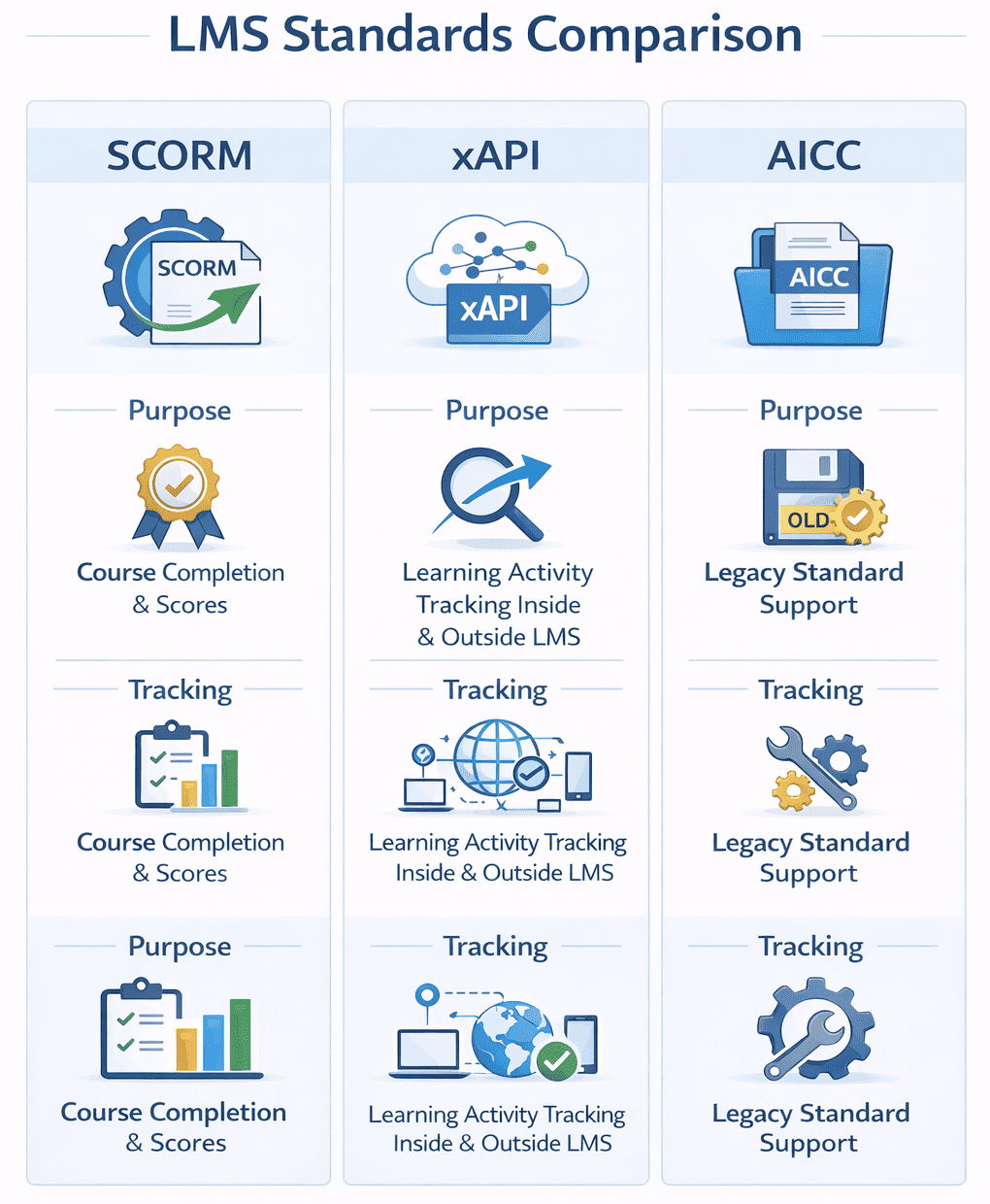
Standards are what let content built in one tool run inside a different vendor’s platform, and what let you change platforms without rebuilding your library.
- SCORM: the established packaging standard. SCORM-compliant content imports into any SCORM-compatible LMS and reports completion, score and time spent. See what SCORM is and the differences between SCORM 1.2 and SCORM 2004.
- xAPI (Experience API / Tin Can): more flexible, and able to record learning that happens outside the LMS entirely. Data is stored as statements in the form learner-verb-object. See what xAPI is.
- AICC: an older standard originally developed for aviation training. Rare in new implementations, still supported for legacy content.
Also read: SCORM vs xAPI: which LMS standard should you use?
What Are the Benefits of an LMS?
- Centralised content: One location for every training material, which removes duplicate versions circulating by email.
- Scalability: The same course reaches 10 or 10,000 people without a proportional increase in instructor time or room bookings.
- Consistency: Every learner gets identical content, so outcomes are comparable across departments and locations.
- Flexibility: Access from any location and time zone, which is what makes distributed and shift-based workforces trainable at all.
- Tracking and compliance: Automated records of who completed what, when, and with what score. This is the audit trail regulators ask for.
- Cost reduction: Less travel, fewer venue bookings, no printed materials, lower instructor cost per learner.
- Data-driven improvement: Completion rates and assessment patterns show where content is failing before performance does.
What Are the Main Challenges of Implementing an LMS?
- User adoption: The most common failure mode. Learners avoid systems that are hard to reach or hard to navigate, and a separate login is often enough friction on its own.
- Technical integration: Connecting to HR, payroll, CRM or identity systems reliably reveals data-quality problems nobody knew existed.
- Content creation: Good courses need instructional design and production capability that many organisations do not have in-house.
- Maintenance: Security patches, feature updates and compatibility testing, a burden that sits with internal IT on self-hosted deployments.
- Customisation limits: Cloud platforms restrict what you can change; highly customisable platforms demand developer time.
Most of these are predictable and can be planned for. Our LMS implementation checklist covers the sequence, and LMS adoption strategy covers the part that actually decides whether the rollout works.
Pro-Tip: The “Active User” Pricing Trap
Many LMS vendors charge per “registered user,” which includes people who sign up but never log in again. Negotiate pricing based on active users, meaning those who log in monthly. This can reduce your bill by 30-50% in large organizations with high turnover or seasonal workers.
How Do You Choose an LMS? 5 Questions to Ask Vendors
If you arrived here searching for a definition, the next question is usually which platform to buy. These five questions separate vendors faster than a feature matrix does.
1. Does it integrate with our existing HRIS and CRM?
Verify that user data syncs bidirectionally with your HR system (Workday, BambooHR, SAP SuccessFactors) or CRM (Salesforce, HubSpot). Ask to watch the integration run live during evaluation rather than accepting a logo on a slide. See why HRIS integrations break before you write requirements.
2. Is pricing based on registered or active users?
A registered-user model charges for everyone who ever created an account. An active-user model charges only for those who engage. For organisations with high turnover in retail, hospitality or seasonal operations, this single distinction can move annual cost by 40%. Compare structures in our guide to LMS pricing models and total cost of ownership.
3. How deep is the mobile offline capability?
If your workforce includes field technicians, retail associates or healthcare staff without reliable connectivity, ask whether users can download an entire course, video and assessments included, and complete it offline. Many mobile apps only cache content already viewed.
4. Does it support our specific compliance reporting needs?
Don’t accept generic “compliance features”. Ask for a sample PDF audit report showing completion timestamps, manager approvals and expiry alerts for your actual regulation, whether that is OSHA, HIPAA, GDPR or GxP. Request it during the demo, not after signing.
5. Can we brand or white-label the interface?
For customer-facing or partner-facing deployments, confirm you can remove the vendor’s logo, apply your colours and use your own domain. Some vendors charge separately for it. See LMS white labeling.
For the full evaluation process, use our practical LMS vendor evaluation checklist and the free LMS RFP template.
LMS Glossary: Key Terms Explained
- Blended learning: Online content combined with in-person instruction.
- Microlearning: Short, single-objective units, typically under ten minutes.
- Gamification: Points, badges and leaderboards used to drive engagement.
- Social learning: Peer-to-peer learning through forums and collaborative tools.
- Learning path: An ordered sequence of courses building toward a role or certification.
- Asynchronous learning: Self-paced, with no real-time interaction.
- Synchronous learning: Live, instructor-led, with participants present together.
- Single sign-on (SSO): One set of credentials granting access to multiple systems.
The full list is in our LMS terminology glossary.
Conclusion
The definition of an LMS has not changed: software that delivers training, controls who receives it, and records the result. What is changing is how much the recording layer is expected to do. Platforms are moving from reporting what was completed toward identifying which skills are missing and assigning something before a performance review surfaces the gap.
That shift makes the tracking layer, the part covered above that nobody sees, the most consequential thing to evaluate. Content is replaceable. Data is not.
FAQ about LMS
Q1. What is LMS software used for?
LMS software is used for employee onboarding, compliance and regulatory training, skills development, sales enablement, customer and partner education, and academic course delivery. The common requirement across all of these is trackable completion.
Q2. What is the primary purpose of a learning management system?
The primary purpose is to deliver consistent training to many people at once and prove it happened. Content delivery solves the logistics problem; tracking solves the evidence problem, which is why regulated industries adopt LMS platforms first.
Q3. What is an LMS in simple terms?
An LMS is a single place where an organisation puts its training, decides who has to take it, and keeps a record of who finished it. Think of it as a course library, a registration desk and a filing cabinet for results, combined into one system.
Q4. What does LMS stand for?
LMS stands for learning management system. It refers to software that delivers training content, manages who has access to it, and records completion and assessment results. The abbreviation is used identically in corporate, academic and compliance settings.
Q5. How does an LMS work?
An administrator uploads content, configures completion rules and enrols users. Learners log in, work through the content and complete assessments. The system records every interaction, time spent, scores, completion status, and reports it back to administrators.
Q6. Can I switch LMS vendors without losing my data?
Yes, you can switch LMS vendors without data loss if your content follows SCORM or xAPI standards. You must also ensure your current provider allows you to export learner progress records via CSV, SQL, or API to import into the new system.
Q7. What is the difference between an LMS and an LXP?
An LMS delivers structured, administrator-assigned training with formal tracking and compliance. An LXP emphasises learner-driven discovery, using recommendations to surface content from many sources. LMS answers “did they complete it”; LXP answers “what should they explore next”.
Q8. What is LMS training?
LMS training refers to any training delivered through a learning management system rather than in a classroom, self-paced modules, assessments, and blended programmes where online content supports instructor-led sessions.
Q9. Is an LMS the same as a learner management system?
No, though the terms are often confused and used interchangeably in search. A learner management system focuses on records about people, enrolment, progress, and credentials. A learning management system covers both the people and the content delivered to them. Most commercial platforms do both.
Q10. What industries use learning management systems?
LMS platforms are used across industries including healthcare (for staff training and compliance), education (course delivery), retail (employee onboarding and product knowledge), banking and financial services (regulatory training), government (employee development), real estate (agent certification), and insurance (compliance training). Any organization with structured training needs can benefit from an LMS.
Q11. Is an LMS only for large organizations?
No. LMS platforms serve organizations of all sizes. Small businesses use LMS platforms for employee onboarding and skills training. Pricing models like per-user subscriptions and freemium options make LMS accessible to organizations with limited budgets. The scalability of cloud-based systems means organizations can start small and expand as needed.