
Key Takeaways

Definition
A learning management system is a software platform that centralizes course creation, delivery, tracking, and assessment, eliminating the need for scattered spreadsheets and manual training logistics.
Cost Reduction
Eliminate travel, facility rentals, and printed materials companies report 40-60% savings vs. in-person training
Compliance Automation
Automated tracking and expiration alerts ensure regulatory requirements are met without manual oversight.
Scalability
Deliver the same course to 10 or 10,000 learners without increasing instructor hours.
Industry Standards
SCORM and xAPI (Tin Can) enable content portability across platforms, preventing vendor lock-in.
Organizations today face a persistent challenge: how to train employees, partners, and customers efficiently while maintaining consistency and tracking outcomes. The learning management system has emerged as the standard solution to this problem. This guide explains what is learning management system, how the LMS workflow operates, the underlying LMS architecture, and how organizations use LMS functionality across different contexts.
The Core Purpose of the Learning Management System
At its most basic level, an LMS solves a logistics problem: how to deliver consistent training to multiple people across different locations without requiring everyone to be in the same room at the same time. This fundamental capability explains why organizations from universities to global corporations have adopted these systems. The system handles three primary functions: content delivery, user management, and progress tracking. Everything else builds on this foundation.
💡 Pro-Tip: Implementation Pitfall to Avoid
Don’t assume “SCORM-compliant” guarantees seamless integration. During vendor demos, ask: “Can we see a live import of an xAPI module from a third-party provider?” Many systems claim compatibility but fail with complex interactions or mobile-optimized content.
How Learning Management Systems Work: The LMS Workflow
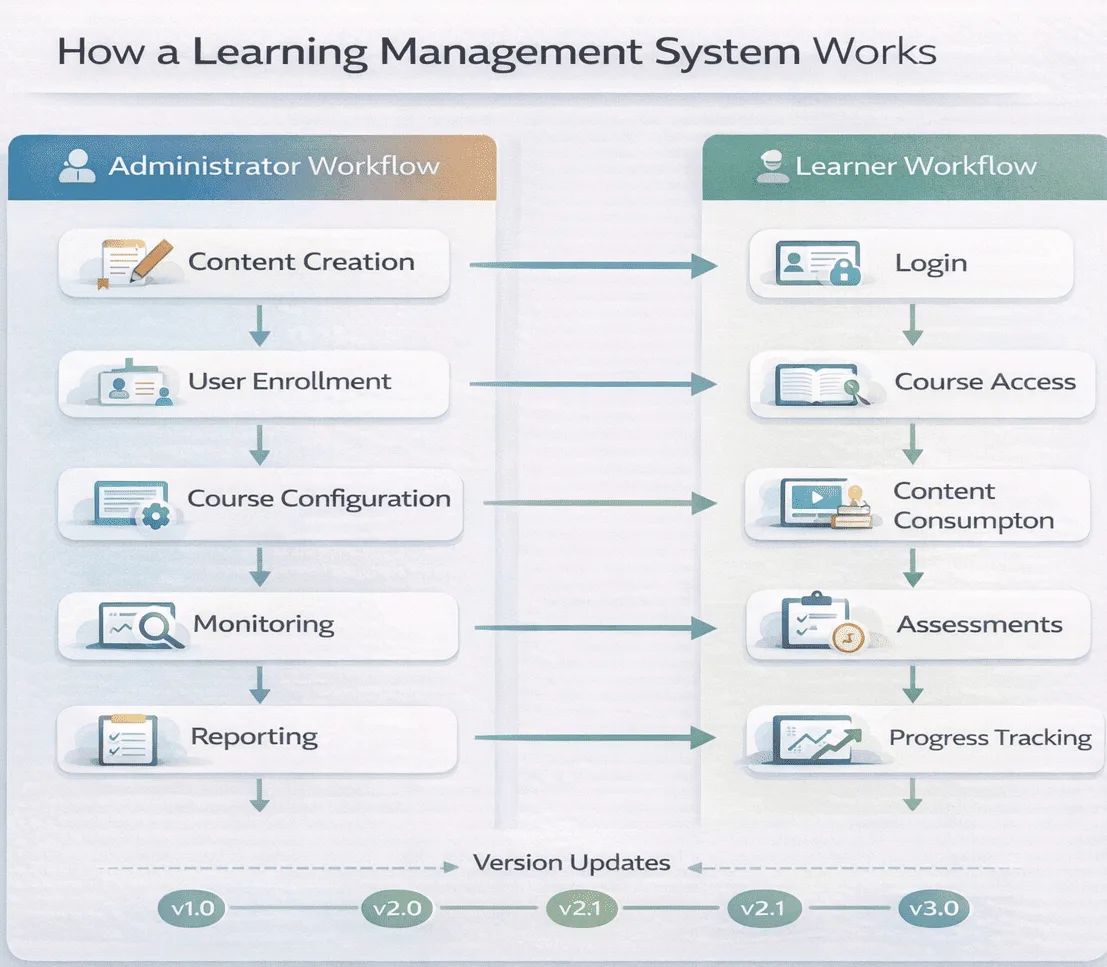
Understanding LMS functionality requires looking at the LMS workflow from both administrative and learner perspectives.
The Administrative Workflow
Administrators and instructors follow a general LMS process when using the system:
- Content creation and upload: Course materials are created either within the LMS using built-in authoring tools or externally, then uploaded. Content formats include video, documents, presentations, interactive modules, and assessment materials packaged according to technical standards like SCORM or xAPI.
- User management: Administrators enroll learners, assign roles and permissions, and organize users into groups based on department, role, or learning path requirements.
- Course configuration: Settings determine whether learning is self-paced or instructor-led, which assessments are required, passing scores, certification rules, and completion criteria.
- Delivery and monitoring: Once launched, administrators monitor learner progress through dashboards showing enrollment numbers, completion rates, assessment scores, and time spent on materials.
- Reporting and analysis: The system generates reports on individual and group performance, allowing administrators to identify knowledge gaps and refine content.
The Learner Workflow
From the learner’s perspective, the LMS process is more straightforward:
- Access and enrollment: Learners log in using credentials and either self-enroll in available courses or find themselves automatically enrolled based on role or requirements.
- Content consumption: Learners access materials in various formats, video lectures, reading materials, interactive simulations, and progress at their own pace or according to scheduled sessions.
- Assessment and feedback: Learners complete quizzes, tests, or assignments. The system provides immediate scoring for automated assessments or allows instructors to grade and provide feedback manually.
- Progress tracking: Learners see their own progress through dashboards showing completed modules, pending assignments, and certification status.
- Collaboration and discussion: Many systems include forums or discussion boards where learners interact with peers and instructors.
LMS Architecture: Key Components
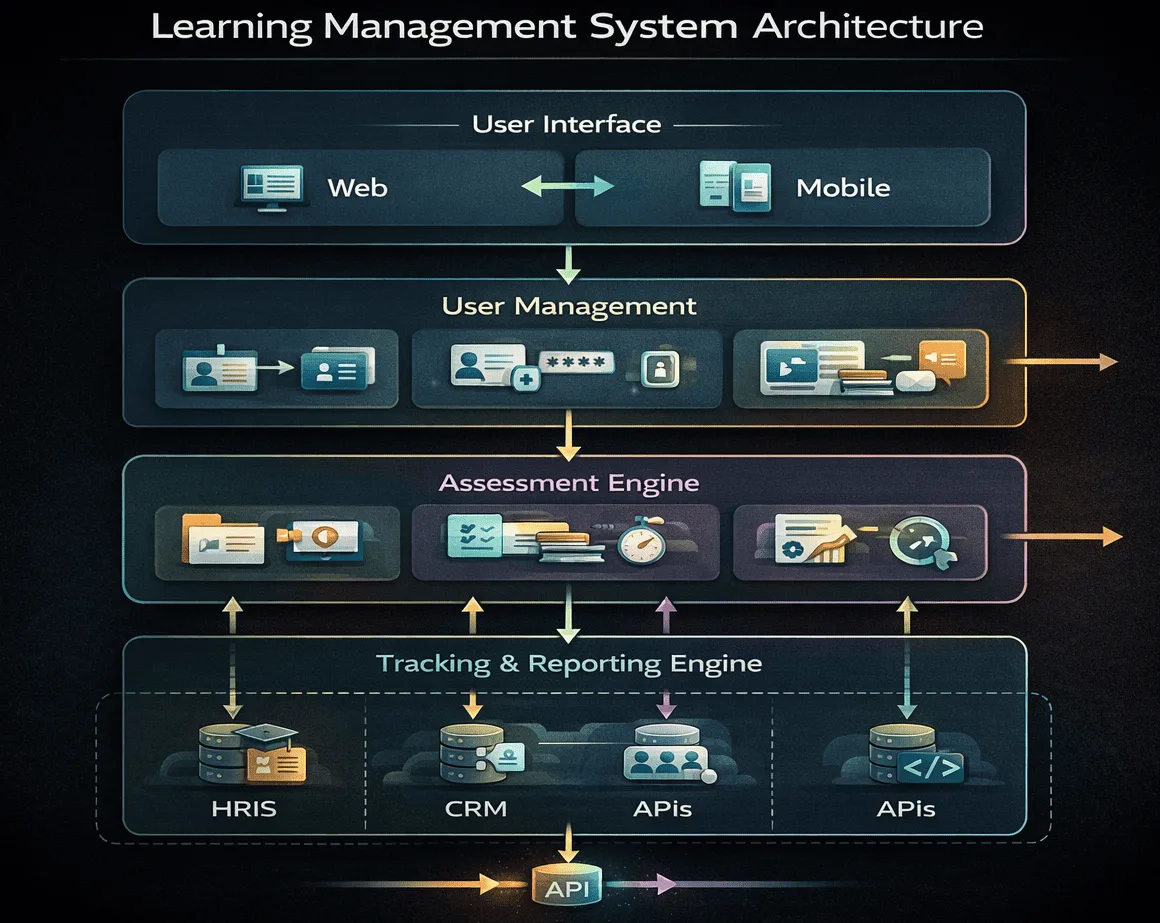
The LMS architecture consists of several interconnected components that enable its functionality.
Content Repository
This is the storage system where all learning materials reside. The repository organizes content by course, topic, or format and manages versioning when materials are updated. It must handle ‘Object Storage’ for large video files and metadata tagging for searchable libraries.
User Interface Layer
The UI provides the visual environment where users interact with the system. Modern LMS platforms use responsive design, meaning the interface automatically adapts to different screen sizes, desktop monitors, tablets, and smartphones.
User Management System
This component handles authentication (verifying who users are), authorization (determining what they can access), and user data including enrollment history, progress records, and assessment scores.
Assessment Engine
The assessment component creates, delivers, and scores tests and quizzes. It supports multiple question types, multiple choice, fill-in-the-blank, essay, matching, and can grade automatically or route responses to instructors for manual review.
Tracking and Reporting Engine
This backend system continuously logs learner activity: which content was accessed, how long was spent on each module, assessment scores, completion status. This data feeds into reports and analytics dashboards.
Communication Tools
Most LMS platforms include messaging, notification systems, discussion forums, and sometimes integration with video conferencing software for live sessions.
Integration Layer
The ‘Glue’ of the system. In 2026, look for RESTful APIs and Webhooks that allow real-time data syncing between the LMS and your HRIS (like Workday) or CRM (like Salesforce). This typically uses APIs (application programming interfaces) and follows standards like SCORM, xAPI, or AICC for content interoperability.
Pro-Tip: Integration Red Flag
When evaluating an LMS, don’t just check for SCORM compliance, ask if their API supports Single Sign-On (SSO). Without SSO, you’ll face user adoption friction as employees resist managing yet another login credential. Request a test integration with your existing identity provider (Okta, Azure AD, etc.) during the trial period.
LMS Process: Technical Standards and Content Interoperability
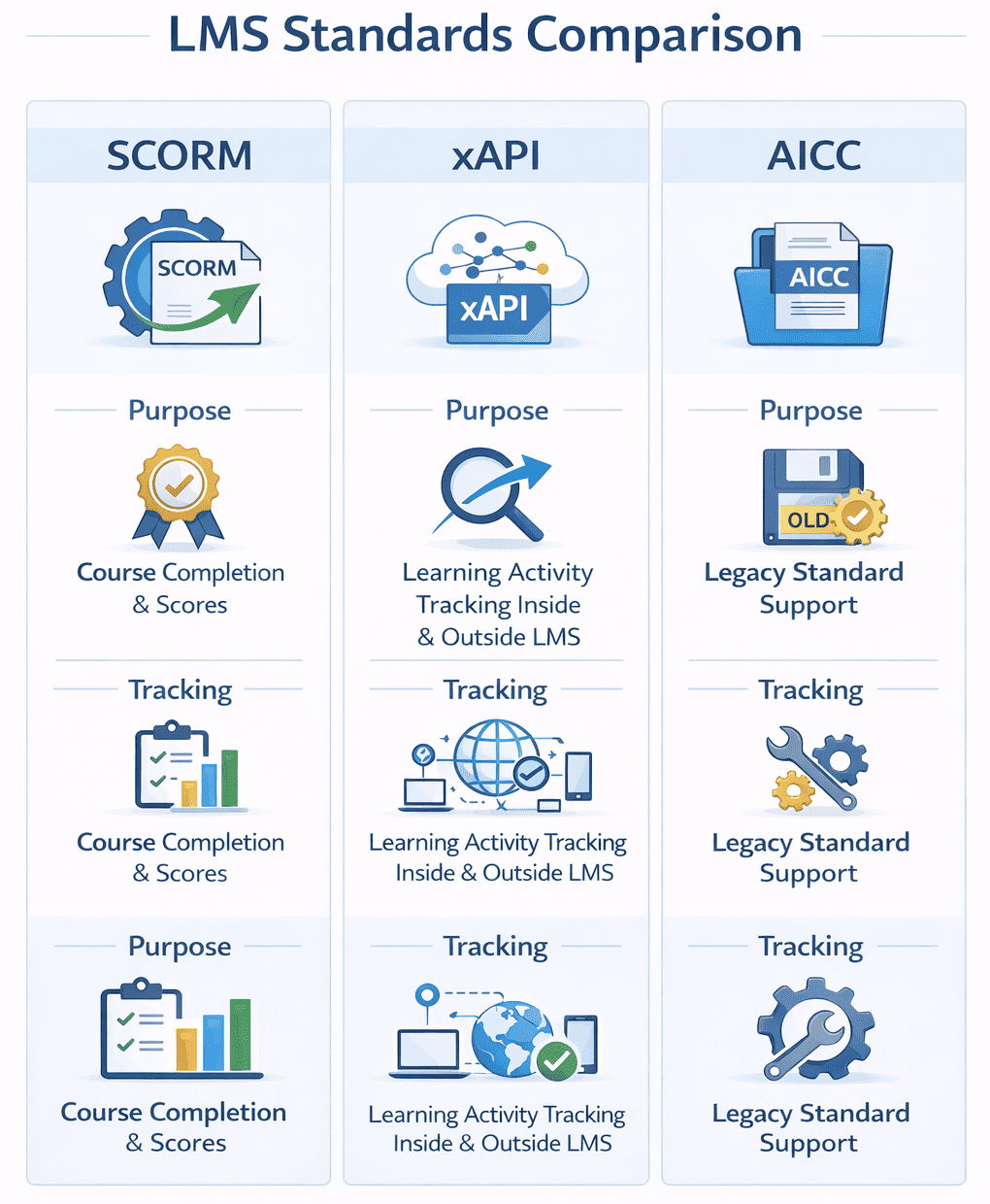
For an LMS to function across different systems and content sources, the industry relies on technical standards.
SCORM (Sharable Content Object Reference Model)
SCORM is the most established standard for packaging e-learning content. When content is “SCORM-compliant,” it can be imported into any SCORM-compatible LMS. The standard defines how content communicates with the LMS, reporting completion status, scores, and time spent.
xAPI (Experience API) / Tin Can
xAPI is a newer, more flexible standard that tracks a broader range of learning activities, including experiences outside the LMS itself, simulations, mobile apps, on-the-job activities. It records learning in the form of “statements” (learner-verb-object, such as “Jane completed Module 3”).
AICC
AICC is an older standard originally developed for aviation industry training but applied more broadly. It’s less common in modern implementations but still supported by many systems for legacy content.
These standards allow organizations to switch LMS vendors without losing existing content or to purchase off-the-shelf courses from third-party providers.
Also Read: SCORM vs xAPI: Which LMS Standard Should You Use?
Types of Learning Management Systems
Types of LMS platforms vary based on deployment model and intended market.
By Deployment Model
| Type | Description | Considerations |
|---|---|---|
| Cloud-based/SaaS | Hosted remotely, accessed via internet, vendor manages updates | Lower upfront cost, scalability, requires internet connection |
| Self-hosted/On-premise | Installed on organization’s servers | Full control, requires IT resources, higher upfront cost |
| Open-source | Free, community-built, customizable | Requires technical expertise, no vendor support |
| Mobile app | Dedicated mobile application | On-the-go access, may have limited features compared to web version |
By Market Segment
- Academic LMS: Platforms designed for K-12 schools, colleges, and universities. Examples include Blackboard, Canvas, Moodle, and Google Classroom. These emphasize course scheduling, student assessment, gradebooks, and collaborative learning tools.
- Corporate/Enterprise LMS: Platforms designed for employee training, compliance, and partner education. Examples include SimpliTrain, Docebo, Cornerstone, SAP SuccessFactors, Learning, and Absorb. These emphasize certification tracking, compliance reporting, and integration with HR systems.
The distinction between these segments is not absolute; some organizations use academic platforms for corporate training and vice versa, but design priorities differ.
Common Use Cases Across Industries
LMS platforms serve multiple purposes depending on organizational needs.
Corporate and Enterprise Applications
- Employee onboarding: New hire orientation, company policy training, role-specific skill development delivered through standardized modules accessible from day one.
- Compliance and regulatory training: Mandatory safety training, data privacy regulations, anti-harassment policies, industry-specific certifications with automated tracking and expiration reminders.
- Skills development: Upskilling (advancing skills in current role) and reskilling (learning skills for different roles or new technologies) through structured learning paths.
- Sales enablement: Product knowledge, competitive positioning, customer interaction techniques, updated as products and markets evolve.
- Leadership development: Management training, communication skills, strategic thinking delivered to managers and high-potential employees.
Extended Enterprise Applications
- Customer education: Product tutorials, certification programs for customer administrators, best practices guide that improve product adoption and reduce support costs.
- Partner and channel training: Training for franchisees, resellers, distributors, consultants on brand standards, product specifications, and operational procedures.
- Member training: Professional associations use LMS platforms for continuing education, certification maintenance, and member engagement.
Academic Applications
- Course delivery: Syllabus management, assignment distribution, student assessment, grade tracking for traditional or fully online courses.
- Blended learning: Combination of in-person classroom instruction and online modules, allowing educators to assign pre-class preparation or post-class reinforcement.
If compliance is your primary use case, verify that the LMS supports audit trail exports in formats your legal team requires (usually CSV or PDF with timestamps). Also confirm it can send escalation emails to managers when employees miss deadlines,manual follow-up defeats the purpose of automation.
Key Terminology in the LMS Space
Understanding common LMS terminology helps when evaluating systems or discussing requirements.
- Blended learning: Combination of online and in-person instruction, allowing flexibility while maintaining face-to-face interaction.
- Microlearning: Short, focused learning units typically under 10 minutes, designed for quick consumption and easy retention.
- Gamification: Use of game mechanics, points, badges, leaderboards ,to increase engagement and motivation.
- Social learning: Peer-to-peer learning facilitated through forums, discussion boards, or collaborative tools within the LMS.
- Learning paths: Structured sequences of courses designed to build toward a specific skill, role, or certification.
- Asynchronous learning: Self-paced learning where learners access content on their own schedule without real-time interaction.
- Synchronous learning: Real-time, instructor-led sessions where participants interact live, often via video conferencing.
- Single Sign-On (SSO): Authentication method allowing users to access multiple systems with one set of credentials.
Distinguishing LMS from Related Systems
Several adjacent technologies serve related but distinct purposes. Understanding these differences prevents misaligned expectations during vendor selection.
LMS vs. Adjacent Learning Technologies
| System Type | Primary Goal | Content Type | Target Audience |
|---|---|---|---|
| LMS | Deliver and track structured training | Administrator-created courses, compliance modules | Employees, students, partners requiring certification |
| LXP (Learning Experience Platform) | Personalize learner-driven discovery | AI-curated content from multiple sources | Self-directed learners seeking skill growth |
| LCMS (Learning Content Management System) | Create and manage learning content | Reusable learning objects, version-controlled modules | Instructional designers, content authors |
| TMS (Training Management System) | Schedule and coordinate live training events | Instructor-led sessions, webinar logistics | Event coordinators managing physical/virtual classrooms |
LMS vs. LCMS (Learning Content Management System)
An LCMS focuses on creating, storing, and managing learning content. It emphasizes the authoring process and content organization. An LMS focuses on delivering content to learners and tracking their progress. Many modern platforms combine both capabilities.
LMS vs. LXP (Learning Experience Platform)
An LXP emphasizes learner-driven, personalized experiences using AI to recommend content based on individual preferences and behavior. An LMS emphasizes structured, administrator-driven learning paths with formal tracking and compliance. The line between these categories is blurring as LMS platforms incorporate personalization features.
LMS vs. TMS (Training Management System)
A TMS handles the logistics of training, scheduling sessions, managing registrations, coordinating instructors, and handling facility bookings. An LMS handles content delivery and learner progress tracking. Organizations running instructor-led training programs may use both systems together.
Widely Accepted Benefits of LMS
Organizations adopt LMS platforms for measurable operational and educational reasons.
- Centralized content management: All training materials stored in one location, reducing duplication and version control issues.
- Scalability: The same course can be delivered to 10 or 10,000 learners without proportionally increasing instructor time or facility costs.
- Consistency: Every learner receives identical content, ensuring standardized training outcomes across departments or locations.
- Flexibility: Learners access materials on their own schedule from any location with internet access, accommodating remote workers and multiple time zones.
- Tracking and compliance: Automated recording of who completed which training, when, and with what score, providing audit trails for regulatory requirements.
- Cost reduction: Elimination or reduction of travel costs, facility rentals, printed materials, and instructor fees associated with in-person training.
- Data-driven improvement: Analytics showing completion rates, assessment scores, and engagement patterns inform content refinement.
Common Implementation Challenges with LMS
Organizations implementing LMS platforms encounter predictable challenges.
- User adoption: Employees or learners unfamiliar with the technology or resistant to change may avoid using the system, reducing effectiveness.
- Technical integration: Connecting the LMS with existing HR systems, payroll, CRM, or other platforms requires technical expertise and may reveal compatibility issues.
- Content creation requirements: Building high-quality courses requires time, instructional design expertise, and multimedia production capabilities that not all organizations possess.
- Maintenance and updates: Systems require regular updates for security, feature enhancements, and compatibility. Self-hosted systems place this burden on internal IT teams.
- Customization limitations: Cloud-based platforms may offer limited customization options, while highly customizable platforms may require developer resources.
Many LMS vendors charge per “registered user,” which includes people who sign up but never log in again. Negotiate pricing based on active users (those who log in monthly). This can reduce your bill by 30-50% in large organizations with high turnover or seasonal workers.
5 Critical Questions to Ask Before Choosing an LMS
If you’re searching “what is a learning management system,” your next step is likely “Which one should I buy?” Use this checklist to evaluate vendors:
1. Does it integrate with our existing HRIS/CRM?
Verify that the LMS can sync user data bidirectionally with your HR system (Workday, BambooHR, SAP SuccessFactors) or CRM (Salesforce, HubSpot). Ask for a live demo of the integration during onboarding.
2. Is the pricing based on ‘Registered’ or ‘Active’ users?
This is a major industry nuance. A “registered user” model charges you for everyone who creates an account, even if they never log in again. An “active user” model charges only for those who engage monthly or quarterly. For organizations with high turnover (retail, hospitality), this distinction can change your annual cost by 40%.
3. How deep is the mobile offline capability?
If your workforce includes field technicians, retail associates, or healthcare workers without reliable internet, ask: “Can users download entire courses, including video and assessments, for offline completion?” Many mobile apps only cache previously viewed content.
4. Does it support our specific compliance reporting needs?
Don’t accept generic “compliance features.” Ask: “Can you generate a PDF audit report showing completion timestamps, manager approvals, and expiration alerts for [specific regulation: OSHA, HIPAA, GDPR]?” Request a sample report during the demo.
5. Can we brand/white-label the interface?
If the LMS is customer-facing or partner-facing, verify that you can remove the vendor’s logo, customize the color scheme, and use a custom domain (learn.yourcompany.com, not your company.vendorname.com). Some vendors charge extra for white labeling.
Conclusion
As we move through 2026, the LMS is evolving from a static repository into an AI-Enabled Talent Intelligence Platform. The next frontier isn’t just “tracking completion,” but Predictive Learning, where the system identifies a skill gap before a performance review and automatically assigns a micro-learning module. Whether you are a small business or a global enterprise, the goal remains the same: transforming raw information into measurable organizational growth.
FAQ about LMS
Q1. How long does a typical LMS implementation take?
LMS implementation typically takes 2 to 4 weeks for standard cloud-based (SaaS) setups. However, complex enterprise implementations involving deep HRIS integrations, data migration, and custom security configurations usually require 3 to 6 months to fully deploy.
Q2. What is the average completion rate for Corporate LMS?
The average completion rate for standard corporate LMS content is 20–30%. Organizations can increase this to 70% or higher by utilizing engagement features such as mobile push notifications, gamification, and social learning tools to reduce learner ghosting.
Q3. Can I switch LMS vendors without losing my data?
Yes, you can switch LMS vendors without data loss if your content follows SCORM or xAPI standards. You must also ensure your current provider allows you to export learner progress records via CSV, SQL, or API to import into the new system.
Q4. How much does an LMS cost?
Pricing varies widely based on deployment models, number of users, and features. Open-source platforms are free but require technical resources. Cloud-based SaaS platforms typically charge monthly or annual subscriptions, either per user or per course. Self-hosted systems involve upfront licensing fees plus ongoing maintenance costs. No single pricing model dominates the market.
Q5. Do I need technical skills to use an LMS?
Most modern LMS platforms are designed for non-technical users. Learners need only basic computer skills to access courses. Administrators and course creators typically work with user-friendly interfaces requiring no programming knowledge, though some customization or integration of tasks may require IT support.
Q6. What is SCORM compliance in LMS?
SCORM compliance means the LMS can import, deliver, and track content packaged according to SCORM standards. This ensures content created in one system works in any SCORM-compliant LMS, providing flexibility and preventing vendor lock-in.
Q7. What industries use learning management systems?
LMS platforms are used across industries including healthcare (for staff training and compliance), education (course delivery), retail (employee onboarding and product knowledge), banking and financial services (regulatory training), government (employee development), real estate (agent certification), and insurance (compliance training). Any organization with structured training needs can benefit from an LMS.
Q8. Is an LMS only for large organizations?
No. LMS platforms serve organizations of all sizes. Small businesses use LMS platforms for employee onboarding and skills training. Pricing models like per-user subscriptions and freemium options make LMS accessible to organizations with limited budgets. The scalability of cloud-based systems means organizations can start small and expand as needed.