
SCORM is one of the core components of LMS and the practical question is rarely which standard is technically superior, SCORM 2004 clearly is. However, most of the organizations are still using SCORM 1.2, it’s not because they want to use it, it is because their Learning Management Systems (LMS) would break if they don’t use it because of the SCORM compatibility issues. So the real question is which one of these formats, your LMS, your authoring tool, and your content pipeline, will reliably execute without data loss or silent failures. This guide maps the specification differences that actually affect implementation decisions, not the ones that belong in a changelog. So understanding SCORM 1.2 vs SCORM 2004 becomes important.
Use SCORM 1.2 if your LMS or content catalog predates 2015, if you cannot control the LMS configuration, or if your content does not require adaptive sequencing or granular interaction tracking. Use SCORM 2004 4th Edition specifically if you need branching sequencing, extended suspend data, or ISO 8601 time data for analytics pipelines. But it is not that simple. You need to fully understand the difference between SCORM 1.2 and 2004.
SCORM 1.2 vs 2004 Technical Deep Dive: SCORM Version Comparison
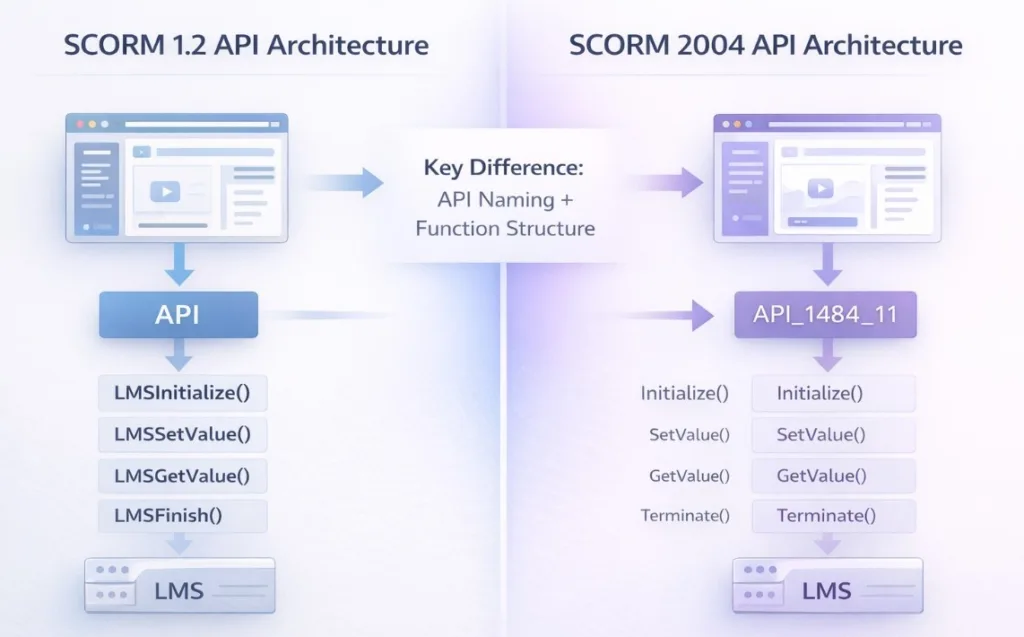
JavaScript API Layer
Both standards communicate through a JavaScript API injected by the LMS into the content window. The API object names differ, his is the single most common source of runtime failures when the SCORM version is misconfigured.
SCORM 1.2 API (LMSInitialize / LMSFinish model): The LMS exposes a global object named API at window or window.parent level. Functions follow the pattern LMSInitialize(“”), LMSGetValue(“cmi.core.student_name”), LMSSetValue(“cmi.core.lesson_status”, “completed”), LMSCommit(“”), LMSFinish(“”).
SCORM 2004 API (Initialize / Terminate model): The LMS exposes API_1484_11. Functions drop the LMS prefix: Initialize(“”), GetValue(“cmi.completion_status”), SetValue(“cmi.completion_status”, “completed”), Commit(“”), Terminate(“”). Note: Finish is renamed to Terminate.
WARNING
Never mix API call patterns. Content that calls LMSSetValue() against a SCORM 2004 API will silently fail, the LMS returns a non-null error code but most poorly-implemented wrappers discard it. Use pipwerks SCORM API wrapper (github.com/pipwerks/scorm-api-wrapper) to abstract both APIs with automatic version detection.
Completion Model: lSCORM completion status vs success status
SCORM 1.2 uses a single field cmi.core.lesson_status with six valid values: “passed”, “completed”, “failed”, “incomplete”, “browsed”, “not attempted”. Completion and pass/fail are conflated in one token.
SCORM 2004 separates these into two independent fields: cmi.completion_status (“completed” | “incomplete” | “not attempted” | “unknown”) and cmi.success_status (“passed” | “failed” | “unknown”). This separation is architecturally correct, a learner can complete a module without passing it.
The practical implication: LMS completion triggers and reporting queries must address both fields in SCORM 2004. Admins migrating content from 1.2 to 2004 frequently misconfigure completion triggers by mapping only completion_status, leaving success_status as ‘unknown’ and breaking certificate logic.
Suspend Data Limit – The Branching Bottleneck
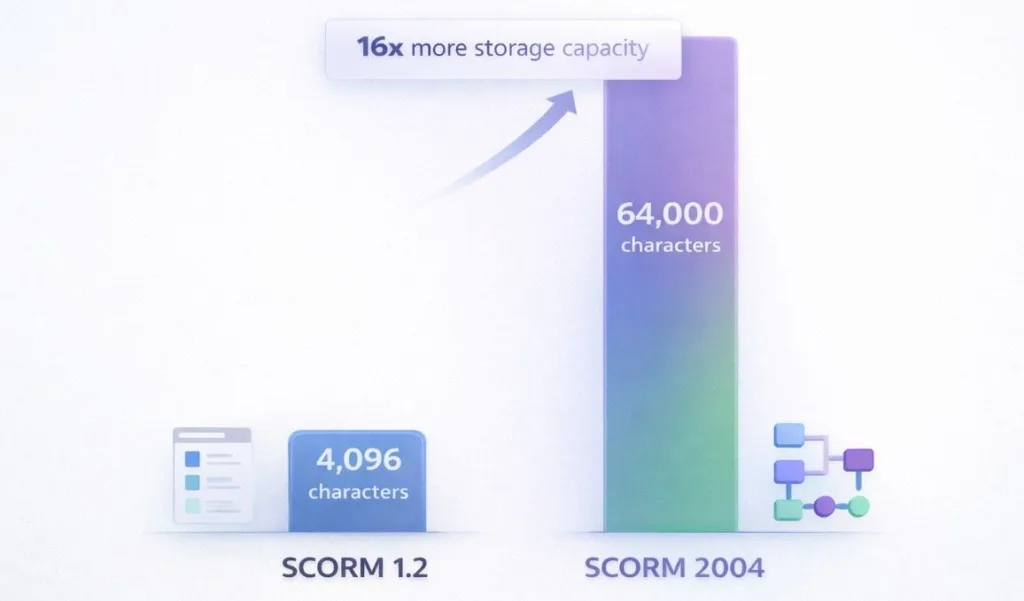
- SCORM 1.2 caps cmi.suspend_data at 4,096 characters. This limit is architectural, not a vendor choice but has an impact on LMS architecture too. Complex branching content, multi-scenario simulations, and state-heavy games routinely hit this ceiling. The result is silent data truncation on LMSSetValue(), the function returns false, the learner’s progress is partially lost, and nothing alerts the LMS admin.
- SCORM 2004 raises this to 64,000 characters. If your content is stateful, storing variable values, visited nodes, or JSON objects in suspend_data, the 1.2 ceiling is the technical forcing function for migration.
Sequencing and Navigation (SCORM 2004 Only)
SCORM 2004 implements IMS Simple Sequencing 1.0 (IMS SS 1.0), enabling rule-based adaptive navigation between SCOs within a package. Pre-condition rules, post-condition rules, and exit condition rules allow the LMS to control which content items are available based on objective status, score thresholds, and attempt counts.
The manifest section responsible is the <sequencing> element wrapping <controlMode>, <sequencingRules>, <limitConditions>, and <objectives>. A minimal sequencing block that locks a post-test until the pre-test objective is satisfied looks like this:
<sequencing>
<controlMode choice=”false” flow=”true”/>
<sequencingRules>
<preConditionRule>
<ruleConditions conditionCombination=”all”>
<ruleCondition referencedObjective=”pre_test_obj”
operator=”not” condition=”satisfied”/>
</ruleConditions>
<ruleAction action=”disabled”/>
</preConditionRule>
</sequencingRules>
<objectives>
<primaryObjective satisfiedByMeasure=”false”/>
<objective objectiveID=”pre_test_obj”>
<mapInfo targetObjectiveID=”pre_test_obj” readSatisfiedStatus=”true”/>
</objective>
</objectives>
</sequencing>
NOTE:
LMS support for IMS SS 1.0 is inconsistent even in modern platforms. Test sequencing logic in the ADL SCORM 2004 Conformance Test Suite (CTS) before assuming your LMS will execute it correctly. Run the SN-01 through SN-10 test scenarios at a minimum.
SCORM Data Model Differences
- SCORM 1.2 tracks score via cmi.core.score.raw, cmi.core.score.min, and cmi.core.score.max. All are raw numeric values; normalization to a 0–100 scale is typically handled by the LMS as a display convention.
- SCORM 2004 adds cmi.score.scaled, a float between -1.0 and 1.0. Many modern LMS analytics dashboards and xAPI translation layers read cmi.score.scaled as the canonical score. Always set it explicitly – do not assume the LMS will derive it from raw/min/max.
Real SCORM Failures in Production (What Breaks & Why) – LMS SCORM Errors
There have been lots of incidents across the industry where there have been failures in production owing to the SCORM Incompatibility. Now, by understanding these common failures, you’ll be able to implement SCORM in LMS in a much better way.
Failure #1 – SCORM 2004 Completion Problem – Not Triggering in Docebo
Many learners using DOCEBO were facing issues when it came to their status update. They were completing their courses but the LMS still continues to show it as incomplete.
The reason was hiding behind how SCORM 2004 tracks progress. It separates Completion and Success in two different fields – cmi.completion_status & cmi.success.status.
Now, while Docebo was implementing LMS, the completion rules were incorrectly mapped success.status instead of completion_status. In many cases only one field was being tracked. Owing to this there was a complete logic failure in the system even when the learners were finishing their courses.
How to fix SCORM 2004 Completion Not Triggering Issue?
- Set completion trigger to cmi.completion_status = completed
- If pass/fail is required, also track cmi.success_status = passed
If you are still struggling with this issue you, there is a consensus fix that you can follow, also known as the “Golden Setting”
- In your Authoring Tool: Set tracking to Passed/Incomplete. This forces the SCORM to send a success_status, which Docebo is more likely to recognize as a “hard” completion.
- In Docebo Training Material Settings: Go to the “Standard” tab and ensure “The course is completed when this training material is completed” is checked.
- SCORM 2004 Version: Use 3rd Edition specifically. Docebo’s support for 4th Edition has historically been less stable regarding sequencing and completion triggers
This has been a major issue for Docebo and its users, the discussion threads often cited a PTSD for Docebo admins. Now it has been finally solved.
Failure #2 – Suspend Data Loss in SCORM 1.2
Another major issue that learners were facing was losing progress when exiting a particular course. When they return, either they are reset or partially rolled back. Now this happened because SCORM 1.2 enforces a strict 4,096-character limit on cmi.suspend_data. Now, when this limit exceeds:
- LMSSetValue() silently fails
- Data is truncated without warning
- LMS often logs no visible error
SCORM 1.2 Suspend Data Limits issue generally happens in branching scenarios, simulations and courses storing JSON state. Now in order to fix this you should:
- Compress suspend data (Base64 + deflate)
- Reduce state storage
- OR migrate to SCORM 2004 (64,000 character limit)
| SCORM Version | cmi.suspend_data Limit | Typical Use Case |
|---|---|---|
| SCORM 1.2 | 4,096 characters | Linear courses, simple quizzes. |
| SCORM 2004 (2nd Ed) | 4,000 characters | Actually lower/stricter in some implementations. |
| SCORM 2004 (3rd/4th Ed) | 64,000 characters | Complex branching, sims, and JSON states. |
Failure #3 – Sequencing Ignored in TalentLMS
Now a LMS works effectively when the content is consumed in a particular order. However, in the failure stories Pre-test/post-test logic or gated navigation did not work owing to which learners were able to access the content out of order. The root cause of this error was the SCORM 2004 sequencing, as it depends on IMS Simple Sequencing (IMS SS 1.0).
Many LMS platforms (including TalentLMS) implement only partial support:
- sequencing rules are ignored
- objectives are not properly evaluated
- navigation defaults to linear or unrestricted flow
Fix:
- Do not rely on LMS sequencing
- Implement navigation logic inside the course (JavaScript or authoring tool logic)
- Validate sequencing using ADL Test Suite before deployment
Failure #4 – SCORM API Not Found (LMSInitialize() Fails)
Now, this error indicates that your e-learning content is not able to connect with your LMS, as your JS code is not able to find the expected SCORM API adapter owing to which course launches but its tracking doesn’t work. Your console shows errors like:
- LMSInitialize() returned false
- or API not found errors
Root Cause:
SCORM content cannot locate the LMS API adapter because:
- content is launched outside the LMS frameset
- window hierarchy is broken (window.parent inaccessible)
- incorrect player configuration
Fix:
- Ensure content launches inside LMS player frame
- Use a SCORM wrapper (e.g., pipwerks) to locate API reliably
- Debug using:
- window.API && API.LMSGetLastError()
| Error / Symptom | Root Cause | Fix |
|---|---|---|
| LMSInitialize() returns false | API adapter not found; content loaded outside SCO frameset | Ensure SCO window has access to parent LMS API; check pipwerks SCORM wrapper version |
| completion_status never writes | SCORM 2004 used in LMS expecting 1.2 calls (LMSSetValue vs SetValue(“”)) | Match SCORM version in content manifest to LMS configuration; use wrapper that auto-detects |
| Suspend data truncated silently | Content exceeds 4,096-char limit in SCORM 1.2 | Migrate to SCORM 2004 or implement custom cmi.suspend_data compression (Base64 + deflate) |
| Sequencing rules ignored | LMS does not implement IMS SS 1.0 fully | Test sequencing in ADL SCORM Test Suite; fall back to JavaScript nav for unsupported LMS |
| Score not recorded (2004) | Scaled score not set; LMS ignores raw score when scaled is absent | Always set cmi.score.scaled alongside raw; range: -1.0 to 1.0 |
| Exit status resets progress | cmi.exit not set to ‘suspend’ on session end | Set cmi.exit = ‘suspend’ (2004) or cmi.core.exit = ‘suspend’ (1.2) before LMSFinish() |
SCORM 1.2 vs 2004 LMS and Authoring Tool Compatibility Matrix
Data reflects vendor documentation and community-verified behavior as of March 2026. ‘Full’ indicates the LMS passes the ADL Conformance Test Suite for that edition. ‘Partial’ indicates known gaps in sequencing, interaction tracking, or objective handling.
| SCORM Compatible LMS Platform | SCORM 1.2 | SCORM 2004 3rd Ed. | SCORM 2004 4th Ed. | xAPI | Notes |
|---|---|---|---|---|---|
| Moodle 4.x | Full | Full | Full | Full | Reference implementation |
| Docebo | Full | Full | Partial | Full | 4th Ed. sequencing limitations reported |
| Cornerstone OnDemand | Full | Full | Full | Full | Verify tenant config for 4th Ed. |
| SAP Litmos | Full | Full | Limited | Full | 4th Ed. nav limited to basic sequencing |
| TalentLMS | Full | Full | Limited | Full | 4th Ed. objective tracking incomplete |
| Absorb LMS | Full | Full | Full | Full | Confirm xAPI endpoint in settings |
| HealthStream | Full | Partial | No | No | Healthcare-specific; SCORM 1.2 only in many configs |
| Relias LMS | Full | Partial | No | No | SCORM 1.2 strongly recommended |
| Blackboard Learn | Full | Full | Full | Full | All editions via Cloud client |
| Canvas LMS | Full | Full | Full | Full | xAPI via Caliper or plugin |
| CSOD (Saba) | Full | Full | Full | Full | All editions supported |
| SimpliTrain | Full | Full | Full | Full | All editions supported |
Authoring tool output defaults (March 2026): Articulate Storyline 360 defaults to SCORM 1.2; 2004 4th Edition available in publish settings. Adobe Captivate defaults to SCORM 1.2; all editions selectable. Lectora Publisher supports all editions. iSpring Suite defaults to SCORM 1.2 with 2004 3rd/4th Ed. available. Dominknow Claro publishes to all editions and xAPI natively.
WARNING
HealthStream and Relias are used by a significant share of healthcare LMS deployments and have limited or no SCORM 2004 4th Edition support. If your organization publishes to multiple LMS environments including healthcare-specific platforms, maintain SCORM 1.2 as your default output and publish 2004 packages separately for non-clinical LMS targets.
SCORM Implementation Steps: Publishing, Uploading, and Validating SCORM Packages
Step 1 – Verify SCORM Version Declaration in imsmanifest.xml
The manifest’s <metadata> block declares the specification. The schemaversion element must match the API your content will call at runtime. Mismatch here is the most common cause of LMS rejection errors.
<!– SCORM 1.2 declaration –>
<metadata>
<schema>ADL SCORM</schema>
<schemaversion>1.2</schemaversion>
</metadata>
<!– SCORM 2004 4th Edition declaration –>
<metadata>
<schema>ADL SCORM</schema>
<schemaversion>2004 4th Edition</schemaversion>
</metadata>
Step 2 – Validate Package Before Upload
Run the package through the ADL SCORM Test Suite (STS) before upload. The STS is available at scorm.com/scorm-explained/technical-scorm/scorm-test-suite/. For SCORM 2004, validate at 4th Edition behavior. Pay specific attention to: Sequencing conformance (SN tests), Data model element persistence (DM tests), and API error handling (API tests).
Step 3 – LMS Upload and Version Selection
Most LMS platforms auto-detect SCORM version from the manifest on upload. When manual selection is required, always choose the edition that matches the manifest declaration — not the latest supported version. Mismatched selection silently breaks API calls.
- Moodle: Activities → SCORM package → upload → compatibility settings → verify ‘Force completed’ is OFF unless you intend to override LMS tracking
- Docebo: Course Manager → add content → SCORM/AICC → select version → enable tracking tab → map completion trigger to correct cmi field
- Cornerstone: Content Anytime → upload → SCORM properties → assign to Learning Object → set completion criteria explicitly
- Articulate 360 / Rise: Publish → LMS → select SCORM version → reporting tab → set ‘Passed/Incomplete’ trigger field before exporting
Step 4 – Configure Completion Triggers Explicitly
Do not rely on default completion logic. For SCORM 1.2, set the LMS completion trigger to cmi.core.lesson_status = completed OR passed. For SCORM 2004, set triggers on cmi.completion_status = completed AND, if pass/fail matters, separately on cmi.success_status = passed. Conflating these two fields is the most common SCORM 2004 reporting misconfiguration in production.
Step 5 – Test with Multiple Browsers and Completion Paths
Test every exit path: normal completion, browser close mid-session, session timeout, and back-button navigation. Browser close without Terminate()/LMSFinish() is the most common cause of lost progress data, regardless of SCORM version. Verify suspend data is being written on every commit, not only on course exit.
When to Migrate from SCORM 1.2 to SCORM 2004 (and When Not To)
Migrate to SCORM 2004 4th Edition when: your content requires adaptive sequencing between SCOs; suspend data regularly exceeds 3,800 characters (buffer below 4,096 ceiling); you need granular interaction type data for compliance reporting; or your analytics pipeline consumes ISO 8601 time values.
Stay on SCORM 1.2 when: your LMS was deployed before 2015 and the vendor has not confirmed 4th Edition conformance; your healthcare LMS (HealthStream, Relias, similar) explicitly recommends 1.2; your authoring tool’s 2004 output has known bugs with your specific LMS; or you are publishing to 10+ LMS targets and cannot test conformance on all of them.
Consider xAPI (Tin Can 1.0.3) instead when: you need learning data from outside an LMS context (mobile apps, simulations, performance support tools), require fine-grained verb-based tracking beyond completion and score, or are building a learning record store (LRS) integration. xAPI does not replace SCORM for LMS-native deployment, t supplements it.
NOTE:
SCORM 2004 3rd Edition (2006) has known interoperability defects and should not be targeted for new content. If your authoring tool presents ‘3rd Edition’ as an option, select 4th Edition unless a specific LMS requires 3rd. There is no currently-maintained LMS that supports 3rd but not 4th Edition.
Summary – SCORM 1.2 and SCORM 2004 Decision Matrix
The choice between SCORM 1.2 and SCORM 2004 4th Edition is an infrastructure decision, not a content decision. Make it based on three verified facts: your LMS’s confirmed conformance level, your content’s suspended data requirements, and whether you need adaptive sequencing.
| Decision Factor | Use SCORM 1.2 | Use SCORM 2004 4th Ed. |
|---|---|---|
| LMS conformance confirmed? | Unknown or pre-2015 LMS | Confirmed 4th Ed. via CTS |
| Suspend data needs | Under 3,500 characters | Over 3,500 characters |
| Adaptive sequencing required | No | Yes |
| Healthcare LMS target | HealthStream / Relias | Modern clinical LMS only |
| Interaction tracking depth | Completion + score only | Granular 14-type interactions |
| Analytics pipeline | Basic reporting | ISO 8601 timestamps required |
| Multi-LMS publishing | Primary recommendation | Secondary / parallel output |
While SCORM has been the industry workhorse, its inability to track learning outside a web browser makes it outdated for 2026. This is why many are choosing to migrate from SCORM to xAPI, a modern standard that uses a simple “Actor-Verb-Object” format to record activity anywhere—from mobile apps and VR simulations to real-world tasks. Unlike SCORM’s rigid browser-based tracking, xAPI captures a complete picture of how employees actually learn.
FAQ
Q1. Does SCORM 2004 4th Edition replace xAPI?
No, they serve different deployment contexts. SCORM 2004 is a synchronous, LMS-resident protocol: content must run inside an LMS SCORM player and communicate via the JavaScript API. xAPI (version 1.0.3, published by ADL 2013, current as of 2026) is an asynchronous, LRS-targeted protocol that works outside the LMS. For content that runs inside an LMS and requires completion/score tracking, SCORM remains the correct choice. Use xAPI when tracking needs to happen in the field, in mobile apps, or across systems that lack a SCORM player.
Q2. Can I publish one course as both SCORM 1.2 and SCORM 2004?
Yes, and for multi-LMS organizations this is best practice. Articulate Storyline, Adobe Captivate, and most commercial authoring tools allow publishing to multiple SCORM targets from the same source. Maintain separate package directories (e.g., /dist/scorm12/ and /dist/scorm2004/). The source content is identical; only the manifest metadata, API call layer, and data model field mappings differ. Automated publish scripts (Grunt, npm scripts) can handle multi-target output as part of a CI pipeline.
Q3. Why does my SCORM 2004 course show as 'incomplete' even after the learner finishes?
The most common cause: cmi.completion_status is being set correctly, but the LMS completion trigger is misconfigured to read cmi.success_status instead. Verify the completion mapping in your LMS course settings. Second most common cause: Terminate(“”) is not being called on exit, the LMS never receives the final data commit. Add a window.onbeforeunload handler that calls Terminate(“”) as a fallback, but note this is not guaranteed in all browsers. Third cause: the authoring tool is setting cmi.completion_status = “incomplete” on exit rather than persisting the completed state – check your tool’s ‘exit action’ publish setting.