
In a 2026 compliance landscape, an over-permissioned LMS Admin isn’t just a workflow inconvenience, it’s a security liability. Most people explain what an Admin, Instructor, and Learner are. Few explain what breaks when those roles are poorly designed. This guide moves beyond definitions and into governance strategy, edge cases, and real operational friction, when it comes to LMS User Roles.
The Core LMS User Roles – And Where They Break
Most LMS platforms structure permissions around three primary roles:
- Administrator
- Instructor
- Learner
This triad forms the foundation of role-based access control (RBAC). But the friction starts when theory meets scale.
Administrator: Power and Liability
- Standard Responsibilities
- System configuration
- User provisioning
- SCORM/xAPI uploads
- Reporting access
- Integration management (HRIS, SSO)
Real-World Friction: The “Super Admin” Bottleneck
In many mid-sized firms, one or two people hold full system access. Every enrollment correction, report export, or catalog change flows through them.
Impact
- Delayed updates
- Compliance risk during audits
- High dependency on individual employees
Governance Solution
Implement Segment Admins in multi-department environments:
- HR manages compliance courses
- Sales manages sales enablement programs
- IT manages system configuration
This distributes authority without compromising system integrity. This shift transforms LMS governance from centralized control to distributed accountability.
Instructor: Empowered, But Often Blocked
Standard Responsibilities
- Course creation
- Learner engagement
- Assessment grading
- Limited reporting access
Common Conflict
Instructors often lack “User Management” rights.
Result:
- They cannot fix simple enrollment errors
- They cannot reassign modules
- They escalate trivial requests to Admin
In mid-sized corporate LMS environments, this becomes a daily bottleneck.
Operational Adjustment
Some organizations introduce a Course-Level Power User role:
- Can enroll users within assigned courses
- Cannot edit system-wide settings
- Cannot modify reporting configurations
This reduces friction without exposing the entire system.
Learner: Minimal Access, Hidden Complexity
Learners appear simple. They:
- Access courses
- Complete assessments
- Track certifications
But complexity arises when learners are:
- Managers viewing team transcripts
- External partners in multi-tenant LMS environments
- Employees in highly regulated industries
In these cases, the “Learner” role often fragments into:
- Functional Manager (read-only team access)
- External Partner
- Auditor
The standard triad rarely remains intact in enterprise deployments.
Permission Matrix: Where LMS User Roles Diverge Technically
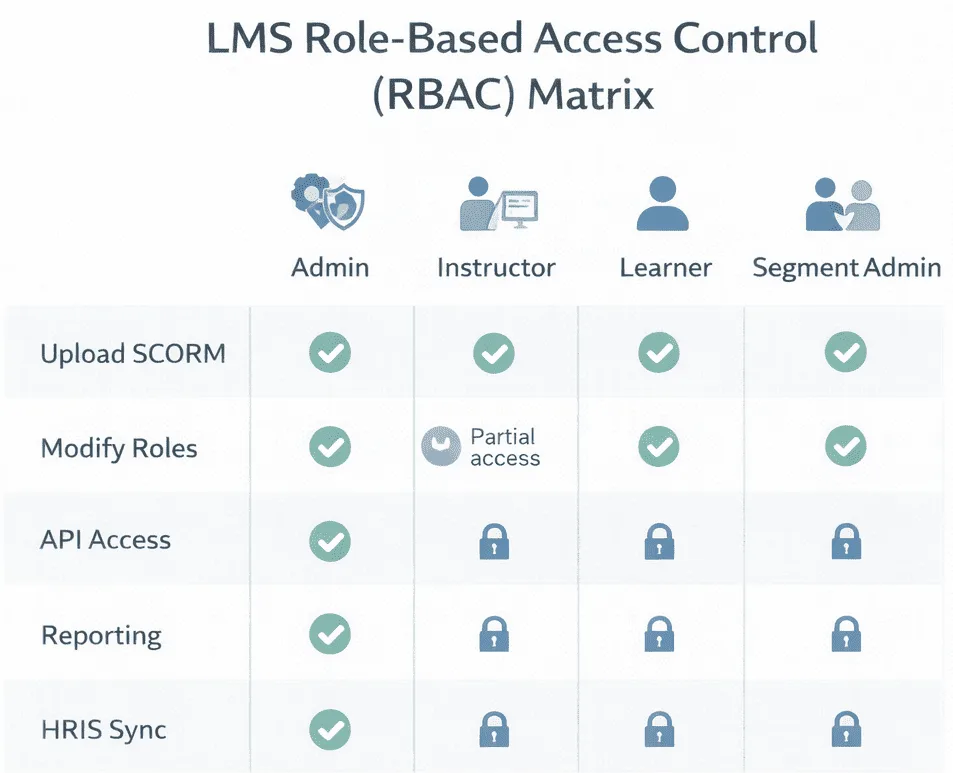
Below is a more detailed permission matrix reflecting technical depth.
| Use Case | Commonly Aligned Standard | Why |
|---|---|---|
| Simple compliance training | SCORM 1.2 | Lowest friction; universal LMS support |
| Legacy course library | SCORM | Preserves existing investments |
| VR or simulation tracking | xAPI | Captures granular interaction data |
| Offline field workforce | xAPI | Syncs data without browser session |
| Cross-platform analytics | xAPI | Aggregates distributed data |
| Structured launch + modern tracking | cmi5 | Hybrid control + flexibility |
Adding API access and HRIS sync signals technical literacy , something many people ignore.
The Gray Areas Most Articles Miss
1. Double-Hatting (Users with Multiple Roles)
A sales manager may need:
- Learner access (for assigned training)
- Manager access (to view team transcripts)
- Instructor access (to run onboarding workshops)
Without careful RBAC planning, permissions overlap and create conflicts.
Solution patterns include:
- Role stacking with precedence rules
- Custom composite roles
- Conditional permission mapping
2. Role Creep and Security Drift
Over time:
- Employees change jobs
- Permissions remain unchanged
- Legacy Admin access accumulates
In regulated sectors like pharma or aviation, this becomes a compliance vulnerability.
Advanced Governance Fix
Automated role synchronization via:
- HRIS integration (e.g., Workday)
- Active Directory mapping
- Identity Providers (IDP)
Roles align dynamically with job titles. This moves governance from manual maintenance to ecosystem automation.
Academic vs Corporate LMS: Structural Differences
Academic LMS
- Teacher
- Teaching Assistant
- Student
- Observer
Permissions revolve around grading and classroom control.
Corporate LMS
- Admin
- Segment Admin
- Compliance Officer
- Manager
- Instructor
- Learner
Corporate systems emphasize:
- Certification tracking
- Audit controls
- Department segmentation
- Reporting hierarchies
Enterprise platforms like SimpliTrain, Docebo or LearnUpon frequently support layered hierarchies to accommodate multi-division structures. The difference reflects organizational accountability models, not software superiority.
Edge Case Roles in Regulated Industries
Highly regulated industries often introduce roles not seen in standard deployments:
Internal Auditor
- Read-only access to compliance reports
- No course editing rights
- Access limited to certification tracking
Content Reviewer
- Can approve SCORM uploads
- Cannot publish content without Admin review
- These roles signal mature LMS governance.
They rarely appear in introductory blogs , but are common in aerospace, pharma, and energy sectors.
The Future of LMS Roles: AI and Automation
We are seeing a rapid shift in traditional LMS roles with the advent of AI and Automation, the role design is evolving. New patterns include:
- AI-driven enrollment suggestions
- Automated compliance escalation
- AI “Admin Assistants” generating reports
This changes the Learner role from passive content consumer to data-generating participant. It also introduces new governance questions:
- Who approves AI-generated role assignments?
- How are automated escalations audited?
- The permission structure must adapt to automation layers.
How to Think About Architecting LMS Roles
Instead of asking “What roles does this LMS have?”, ask:
- How many reporting layers exist in our organization?
- Do we operate in a regulated industry?
- Will HRIS integration automate role assignments?
- What happens if an Admin leaves the company tomorrow?
- How often will we audit permission assignments?
LMS user roles explained properly is not about definitions. It’s about designing authority boundaries that match operational complexity. In 2026, governance architecture, not feature lists, determines whether an LMS scales safely.
FAQ
Q1. How do I handle users with multiple LMS roles?
Implement structured role stacking with predefined precedence rules or create composite roles that avoid permission overlap.
Q2. What is role-based access control (RBAC) in LMS?
RBAC assigns permissions based on predefined role categories rather than individual users, simplifying governance at scale.
Q3. How do LMS roles affect compliance audits?
Incorrect role assignments can restrict visibility of certification reports or create unauthorized editing capabilities, increasing audit risk.
Q4. Should LMS managers have admin rights?
In most enterprise environments, managers receive read-only reporting access rather than full system control.