
Key Takeaways

LMS for employee training isn’t one thing. Platforms differ by design, compliance, skills, blended learning, or extended enterprise.
Every LMS involves trade-offs. What improves control or compliance often reduces flexibility and autonomy
Context beats features. Workforce structure, regulation, and internal maturity determine whether an LMS fits or creates friction.
One system rarely does everything well. Onboarding, compliance, and skill development pull LMS architecture in different directions.
Completion ≠ learning. Most LMS reporting tracks activity, not real capability or performance impact.
Integration and cost hide long-term complexity. Effort, data quality, and admin overhead often matter more than license price.
Organizations evaluating learning management systems rarely struggle to find options. Hundreds of vendors offer LMS for employee training platforms, each claiming to solve workforce development challenges. The difficulty lies elsewhere: understanding which design philosophy matches organizational reality. The phrase “LMS for employee training” suggests a unified category, a set of platforms serving a common purpose with minor variations. In practice, systems marketed under this label embody fundamentally different assumptions about what employee training means, how learning happens in organizations, and where technology should intervene.
This article examines structural models of employee training LMS platforms, the trade-offs each model creates, and the organizational contexts where those trade-offs become critical. It does not recommend specific platforms or claim universal truths about what works. Instead, it surfaces the tensions, constraints, and consequences that shape how these systems function in practice.
Also Read: What Is a Learning Management System? A Complete Guide to LMS Functionality and Architecture
Why Employee LMS Is Not a Single Thing
A manufacturing company with 5,000 frontline workers faces different training challenges than a software company with 500 remote knowledge workers. A hospital managing JCAHO compliance operates under different constraints than a consulting firm developing client-facing skills. Yet vendors often present the employee learning management system as a universal solution.
Employee training needs vary by:
- Organization size and structure: Centralized organizations with uniform processes benefit from standardized training delivery. Decentralized organizations with autonomous business units encounter friction when corporate L&D imposes platform choices that don’t match local workflows.
- Risk and compliance exposure: Regulated industries prioritize audit trails, mandatory completion tracking, and certification management. Organizations with minimal regulatory burden find compliance-focused architectures bureaucratic and limiting.
- Skill volatility: Technology companies where job requirements shift quarterly need systems supporting rapid content updates. Stable industries with established procedures benefit from structured curriculum and formal knowledge transfer.
- Workforce distribution: Desk-based employees tolerate desktop-centric systems. Frontline workers without assigned workstations need mobile-first platforms with offline capability.
Most learning and development platform comparison frameworks fail because they assume organizations fit similar patterns. Understanding how different platforms embody different assumptions about these variables clarifies why systems that work well in one context create friction in another.
Structural Models of LMS for Employee Training
Before evaluating trade-offs, it’s useful to establish what differs structurally across employee training LMS platforms.
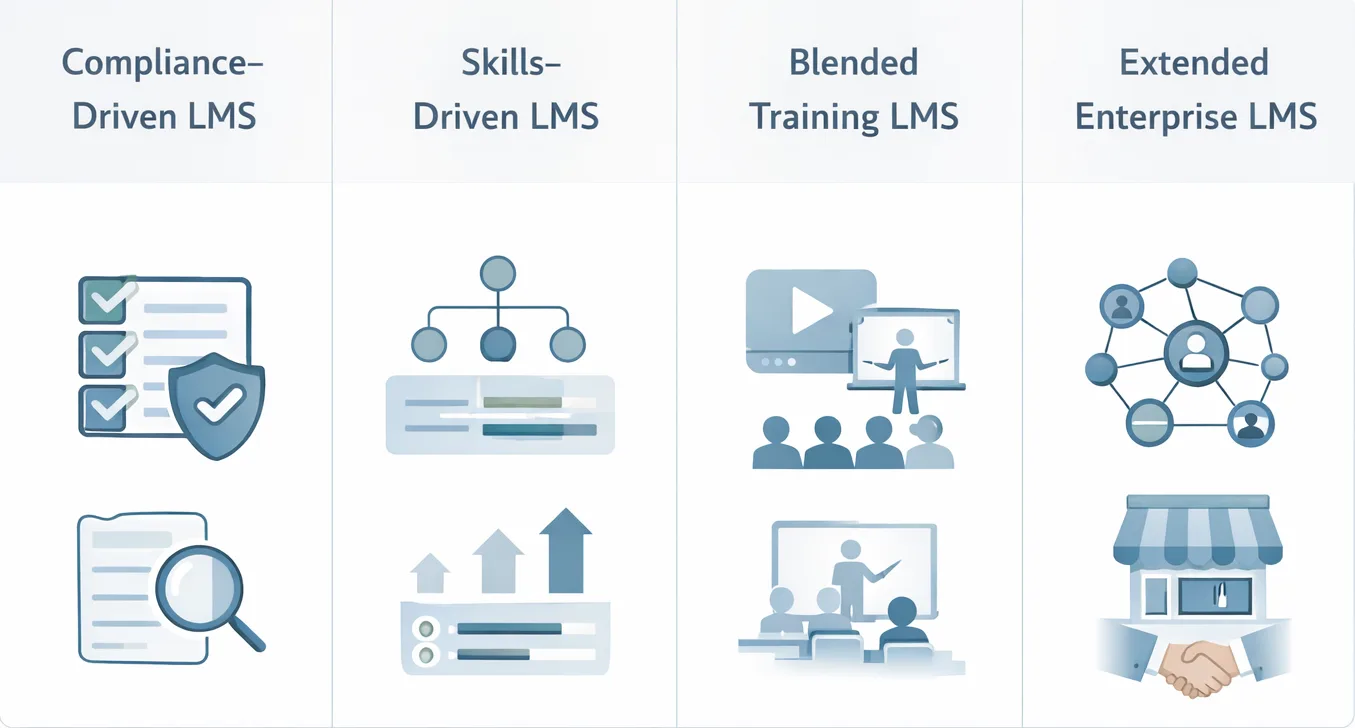
Compliance-Driven LMS
- Original design intent: Manage mandatory training requirements with audit-ready documentation.
- Problem it was created to solve: Organizations in regulated industries needed systematic ways to assign required training, track completion, enforce deadlines, and produce audit trails. Spreadsheets created compliance risk.
- Architectural emphasis: Automated assignment rules, deadline management, recertification workflows, immutable completion records, regulatory reporting.
Skills-Driven LMS
- Original design intent: Develop workforce capabilities aligned with business strategy.
- Problem it was created to solve: Organizations needed to close identified skill gaps, prepare employees for new responsibilities, and build capabilities for future business needs.
- Architectural emphasis: Competency frameworks, proficiency assessments, learning paths, personalized recommendations, skills tracking, performance management integration.
Blended Employee Training Platforms
- Original design intent: Combine self-paced online learning with live instruction.
- Problem it was created to solve: Some learning works well asynchronously while other development requires real-time interaction. Single-mode platforms forced artificial choices.
- Architectural emphasis: Virtual instructor-led training scheduling, video conferencing integration, cohort management, attendance tracking.
Extended Enterprise–Capable LMS
- Original design intent: Train employees plus external stakeholders (customers, partners, franchisees).
- Problem it was created to solve: Organizations needed to deliver product training to customers and certify channel partners while maintaining separation from internal employee training.
- Architectural emphasis: Multi-tenancy architecture, public course catalogs, e-commerce, CRM integration, separate branding per audience.
Comparison Dimensions That Actually Matter in Employee Training LMS
Comparing these models requires identifying dimensions where structural differences create meaningful consequences.
| Dimension | Compliance-Driven | Skills-Driven | Blended Platforms | Extended Enterprise |
|---|---|---|---|---|
| Primary Training Goal | Risk mitigation, regulatory adherence | Capability development, performance improvement | Knowledge + application, experiential learning | Stakeholder enablement, ecosystem education |
| Content Lifecycle | Slow-changing, version-controlled | Fast-changing, continuously updated | Hybrid: stable modules + dynamic discussions | Variable by audience |
| Learner Autonomy | Low: mandatory assignments, fixed deadlines | Moderate: guided paths with personalization | Structured: cohort-based progression | High: self-service discovery |
| Reporting Depth | Completion-centric, audit-focused | Competency-centric, gap analysis | Attendance + engagement + assessment | Multi-tenant segmentation |
| Integration Dependence | High: HRIS for auto-assignment, SSO mandatory | High: HRIS, performance systems, skills databases | Moderate: video platforms, calendars | High: CRM, e-commerce, payment gateways |
| Administrative Overhead | Medium: rules-based automation | High: content curation, path building | High: session scheduling, instructor coordination | Very High: multi-audience management |
These dimensions reveal incompatibilities. A system optimized for compliance tracking creates friction when organizations prioritize self-directed skill development. A platform designed for personalized learning paths introduces administrative complexity in contexts needing simple compliance documentation.
Corporate Training LMS vs Enterprise LMS for Employee Development
The terms corporate training LMS and enterprise LMS for employee development sometimes distinguish governance models and scalability assumptions rather than features.
Corporate Training LMS
Governance model: Centralized L&D controls platform, content, curriculum. Training standardized across organization.
Tends to work well when:
- Organizational culture supports centralized decision-making
- Training needs are relatively homogeneous
- Compliance requirements apply uniformly
- L&D has bandwidth to curate all content
Often introduces friction when:
- Business units operate autonomously with different priorities
- Decentralized experts want direct content publishing
- Divisions have conflicting reporting requirements
Enterprise LMS for Employee Development
Governance model: Federated administration. Corporate L&D sets standards but business units control local implementation.
Tends to work well when:
- Organization operates as portfolio of distinct businesses
- Training needs vary significantly across divisions
- Local teams have budget and authority for initiatives
Often introduces friction when:
- Decentralization creates data silos
- Business units duplicate efforts without visibility
- Corporate lacks aggregate view of training investment
The distinction isn’t about capability, it’s about organizational maturity, governance clarity, and administrative resource allocation.
LMS for Workforce Training: Desk-Based vs Frontline Contexts
The LMS for workforce training assumes learners have time, devices, and environment conducive to learning. This holds for desk-based knowledge workers but breaks down for frontline workers.
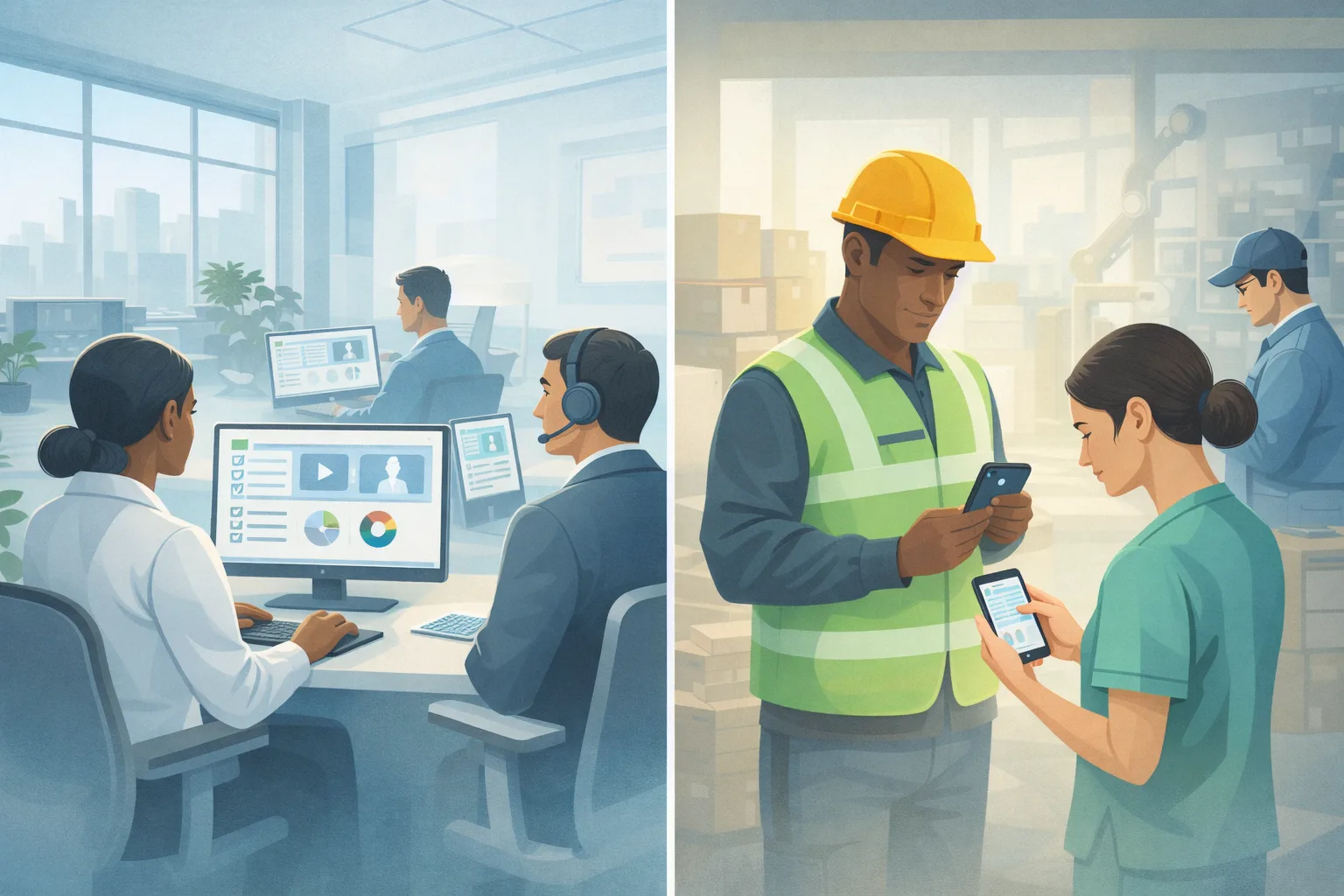
Desktop-Centric Systems
Tends to work well when:
- Employees have assigned workstations
- Training occurs during designated time blocks
- Reliable internet access at work locations
Often introduces friction when:
- Frontline workers share devices or lack personal access
- Training must occur during breaks or shift changes
- Field workers need reference materials during tasks
Mobile-First Systems
Tends to work well when:
- Workforce lacks desktop access during shifts
- Learning happens in short increments
- Just-in-time reference materials support tasks
Often introduces friction when:
- Content requires visual detail (diagrams, complex procedures)
- Assessments involve extensive typing
- Device diversity creates compatibility issues
Neither model is universally superior. Hybrid workforces requiring both create tension: optimize for desktop (limiting frontline access) or mobile (constraining complex learning)?
Employee Onboarding, Compliance, and Skill Development – One LMS or Many?
Organizations deploy LMS for employee training across employee onboarding training, compliance training for employees, and upskilling and reskilling employees. These use cases pull platform architecture in conflicting directions.
| Use Case | What LMS Must Optimize For | Common Failure Mode | Consequence |
|---|---|---|---|
| Onboarding | Progressive content revelation; cross-system integration; manager oversight | Information overload: 40+ hours assigned day one | Overwhelmed new hires, delayed completion |
| Compliance | Automated enforcement; version control; audit trail integrity | Manual tracking: no automated assignment | Compliance gaps during audits |
| Skill Development | Personalized paths; competency tracking; manager/employee collaboration | Generic catalog: no connection to job requirements | Low engagement, poor ROI |
Compliance-optimized platforms excel at onboarding logistics but create friction for voluntary development. Skills-optimized platforms support development well but introduce administrative overhead for compliance. Organizations face three responses: accept platform limitations, implement multiple systems (accepting data fragmentation), or build extensive workarounds.
Reporting, Analytics, and the Illusion of Measurement
Training, tracking and reporting capabilities appear prominently in evaluations. Organizations expect platforms to measure effectiveness and demonstrate ROI. These expectations encounter structural limitations.
What LMS platforms actually track:
- Completion data (who finished, time spent, scores)
- Certification status
What completion data doesn’t reveal:
- Whether learners understood content
- Whether they retained information
- Whether they applied skills on the job
- Whether application improved performance
Manager training dashboards display completion percentages and average scores. Managers interpret these as learning effectiveness indicators, assuming completing training equals learning occurred. Employees complete mandatory training to clear notifications, pass assessments through repeated attempts, and leave browser tabs open inflating time metrics. Organizations discover high completion rates don’t correlate with performance improvements. The debate centers on whether detailed tracking improves learning or creates surveillance pressure that distorts behavior. No consensus exists.
Integration Reality: LMS as a System, Not a Tool
The LMS for employee training rarely operates independently. Effective deployment requires HRIS integration (user provisioning, org structure data), SSO (authentication), performance management (skills data), and video conferencing (VILT).
Where integrations fail in practice:
- HRIS integration helps in data mapping mismatches (job codes don’t match role taxonomy), nested org structures causing assignment errors, update frequency problems (nightly sync misses same-day hires).
- SSO integration: Configuration complexity requiring IT security involvement (months to schedule), mobile app authentication failures, session timeout mismatches.
- Organizations implement workarounds: manual data cleanup, exception processes, parallel spreadsheets. The “seamless” integration becomes a managed process requiring ongoing administrator attention.
- Deep integration environments work well when both systems designed for integration, technical resources available, and data quality is high. They introduce friction when integration exposes data quality issues or edge cases don’t map cleanly.
- Standalone LMS setups work well for small organizations with stable populations. They introduce friction when manual data entry creates errors or organization scales beyond manual capacity.
Cost, Complexity, and the Hidden Trade-Off Curve
- Employee training LMS pricing varies widely. Organizations encounter a non-obvious trade-off: platforms with lower subscription fees often impose higher operational costs.
- Lower-cost platforms have simpler features requiring less configuration but hidden costs from manual processes compensating for automation gaps and additional tools filling capability gaps.
- Higher-cost platforms offer comprehensive features enabling sophisticated workflows but hidden costs from longer implementations, steeper learning curves, and feature sprawl, for capabilities never utilized.
- Organizations discover cheaper platforms may cost more when accounting for staff time on manual processes. Expensive platforms may underdeliver when features go unused because the organization lacks maturity to leverage them.
Common Points of Debate in Employee Training LMS Selection
- AI personalization: Proponents argue algorithms improve relevance and engagement. Skeptics note recommendations often reflect course popularity rather than individual need, and effectiveness depends on metadata quality rarely achieved.
- Microlearning effectiveness: Advocates claim short modules fit workflow and improve retention. Critics argue fragmentation without connecting themes and difficulty assessing comprehension from brief modules.
- One LMS vs LMS + LXP: Some argue single platform simplifies; others argue specialized tools serve different needs better.
- Central control vs team autonomy: Centralization ensures consistency; decentralization matches local needs but creates data silos.
These debates have no universal resolution, context determines which tensions organizations can tolerate.
How to Think About Choosing an LMS for Employee Training
This is not a recommendation section, it’s a framework for organizational self-assessment.
Questions organizations should ask:
- What problem are we solving this year? Compliance risk, skills gaps, onboarding inefficiency, or distributed workforce access? The answer determines which model fits.
- What breaks if adoption is low? If compliance failure creates regulatory risk, enforcement features matter. If voluntary development suffers from low engagement, personalization matters.
- What do we need evidence for? Audit defense requires immutable completion records. Performance improvement requires capability assessment, not just completion tracking.
- What can we realistically maintain? Federated administration requires distributed expertise. Deep integrations require technical resources. Content curation requires subject matter expert availability.
Emphasize context over capability. A platform’s sophistication matters less than alignment with organizational capacity to implement, maintain, and evolve usage over time. Constraints over features. What you cannot tolerate (compliance gaps, manual overhead, integration complexity) determines fit more than what you might want.