
30-Second Bottom Line

Configuration : Using built-in platform settings. Fast, cheap, upgrade-safe. Covers 80% of use cases.
Customization : Code-level changes. Expensive, slow, and creates ongoing maintenance obligations.
Choose configuration unless your workflows are genuinely unique, you’re selling the LMS as a product, or you have a developer on retainer. If you’re unsure , start with configuration.
LMS Customization vs Configuration – Why Buyers Get Confused
The difference isn’t just technical. It’s a budget killer. “Fully customizable” is among the most elastic phrases in LMS vendor marketing. Buyers interpret it as “we can make it do anything.” Vendors mean anything from theme color changes to deep API-level workflow engineering, sometimes in the same sales conversation. The real distinction between LMS customization vs configuration directly affects project cost, deployment timeline, upgrade risk, IT dependency, and vendor support. Configuration works within platform-designed settings. Customization alters functionality beyond default parameters, requiring code-level changes.
Platforms like SimpliTrain & Moodle offer deep customization flexibility. Docebo and Absorb LMS provide extensive enterprise configuration. TalentLMS provides white-labeling features often marketed as customization. Each uses different terminology for overlapping capabilities, which is exactly why buyers misalign expectations before procurement closes.
Can an LMS Really Be Customized – or Is That Marketing Language?
Sometimes it’s both. But mostly it’s marketing. LMS customization in the true sense means code-level changes modifying platform behavior beyond built-in settings. This includes custom plugins, API integrations with custom data flows, UI modifications restructuring navigation, and custom workflow logic handling enrollment rules the standard platform doesn’t support.
The critical distinction: SaaS LMS platforms restrict access to core application code. Customization on SaaS means working within extension points, APIs, webhook hooks, plugin frameworks, not modifying the platform itself. This differs meaningfully from open-source deployments (Moodle, Open edX) where organizations control the codebase directly. A vendor claiming their SaaS platform is “fully customizable” usually means “extensively configurable with API integration capability.” These aren’t equivalent. Understanding which extensibility type is actually available prevents architecture mismatches discovered post-deployment, after the contract is signed.
What Is LMS Configuration, and Why Do Vendors Recommend It First?
LMS configuration is changes made through the admin interface using built-in toggles and settings, without touching source code. This includes role and permission structures, branding elements, notification templates, course workflow rules (sequential enrollment, prerequisite gates, completion criteria), user group hierarchies, and reporting layouts.
- Vendors recommend configuration first for four reasons: speed (changes deploy in hours, not weeks); safety (configured settings survive platform updates); support (vendors cover configurations within documented settings; custom code falls outside standard agreements); predictability (configuration costs are largely absorbed into license fees with known admin overhead).
- The structural limit: configuration can only produce outcomes the platform was designed to support. If your compliance workflow requires a manager approval step that doesn’t exist in the native workflow engine, configuration cannot create it, customization can.
Comparison Table: LMS Customization vs Configuration – Structural Differences
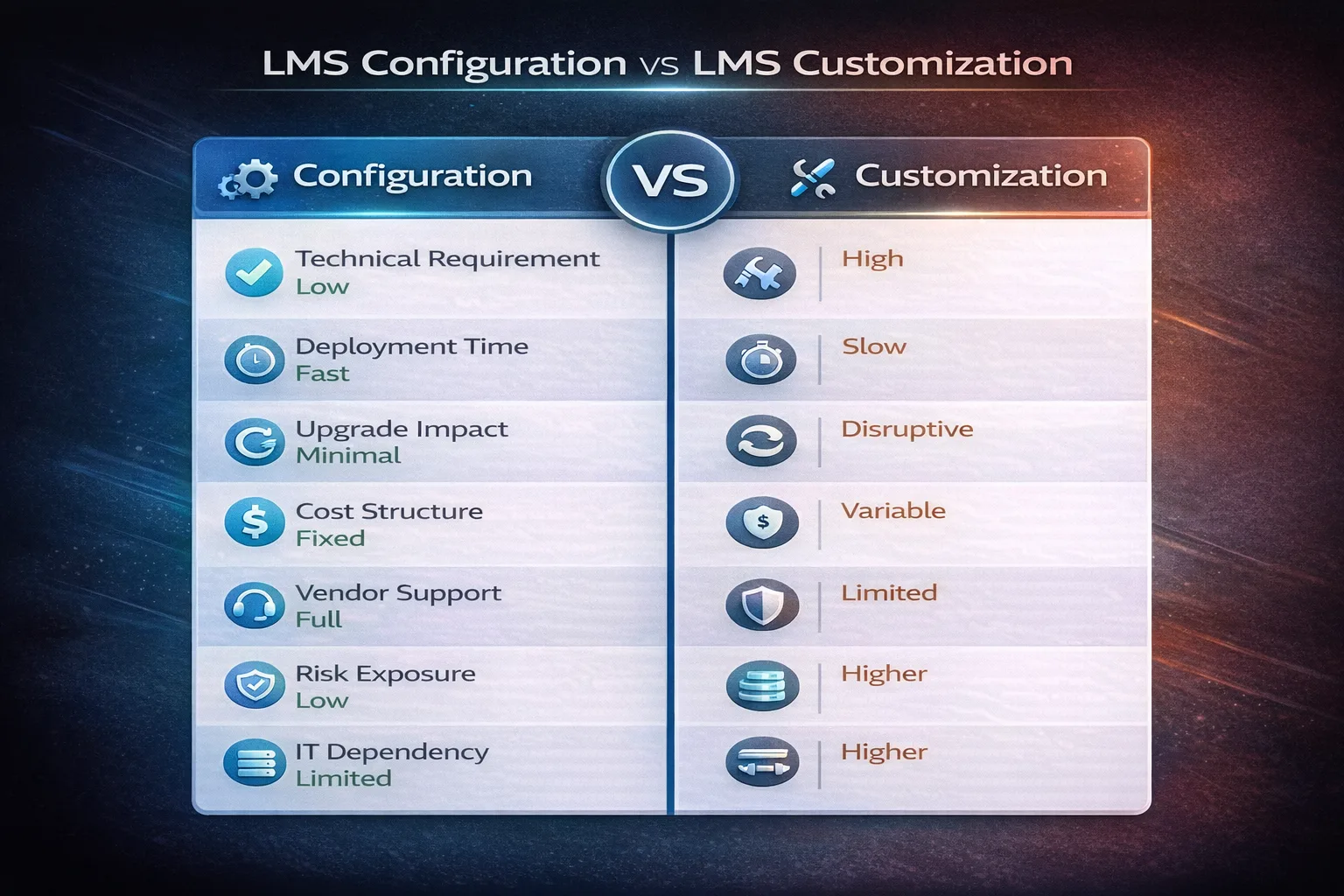
| Dimension | Configuration | Customization | Practical Impact |
|---|---|---|---|
| Technical requirement | Admin skills, platform knowledge | Developer expertise, code access | Determines who owns changes |
| Deployment time | Hours to days | Weeks to months | Affects go-live timeline |
| Upgrade impact | Settings preserved by vendor | Custom code may break | Long-term maintenance risk |
| Cost structure | Included in license + admin time | Developer hours + ongoing QA | Budget planning complexity |
| Vendor support | Full coverage | Limited or excluded | Support escalation risk |
| Risk exposure | Low | Moderate to High | Operational stability |
| Flexibility ceiling | Platform-bounded | Architecture-bounded | Shapes what’s achievable |
| IT dependency | Low – admin-manageable | High – developer-dependent | Internal resource requirement |
Is LMS White Labeling Customization or Just Configuration?
White labeling is often a marketing lie. Not always, but often enough to warrant scrutiny. Vendors use “white labeling” and “customization” interchangeably to make a configuration feature sound like bespoke development work. It’s a common upsell technique: charge enterprise rates for what is, in practice, logo replacement and a custom domain. Configuration-level white labeling covers logo replacement, custom domain, brand color schemes, email template styling, and custom login page design. This is what most SaaS platforms mean by “white-label options.” SimpliTrain, TalentLMS, Absorb LMS, and Docebo support this without code involvement- fast, upgrade-safe, and fully supported. Ask any of them for a demo. You’ll see it takes 20 minutes in an admin panel.
Customization-level white labeling is different in kind. It restructures navigation to remove vendor identity entirely, builds custom mobile app wrappers, or modifies learner interface components at the theme level. SimpliTrain, Moodle allows genuine theme-level customization, rewriting template files, CSS frameworks, component libraries, requiring front-end developer involvement and creating an upgrade dependency.
The trap: vendors present both under the same “white labeling” banner at different price points. If a vendor quotes significant professional services fees for white labeling a SaaS platform, ask specifically what configuration options are included in your base license first.
What Does LMS Customization Actually Involve Behind the Scenes?
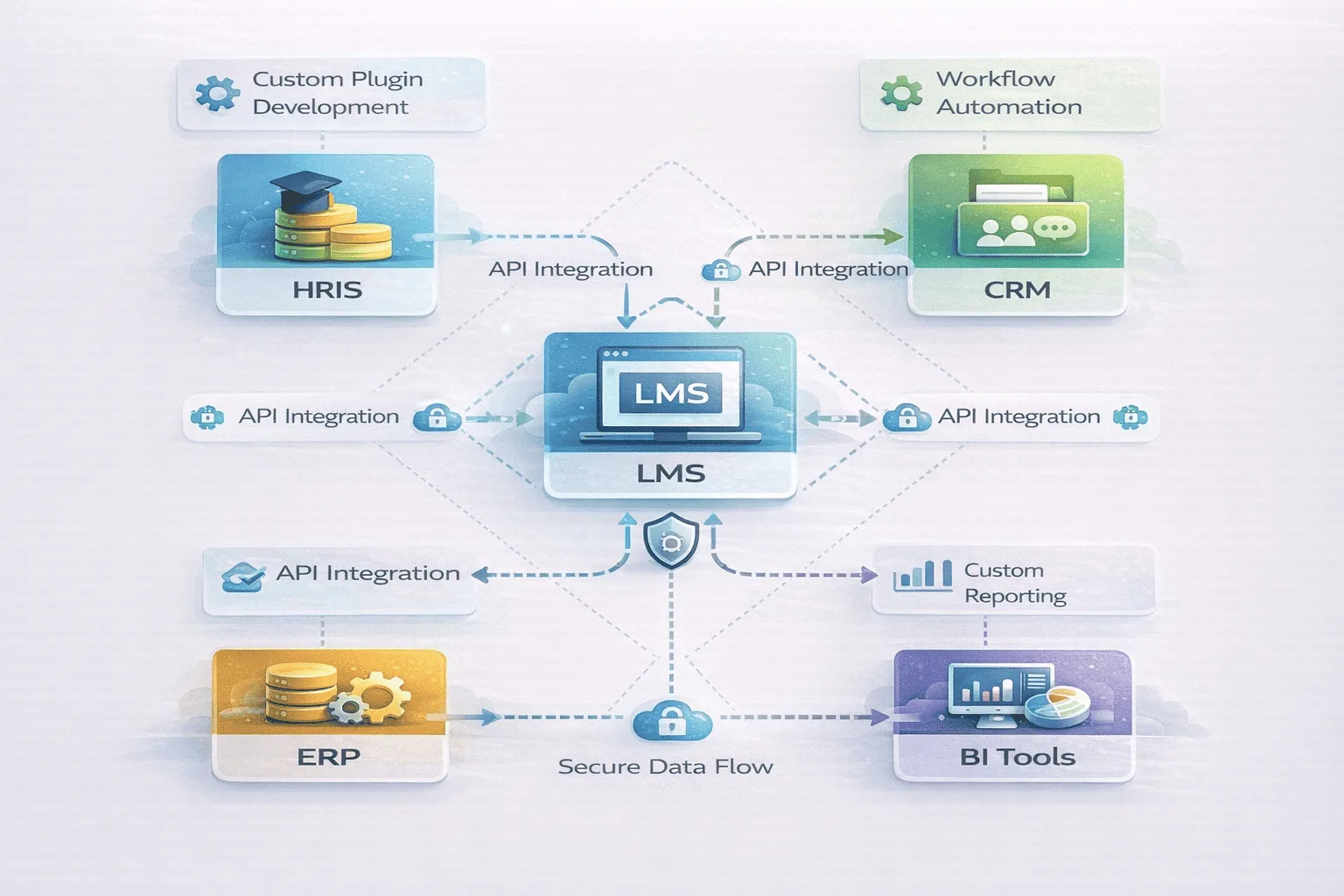
Four distinct workstreams. Each one has a different cost, timeline, and maintenance obligation.
🔧 Custom Plugin or Module Development Writing code that extends platform functionality beyond what settings allow, custom enrollment logic, proprietary assessment types, or gamification engines. Requires a developer familiar with the platform’s SDK. Breaks when the SDK updates.
🔌 API-Level Integration Development Bi-directional data flows between LMS and external systems (HRIS, CRM, ERP) with custom field mapping and transformation logic. This is the category where budget most consistently overruns. Budget for 45 hours of dev time and 10 hours of QA per integration, then budget the same again for the first major platform update.
📊 Custom Reporting and Analytics Dashboards pulling LMS data into external BI tools (Tableau, Power BI, Looker) with non-standard aggregations or business-specific metrics. Often straightforward in scope, until the underlying data schema changes.
⚙️ Workflow Automation Beyond Platform Defaults Approval chains, conditional enrollment logic, or notification triggers requiring logic the platform’s built-in workflow engine doesn’t support. Highest risk of “orphaned logic”, automated processes nobody remembers built that silently fail after an update.
Each workstream involves dedicated developer time, QA cycles per platform update, and organizational dependency on whoever built the layer. The alignment payoff is real. So is the technical debt.
Pros and Cons: Configuration vs Customization
Configuration
- Advantages: Fast deployment, lower cost, vendor-supported, upgrade-safe, manageable by admin team without developer dependency
- Limitations: Bounded by platform design decisions; cannot produce functionality the vendor hasn’t built; may not fit genuinely complex or unique workflows
Customization
- Advantages: Tailored workflows matching unique processes, deep integration flexibility, differentiated learner experience, organizational logic embedded in platform behavior
- Limitations: Higher upfront and ongoing cost, longer deployment timelines, upgrade complexity, maintenance burden, reduced vendor support coverage
How Much Does LMS Customization Cost Compared to Configuration?
The hidden cost isn’t the build. It’s the tail. Configuration cost is primarily absorbed into the platform license. Admin labor runs 20–80 hours for initial mid-market deployment, declining to a few hours monthly thereafter. Predictable. Flat. Customization cost is a different shape entirely. Three components buyers consistently underestimate:
- Initial development: Budget for 45 hours of dev time and 10 hours of QA per API integration for a straightforward HRIS or CRM connection. Add complexity multipliers for custom data transformations, error handling requirements, or non-standard authentication flows. Custom plugin development runs 60–200 hours depending on functional scope.
- The maintenance tail: Enterprise SaaS platforms update quarterly. Each update potentially requires regression testing and code patches. Plan for 8–15 hours per integration per release cycle, not as a worst case, as a budget line.
- Developer dependency: When the engineer who built your custom HRIS integration leaves, that institutional knowledge leaves with them. Documentation is almost never prioritized during delivery. It becomes critical the first time something breaks at 11pm before a Monday compliance deadline.
📋 Field Note
In our experience across enterprise LMS deployments, the “18-Month Rule” holds consistently: for every $1.00 spent on a custom integration at launch, expect to spend approximately $0.20 per year just keeping it functional through standard vendor updates. A $15,000 initial build carries roughly $3,000 in annual maintenance overhead, before any new feature work.
The practical threshold: if you don’t have a developer on retainer or an internal technical owner, do not customize. The integration will work beautifully for 14 months. Then it will break on a Tuesday when the vendor pushes a routine update, and you’ll have no one to call. Open-source platforms shift licensing cost to infrastructure, patching, and maintenance. Total cost of ownership often converges with commercial SaaS when internal technical labor is fully accounted for.
Comparison Table: Cost and Risk Comparison
| Factor | Configuration | Customization | Long-Term Impact |
|---|---|---|---|
| Upfront cost | Low (license + admin time) | Moderate to High (developer hours) | Budget planning risk |
| Ongoing maintenance | Minimal – vendor-managed | Regular – testing per release cycle | Compounding labor cost |
| Upgrade effort | Negligible – vendor handles | Significant – revalidation required | Innovation speed trade-off |
| Support dependency | Vendor-covered | Partially or fully excluded | Risk escalation path |
| Internal resource need | Admin-level | Developer-level | Hiring/retention risk |
| Flexibility payoff | Bounded but immediate | High but deferred | Architecture fit over time |
How Should You Think About Choosing Between LMS Customization and Configuration?
Seven questions. Answer honestly before you talk to a vendor.
- Are your workflows genuinely unique? If the same pattern exists in the default platform toolkit under a different label, configuration achieves it, without the maintenance tail.
- Can your needs be met through configuration today? Platforms evolve. A feature requiring customization now may ship as native configuration in the next release cycle.
- Do you have internal technical capacity? Customization without an internal owner creates vendor dependency. Without documentation, it creates a knowledge trap.
- How frequently does the vendor update the platform? Quarterly releases mean quarterly regression testing obligations for every custom component.
- Is branding enough, or do you need functional changes? Most brand requirements are configuration. Unique workflows and non-standard integrations are where customization earns its cost.
- What is your 3-year maintenance appetite? Customization compounds. A $15,000 build in Year 1 carries $3,000+ in annual overhead. Model the 36-month cost, not the invoice.
- Are integrations critical to core operations? Custom integrations in critical paths require the highest maintenance diligence and the most thorough documentation.
The Decision Matrix: Which Should You Choose?
| Choose Configuration If… | Choose Customization If… |
|---|---|
| You’re a standard HR or L&D team with under 5,000 users | The LMS is your product, you’re selling courses to external B2B clients |
| Your workflows match standard compliance, onboarding, or skills training patterns | You have workflows with no native equivalent in the platform’s default engine |
| You don’t have a developer on retainer | You have an internal technical owner who will own maintenance long-term |
| You want to absorb new platform features immediately | Deep brand immersion is a product requirement, not a preference |
| Budget certainty matters more than bespoke fit | Your integrations involve non-standard data models or proprietary systems |
LMS customization vs configuration isn’t a binary choice, most deployments use both. The question is where each earns its cost relative to the operational value it creates and the maintenance obligations it carries in return.
FAQ
Q1. Can LMS platforms be fully customized?
Depends on architecture. Open-source platforms (Moodle, Open edX) allow code-level customization without vendor-imposed limits. SaaS platforms customize through extension points, APIs, plugins, webhooks, but rarely allow core code access. “Fully customizable” in SaaS vendor context typically means “extensively configurable with API integration capability.”
Q2. What is LMS white labeling?
Replacing vendor branding with organizational identity, custom domain, logo, color palette, email templates. Most SaaS platforms offer this as configuration. Deeper white labeling (custom mobile apps, theme-level UI restructuring) requires development and is common on open-source platforms.
Q3. How much does LMS customization cost?
Configuration is absorbed in license fees plus admin time. Custom development ranges from 40–120 hours per API integration, plus ongoing maintenance per release cycle. Developer dependency and documentation debt frequently exceed initial estimates.
Q4. Is configuration enough for most organizations?
For the majority of commercial deployments, yes. Standard compliance training, onboarding, skills development, and reporting fit within platform-designed configuration. Customization becomes proportionate when workflows are genuinely unique or the platform serves external customers with brand-integrity requirements.
Q5. Does customization affect LMS upgrades?
Consistently. Custom code requires revalidation against each platform update. Heavily customized systems often defer updates to minimize regression risk, accumulating security and feature debt over time.