
Key Takeaways

LMS architecture is the structural blueprint defining how a learning management system organizes its frontend (user interface), backend (processing logic), database (data storage), and integration components to deliver, track, and manage learning experiences at scale.
Three-tier structure
Presentation layer (what users see), Application layer (business logic), Data layer (persistent storage)
Deployment model
Cloud-based (SaaS), on-premise, or hybrid infrastructure determining where the system runs and who manages it
Supporting infrastructure
Web servers, API gateways, CDNs, load balancers enabling performance, connectivity, and scalability
When evaluating a learning management system, most buyers focus on features, course builders, reporting dashboards, and mobile apps. But the underlying LMS architecture, the structural design and technical framework determining how the platform is built, directly impacts performance, scalability, integration capabilities, and long-term maintenance costs. This guide explains the LMS system architecture, breaking down the layers, components, and design patterns that make a learning platform function. Understanding this foundation helps decision-makers ask better questions during vendor evaluation and IT teams prepare for implementation.
The Three-Tier LMS System Architecture
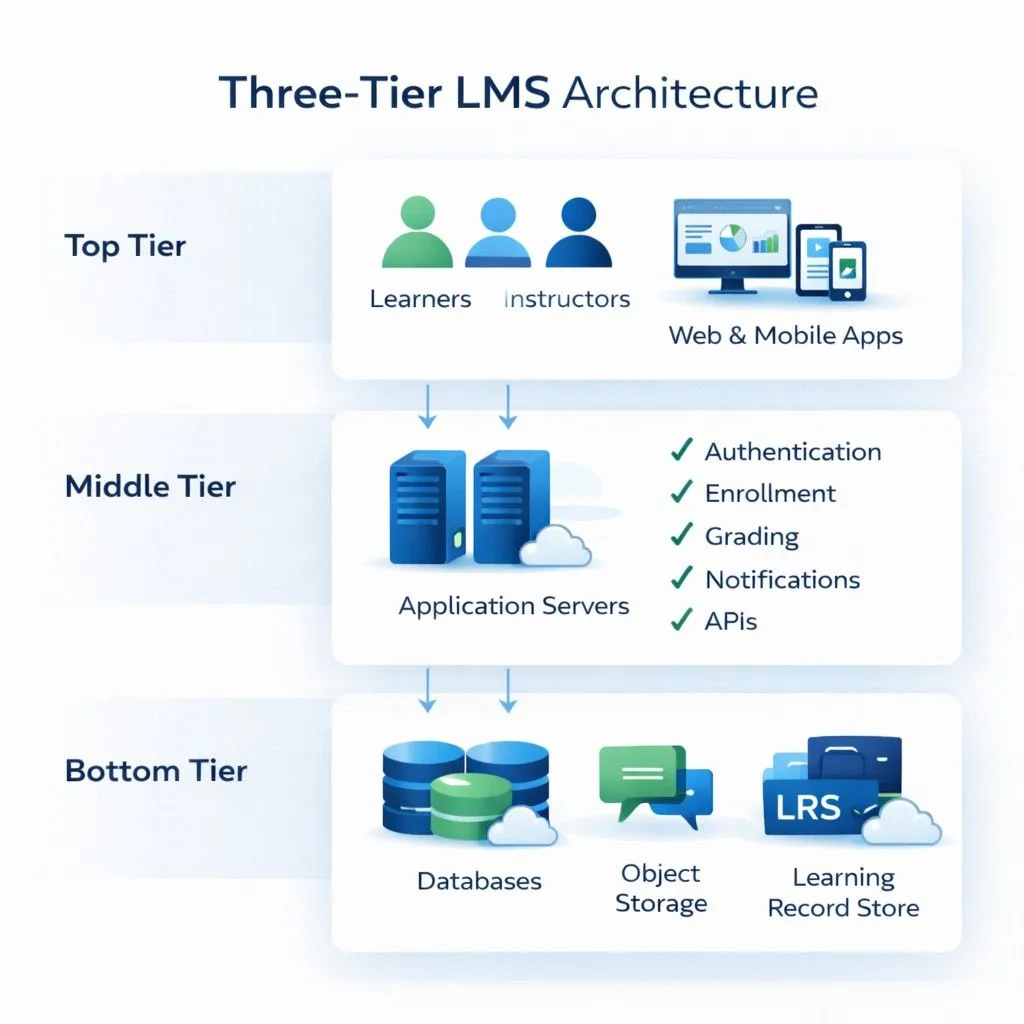
Nearly all modern learning platforms follow a three-tier application architecture, separating concerns into distinct layers. This LMS backend frontend architecture pattern provides modularity, maintainability, and scalability.
Layer 1: Presentation Layer (Frontend)
This is what users actually see and interact with, the user interface for learners, instructors, and administrators. What it includes:
- Web browsers displaying course catalogs, dashboards, and content
- Mobile applications (native iOS/Android apps or responsive web interfaces)
- Desktop clients (less common in modern systems)
- All visual elements: navigation menus, buttons, forms, media players
Technologies typically used:
- HTML, CSS, JavaScript for structure, styling, and interactivity
- Frontend frameworks: React, Angular, Vue.js for dynamic interfaces
- Mobile frameworks: React Native, Flutter for cross-platform apps
The user experience layer: Every click, scroll, video play, or quiz submission originates here. The presentation layer captures user actions and sends requests to the application layer for processing. In practice, responsive design ensures the same interface adapts to desktop monitors, tablets, and smartphones. Organizations with field workers or frontline staff need presentation layers optimized for mobile-first experiences, not just desktop interfaces shrunk to fit smaller screens.
Layer 2: Application Layer (Backend / Business Logic)
This middle tier processes requests from the presentation layer, executes business rules, and coordinates between the user interface and database.
Core responsibilities:
- Authentication and authorization: Verifying user credentials, determining permissions based on roles
- Enrollment logic: Processing course assignments based on rules (auto-enroll sales team in product training)
- Grading algorithms: Calculating scores, determining pass/fail status, triggering certifications
- Notification engine: Sending emails or push notifications when courses are assigned, deadlines approach, or training completes
- Content delivery rules: Determining which content users can access based on prerequisites, subscriptions, or compliance requirements
- API request processing: Handling integration requests from external systems (HRIS, CRM, video conferencing)
Technologies typically used:
- Server-side languages: Node.js, Python (Django/Flask), PHP, Java, Ruby, .NET (C#)
- Application servers executing the code
- Business logic frameworks specific to chosen language
The orchestration layer: When you upload a SCORM package, the application layer unpacks it, validates the structure, extracts metadata, stores files appropriately, and updates the course catalog. When a learner completes training, this layer checks completion rules, updates the database, triggers notifications, and logs the event.
Layer 3: Data Layer (Database and Storage)
This layer persistently stores all system information and serves it back when requested. What gets stored:
- Relational database (SQL): User profiles, enrollment records, assessment scores, completion status, certifications, learning paths, system configurations
- File storage: Videos, PDFs, SCORM packages, images, documents (often separate from database)
- Learning Record Store (LRS): Granular xAPI statements tracking detailed learning activities
- Cache: Temporary storage (Redis, Memcached) for frequently accessed data to improve performance
Database technologies commonly used:
- Relational: MySQL, PostgreSQL, Microsoft SQL Server, Oracle
- NoSQL: MongoDB, Cassandra (for specific use cases requiring flexibility)
- Object storage: Amazon S3, Azure Blob Storage, Google Cloud Storage (for files)
The persistence layer: Everything the LMS “remembers”, who you are, which courses you’ve taken, your test scores, your certifications—lives here. When you log in from a different device, the presentation layer pulls your data from this layer via the application layer.
Data Request Lifecycle: How the Layers Work Together
Understanding LMS system design requires following a request through all three layers:
Example: Learner Accessing a Course
- User Action → Learner clicks “Start Course” button (Presentation Layer)
- HTTP Request → Browser sends HTTPS POST request to web server
- Authentication Check → Application Layer verifies session token is valid
- Permission Verification → Application Layer queries Data Layer: “Is this user enrolled in this course?”
- Database Response → Data Layer returns enrollment record and user permissions
- Business Logic → Application Layer checks: Has learner met prerequisites? Is course still active?
- Content Retrieval → Application Layer fetches course structure metadata from Data Layer
- File Access → Application Layer retrieves video files from object storage or CDN
- Response Assembly → Application Layer packages content, progress data, navigation structure
- Data Transmission → Web server sends response back to browser
- UI Rendering → Presentation Layer displays course player with content (user sees video)
Reverse flow (User completing quiz):
- User submits answers → Presentation Layer sends quiz responses to Application Layer
- Validation → Application Layer verifies session hasn’t expired, user is authorized
- Grading → Application Layer compares answers to stored answer key from Data Layer
- Score calculation → Business logic determines percentage, pass/fail, certification eligibility
- Database write → Data Layer stores score, updates completion status, timestamps activity
- xAPI tracking → If enabled, granular statements sent to LRS (“answered Q3 incorrectly”)
- Notification trigger → Application Layer checks rules, triggers email via notification service
- Integration webhook → Optional: API call sent to HR system reporting completion
- UI update → Presentation Layer refreshes dashboard showing new status
This multi-layer orchestration happens in milliseconds but involves coordinated actions across the entire LMS technical architecture.
💡 Implementation Reality: The Business Logic Bottleneck
During evaluation, ask vendors how their application layer handles concurrent rule processing. We’ve audited systems where automatic enrollment rules worked perfectly with 100 users but created 20-minute delays when processing 5,000 employees simultaneously because the business logic wasn’t designed for batch operations. Request load testing documentation for user volumes 3x your current size.
Critical Supporting Components in LMS Infrastructure
Beyond the three core layers, several LMS technical architecture components enable functionality, performance, and connectivity.
Web Server
Routes incoming HTTP/HTTPS requests to the appropriate application components and serves static content (HTML files, images, CSS stylesheets, JavaScript files).
Common technologies: Apache, Nginx, Microsoft IIS
The web server sits between users and the application server, handling initial request routing and often serving cached content without involving the application layer for improved performance.
API Gateway / Integration Layer
Enables the LMS system design to communicate with external systems through defined interfaces.
What it handles:
- RESTful API endpoints exposing LMS data and functionality to external systems
- Incoming API calls from HRIS (automated user provisioning), CRM (customer training data), video conferencing tools
- Webhooks sending automated notifications to other systems when events occur (learner completes course → trigger sent to HR system)
- SSO (Single Sign-On) authentication via SAML, OAuth, LDAP protocols
The connectivity layer: This determines how easily your LMS integrates with existing workplace systems. Platforms with well-documented APIs and pre-built connectors reduce custom development needs during implementation.
💡 Pro-Tip: API Rate Limiting Is a Hidden Cost Driver
When reviewing API documentation, check for rate limits, many vendors cap requests at 100-500 per hour. If your HRIS sync runs nightly updating 10,000 employee records, you’ll hit limits and need to pay for enterprise tier pricing. Ask: “What are the rate limits for user provisioning APIs, and can we test with our actual sync volume during the trial?” Also verify if failed requests due to rate limiting retry automatically or require manual intervention.
Content Delivery Network (CDN)
Distributes static content, particularly videos and large files, across geographically distributed servers closer to end users.
Benefits:
- Reduces latency for global learners accessing video content
- Decreases bandwidth costs on primary servers
- Improves load times for media-heavy courses
When it matters: Organizations with international learners or video-intensive training benefit significantly from CDN architecture. Employees in regional offices accessing training hosted on servers across the world experience dramatically better performance when CDN caches content locally. Not all LMS platforms include CDN by default; some require separate CDN service procurement.
Load Balancer
Distributes incoming traffic across multiple servers to prevent any single server from becoming overwhelmed.
- How it works: When 5,000 employees attempt to access mandatory compliance training simultaneously, the load balancer routes requests across multiple application servers rather than funneling everything through one machine.
- High availability benefit: If one server fails, the load balancer redirects traffic to healthy servers, maintaining system accessibility.
Primarily relevant in cloud-based architectures and large-scale deployments.
LMS Architecture by Deployment Model
The software architecture for LMS varies significantly based on where and how it’s hosted.
| Deployment Model | Infrastructure Ownership | Architectural Characteristics | Typical Users |
|---|---|---|---|
| Cloud-Based (SaaS) | Vendor-hosted (AWS, Azure, Google Cloud) | Multi-tenant architecture; shared infrastructure; vendor manages updates, scaling, security | Organizations wanting minimal IT overhead, faster deployment |
| On-Premise | Organization-owned servers | Single-tenant architecture; organization manages infrastructure, updates, security | Organizations with data sovereignty requirements, existing infrastructure investment |
| Private Cloud | Dedicated cloud environment (managed by organization or third party) | Single-tenant in cloud; data isolation with cloud scalability benefits | Regulated industries requiring data isolation but wanting cloud benefits |
| Hybrid | Combination of on-premise and cloud | Core data on-premise; certain services (analytics, content delivery) in cloud | Organizations transitioning to cloud or with specific compliance constraints |
Expert Verdict: Which Architecture to Choose?
Select Cloud-Based (SaaS) if:
- You have a small IT team (fewer than 3 full-time infrastructure specialists)
- You need to scale from 1,000 to 50,000 users during peak training periods
- Your organization operates across multiple countries requiring global content delivery
- You want automatic updates and vendor-managed security patches
- Your budget favors predictable monthly costs over large upfront capital expenditure
Choose On-Premise if:
- You operate in highly regulated industries (Government, Defense, Healthcare) where data cannot leave your physical network
- You have existing data center infrastructure with unused capacity
- Your compliance framework requires complete control over data encryption keys
- You have skilled IT staff available for ongoing maintenance and security
- Your organization has policies prohibiting cloud data storage
Select Private Cloud if:
- Regulatory requirements prevent public cloud usage but you want cloud scalability
- You need dedicated resources (not shared multi-tenant infrastructure)
- You’re willing to pay premium pricing for data isolation with cloud benefits
- Your compliance auditors accept private cloud but reject public cloud
Choose Hybrid if:
- You’re in transition from on-premise to full cloud
- Specific data types must remain on-premise while other functions can migrate
- You need CDN for global content delivery but core database must stay local
- Your architecture strategy allows gradual cloud adoption over 3-5 years
Multi-Tenancy in SaaS Architecture
Cloud-based LMS platforms typically use multi-tenant architecture, a single instance of the software serves multiple organizations (tenants) with data isolation ensuring each organization’s information remains separate. How data isolation works:
- Shared database with tenant ID partitioning (each record tagged with organization identifier)
- Separate databases per tenant (higher isolation, higher infrastructure cost)
- Schema-based separation (each tenant gets dedicated database schema)
Multi-tenancy reduces per-customer costs by sharing infrastructure but requires careful security design to prevent data leakage between tenants.
Modern Architectural Patterns: Microservices vs. Monolithic
The learning platform architecture increasingly incorporates microservices, though adoption varies. Many legacy platforms like Cornerstone OnDemand began as monolithic systems and have gradually evolved into modular ‘LXS’ platforms, whereas newer entrants like SimpliTrain were built with modern, flexible API-first frameworks.
Monolithic Architecture
All components, user management, content delivery, assessments, reporting, are tightly integrated into a single application.
Characteristics:
- Simpler to develop initially and deploy as single unit
- All components share the same codebase and database
- Updates require redeploying the entire application
- Scaling means scaling everything, even if only one component experiences high load
Where it’s still used: Smaller LMS platforms, legacy systems, organizations prioritizing simplicity over scalability.
Microservices Architecture
The system is divided into independent services (user authentication service, course delivery service, assessment service, reporting service) that communicate via APIs.
Characteristics:
- Each service can be developed, deployed, and scaled independently
- Different services can use different technology stacks
- Failure in one service doesn’t necessarily crash entire system
- More complex to implement and manage
Emerging adoption: Some modern LMS platforms use microservices for specific high-demand components (content delivery, video streaming) while keeping other functions in traditional architecture. In practice, many platforms fall between pure monolithic and pure microservices, using modular architecture, distinct modules with clear boundaries but not fully independent services.
Scalability in LMS Platform Architecture
The system design layers determine how well the platform handles growth.
Vertical vs. Horizontal Scaling
- Vertical scaling (scaling up): Adding more power, CPU, RAM, storage, to existing servers. Simpler but has physical limits.
- Horizontal scaling (scaling out): Adding more servers to distribute load. Cloud architectures typically use horizontal scaling for flexibility.
What Needs to Scale
- Compute resources: Application servers processing business logic
- Storage: Database capacity for user records, content files
- Bandwidth: Network capacity for concurrent users streaming video
- Database connections: Simultaneous queries from active users
Well-designed cloud architectures auto-scale based on demand, adding resources during peak usage (annual compliance training deadline) and reducing them during low-activity periods. On-premise architectures require capacity planning to ensure sufficient resources during peak loads without overpaying for unused capacity during normal operations.
⚠️ Technical Red Flag: Database Connection Pool Bottlenecks
Horizontal scaling is useless if your central Database Layer (Layer 3) becomes a bottleneck due to limited connection pools. Most relational databases support 100-500 concurrent connections by default. If your application layer scales to 50 servers during peak load, each server might open 10-20 database connections, quickly exhausting the pool and causing timeout errors. During architecture review, ask vendors: “What is your database connection pooling strategy? How many concurrent connections does your Data Layer support? What happens when that limit is reached?” This technical detail causes more real-world scalability failures than compute or bandwidth limitations.
Architecture Evaluation Checklist for RFP (Request for Proposal)
Before finalizing your LMS selection, use this technical architecture checklist during vendor evaluation:
Infrastructure & Performance
- Does the vendor use a multi-region CDN? (Critical for global organizations)
- What is the guaranteed uptime SLA? (Look for 99.9% minimum)
- Is the API documentation publicly accessible for pre-purchase load testing?
- Can you provide database connection pool limits and scaling thresholds?
- What are the concurrent user limits before performance degrades?
Data & Security
- What is the Recovery Point Objective (RPO) for the Data Layer? (How much data could be lost in disaster)
- What is the Recovery Time Objective (RTO)? (How long to restore service)
- Is database encryption at rest included in base pricing or premium tier?
- Where are data backups stored geographically? (Compliance requirement for some industries)
- Does your architecture support GDPR data residency requirements?
Integration & Scalability
- What are API rate limits for user provisioning, reporting, and content access?
- Is the LRS embedded or external? How does xAPI tracking work offline?
- Do you use microservices or modular monolithic architecture?
- Can specific components (reporting, video delivery) scale independently?
- What authentication protocols are supported? (SAML 2.0, OAuth 2.0, LDAP, OpenID Connect)
Deployment Model
- For SaaS: Is this multi-tenant or single-tenant architecture?
- For on-premise: What hardware specifications are required for our user volume?
- For hybrid: Which components can remain on-premise vs. must be cloud-hosted?
- What is the typical implementation timeline for our deployment model?
Future-Proofing
- How often do you release updates, and what is the deployment process?
- Can we test integration with our HRIS in a sandbox environment before purchase?
- What happens to our architecture if you’re acquired by another vendor?
- Do you support containerization (Docker/Kubernetes) for on-premise deployments?
Conclusion: Architecture Determines Long-Term Success
The LMS architecture isn’t just a technical detail for IT teams, it directly impacts user experience, integration complexity, scalability limits, and total cost of ownership. A well-designed learning platform architecture handles growth seamlessly, integrates smoothly with existing systems, and provides the performance users expect. Poor architecture creates bottlenecks, requires expensive workarounds, and limits future capabilities. The three-tier structure, presentation, application, and data layers, coordinates to process every user action, from logging in to completing courses. The deployment model, cloud-based, on-premise, or hybrid, determines control, scalability, and maintenance responsibilities. Supporting components like API gateways, CDNs, and load balancers transform basic functionality into enterprise-grade platforms.
When evaluating LMS platforms, demand architectural transparency: How do layers communicate? What happens during peak load? How does the integration layer work? Where is data stored and encrypted? What are database connection limits? These technical questions reveal whether the underlying LMS system design will support your organization’s needs five years from now, not just during the initial demo.
FAQ
Q1. What is LMS architecture?
LMS architecture is the structural design and technical framework defining how a learning management system is built, organized, and functions. It includes the frontend (user interface), backend (business logic), database (data storage), and integration components working together, as well as the deployment model (cloud, on-premise, hybrid) and underlying infrastructure (servers, networks, APIs).
Q2. What are the main layers in LMS system architecture?
The three main system design layers are: (1) Presentation Layer (frontend), what users see and interact with via web browsers or mobile apps; (2) Application Layer (backend), server-side processing executing business rules, authentication, enrollment logic, and notifications; (3) Data Layer, databases and file storage persistently holding user data, course content, scores, and learning records.
Q3. What is the difference between cloud-based and on-premise LMS architecture?
Cloud-based (SaaS) architecture runs on vendor-managed infrastructure (AWS, Azure, Google Cloud), uses multi-tenant design sharing resources across customers, and handles updates and scaling automatically. On-premise architecture runs on organization-owned servers, provides single-tenant isolation, requires internal IT management, and offers greater control over data and customization but demands more technical expertise and upfront investment.
Q4. What is multi-tenant architecture in LMS?
Multi-tenant architecture is a design pattern where a single instance of the software serves multiple organisations (tenants) simultaneously. Each organisation’s data is isolated through database partitioning, separate schemas, or tenant-specific databases. This shared infrastructure model reduces per-customer costs, which is why most SaaS LMS platforms use it. Security design ensures one tenant cannot access another tenant’s data.
Q5. What technologies are used in LMS backend architecture?
The LMS backend frontend architecture typically uses server-side languages like Node.js, Python (Django/Flask), PHP, Java, or .NET (C#) for application logic. Databases include relational systems (MySQL, PostgreSQL, SQL Server) for structured data and sometimes NoSQL (MongoDB) for specific use cases. APIs use REST or GraphQL protocols. Infrastructure includes web servers (Apache, Nginx), application servers, and cloud platforms (AWS, Azure, Google Cloud) for hosting.
Q6. What is an API gateway in LMS architecture?
An API gateway is the integration layer managing communication between the LMS and external systems. It provides RESTful API endpoints exposing LMS data and functionality, processes incoming API calls from HRIS (for user provisioning) or CRM (for customer training data), handles webhooks sending event notifications to other systems, and manages SSO authentication protocols (SAML, OAuth, LDAP). This component determines integration ease and flexibility.
Q7. What is a Learning Record Store (LRS) in LMS architecture?
A Learning Record Store (LRS) is a database component that stores xAPI statements, granular records of learning activities like “user watched video for 3 minutes” or “user failed quiz on second attempt.” The LRS can be embedded within the main LMS database or exist as a separate service. It enables more detailed tracking and analytics than older SCORM-based systems, which only record completion status and final scores.
Q8. What is the difference between monolithic and microservices LMS architecture?
Monolithic architecture integrates all components (user management, content delivery, assessments) into a single application sharing one codebase and database. It’s simpler initially but harder to scale specific functions. Microservices architecture divides the system into independent services communicating via APIs, allowing each service to be developed, deployed, and scaled separately. Most LMS platforms use modular approaches between these extremes rather than pure microservices.
Q9. Why does LMS architecture matter for integrations?
The application architecture and API design determine integration capabilities. Well-architected systems provide comprehensive REST or GraphQL APIs with clear documentation, pre-built connectors for common platforms (HRIS, CRM, SSO), and webhook support for event-driven workflows. Poor architecture creates integration bottlenecks requiring extensive custom development. During evaluation, ask about API rate limits, supported authentication methods, and whether integrations require professional services.