
LMS Architecture in 60 Seconds

LMS architecture determines how a learning platform scales, integrates, and handles data. It includes frontend, backend, database, APIs, and infrastructure layers. Monolithic systems are simpler but less flexible, microservices scale better but cost more, and headless offers customization at higher complexity. Architecture quality directly impacts reporting speed, HRIS sync, peak performance, and AI readiness.
When organizations evaluate LMS architecture, the conversation often focuses on visible features, course builders, reporting dashboards, mobile apps. But beneath the user interface lies structural design determining how the platform scales, integrates with existing systems, handles concurrent users, and adapts to changing business requirements. Here’s what non-technical teams often discover too late: the LMS works perfectly during pilot testing with 50 users, then crashes during annual compliance training when 5,000 employees log in simultaneously. Or HR spends hours manually updating user permissions because the architecture doesn’t support automated HRIS synchronization. Or global teams in London experience video buffering that headquarters staff never see.
Learning Management System architecture isn’t just a technical concern for IT teams. It shapes implementation timelines, integration complexity, ongoing maintenance costs, and the platform’s ability to grow with organizational needs. Non-technical stakeholders, HR leaders, L&D directors, compliance officers, encounter architecture’s consequences even when they don’t interact with infrastructure directly. This article explains how LMS works behind the scenes, compares architectural approaches, and surfaces trade-offs that affect operational reality. It does not recommend specific models or claim one approach universally superior. Instead, it clarifies what different architectural choices mean for organizations attempting to deploy learning platforms effectively.
What Is LMS Architecture?
Learning management system architecture refers to the structural design determining how the platform’s components organize, communicate, and operate. This includes:
- LMS backend and frontend: The visible user interface (frontend) separate from server-side processing and business logic (backend)
- Database structure: How user data, course content, progress records, and certifications are stored and retrieved
- Integration layer: The mechanisms enabling the LMS to exchange data with HRIS, SSO systems, and other enterprise platforms
- Cloud infrastructure: Whether the system runs on vendor-managed servers, organization-owned hardware, or hybrid environments
The LMS system structure functions as layers working together. Users interact with the presentation layer, which sends requests to the application layer, which retrieves or updates data in the storage layer. This separation allows changes to one layer without necessarily disrupting others.
Understanding training platform infrastructure helps explain why some platforms handle 10,000 concurrent users smoothly while others experience slowdowns, or why certain integrations work seamlessly while others require extensive custom development.
Core LMS Architecture Components (Behind the Scenes)
The LMS architecture components include distinct functional modules working together to deliver, track, and manage learning.
Content Repository
The content repository stores all training materials: videos, documents, SCORM packages, presentations, assessments. Modern architectures separate content storage from the application layer, often using cloud object storage (Amazon S3, Azure Blob Storage) for scalability and cost efficiency.
The Global Latency Problem
Non-technical teams often overlook content delivery speed. If your content repository isn’t using a Content Delivery Network (CDN), your global employees in London or Singapore will experience video buffering and slow page loads that headquarters staff never see. During vendor demos, ask: “Is a global CDN included in base pricing, or is it a premium add-on?” Also verify where content is cached geographically, a “global CDN” that only caches in North America doesn’t solve the problem.
User Management System
The user management system handles authentication, authorization, and profile data. It determines who can access which content, enforces role-based permissions, and often synchronizes with HRIS for automated user provisioning and de-provisioning.
Assessment Engine
The assessment engine creates, delivers, and scores tests and quizzes. It supports various question types, randomization, time limits, and grading logic. In sophisticated architectures, this operates as an independent service that other components can call.
Reporting and Analytics Engine
The reporting and analytics engine aggregates data from multiple sources, user activity, course completions, assessment scores, and generates dashboards for stakeholders. This component experiences the highest load during reporting periods when managers pull training data.
The 10-Minute Report Load
f managers experience 5-10 minute wait times when generating compliance reports, the problem is usually database structure, specifically, poor indexing or lack of a separate reporting database. When hundreds of managers pull reports simultaneously during quarterly reviews, a poorly architected system queries the same operational database handling live training, creating bottlenecks. Ask vendors: Do you use a separate data warehouse for reporting, or does reporting query the live production database?
Integration Layer (API)
The integration layer exposes application programming interfaces (APIs) enabling the LMS to communicate with external systems. REST APIs and webhooks allow bidirectional data flow: the LMS can retrieve employee data from HRIS or send completion notifications to performance management systems.
Because LMS platforms rely heavily on APIs for HRIS, SSO, and CRM connectivity, organizations should evaluate API security risks outlined in the OWASP API Security Top 10, which highlights common vulnerabilities such as broken authentication and excessive data exposure.
Database Structure
The database structure determines how efficiently the system handles queries, how data relationships are maintained, and how the platform scales. Relational databases (MySQL, PostgreSQL) store structured data like user records and enrollments. NoSQL databases sometimes handle less structured data like learning activity streams.
How LMS data flow works – a real scenario:
Event: Employee promoted to “Manager” in Workday (HRIS)
The Architecture Action:
- Integration Layer detects role change via nightly sync or real-time API call
- User Management System updates employee permissions from “Learner” to “Manager”
- Assessment Engine automatically unlocks “Leadership Level 1” courses based on new role
- Reporting Engine adds employee to manager dashboards showing direct report training progress
- Notification Service (if configured) sends email: “New leadership courses available”
Result: Zero manual admin work. Without proper architecture, HR manually updates LMS permissions days later, creating access gaps.
Monolithic vs Microservices vs Headless LMS Architecture
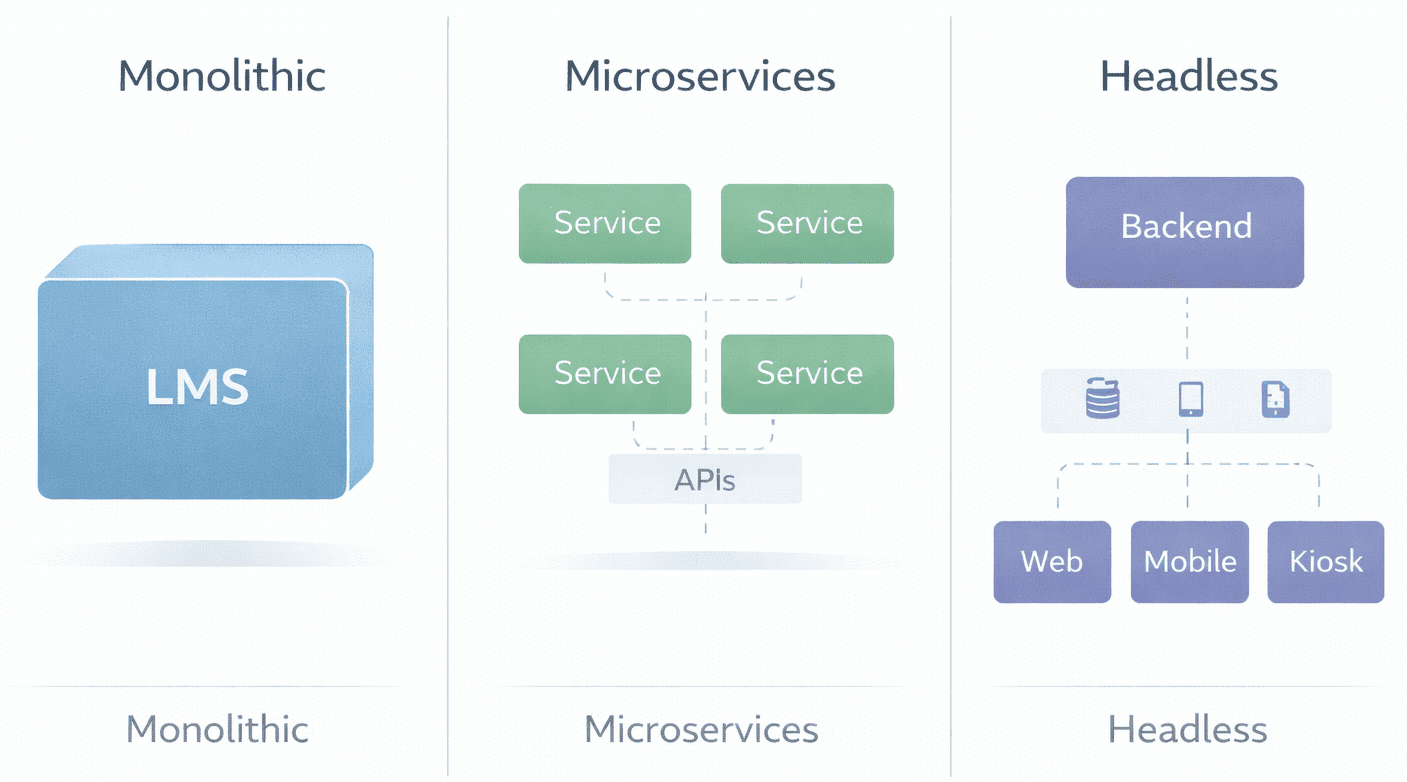
Different LMS technical architecture models represent fundamentally different design philosophies about how components should organize and interact.
| Architecture Model | Structure | Business Impact | Deployment Timeline | When It Works | When It Struggles |
|---|---|---|---|---|---|
| Monolithic | All components in unified application | Fixed budgets; slower to update specific features; simpler admin training | 6–12 weeks implementation | Small to mid-size orgs with straightforward needs | Rapid growth requiring independent component scaling |
| Microservices | Independent services communicating via APIs | Rapid growth support; requires dedicated DevOps budget; resilient to component failures | 3–6 months implementation | Large enterprises, complex integrations, high concurrency | Organizations lacking DevOps expertise or budget |
| Headless | Backend services separate from frontend UI | Complete UX control; supports multi-brand portals; highest customization | 6–12 months implementation | Multi-audience learning (employees + customers + partners) | Limited development resources managing multiple codebases |
Monolithic LMS Architecture examples: Moodle historically followed monolithic architecture, though recent versions incorporate modular patterns. The entire application deploys as a single unit, simplifying initial setup but creating scaling constraints.
Microservices LMS Architecture examples: Platforms like SimpliTrain, Docebo and Absorb use cloud-native architectures where user management, content delivery, and reporting operate as independent services. This enables resilience (one service failure doesn’t crash the system) but introduces operational complexity.
Headless LMS Architecture: Some enterprises build custom frontends while using LMS backends as services. This allows branded learning portals with unique user experiences while leveraging established LMS infrastructure for course delivery and tracking.
The Hidden Operational Cost
Microservices architecture sounds appealing, scale components independently!, but organizations often underestimate ongoing costs. You’ll need: dedicated DevOps engineers ($120K-$180K annually), monitoring tools ($10K-$50K/year), and orchestration platforms (Kubernetes expertise). Before committing, ask your CFO: “Can we sustain a 20-30% increase in IT operational budget long-term?” If the answer is no, monolithic simplicity may serve better.
LMS Integration Architecture – How Systems Connect
The LMS integration architecture determines how easily the platform exchanges data with enterprise systems that organizations depend on.
HRIS Integration
HRIS integration automates user provisioning, when employees join, change roles, or leave, the LMS updates accordingly. This requires the integration layer to map data fields between systems (job title in HRIS might not directly correspond to role taxonomy in LMS), handle organizational hierarchies, and manage synchronization timing.
Data synchronization typically occurs through scheduled batch processes (nightly data imports) or real-time API calls (immediate updates when employee records change). Real-time sync reduces delays but increases system load.
Single Sign-On (SSO)
Single Sign-On (SSO) integration allows employees to access the LMS using corporate credentials via SAML or OAuth protocols. This eliminates password management friction but requires configuration aligning the LMS with the organization’s identity provider (Okta, Azure AD, Google Workspace).
Suggested Read :
The Mobile SSO Gap
During demos, vendors showcase perfect SSO on desktop browsers. Then post-implementation, your field workers discover the mobile app doesn’t support SSO – it requires separate LMS passwords. This happens when the integration architecture only handles web-based SAML but the mobile app uses different authentication. Always test: “Can we demonstrate SSO working on both iOS and Android apps using our actual identity provider during the trial?”
Role-Based Access Control
Role-based access control determines what users can do based on their organizational role. The integration architecture must maintain consistent role definitions across systems – an employee’s manager status in HRIS should automatically grant manager-level LMS permissions.
CRM and ERP Connections
Enterprise LMS architecture in customer training contexts integrates with CRM systems (Salesforce, HubSpot) to track which customers completed product training. The integration layer coordinates training data with customer records, often triggering actions in both systems based on defined business rules.
Integration complexity compounds. Each connected system introduces potential failure points, data mapping challenges, and version compatibility concerns. Architectures handling integration well provide abstraction layers isolating the core LMS from integration-specific logic.
Cloud-Based vs On-Premise LMS Architecture
The LMS platform infrastructure deployment model, cloud-based SaaS, on-premise installation, or hybrid, shapes operational responsibilities and architectural constraints. According to the NIST Cloud Computing Definition, cloud computing is defined as on-demand network access to shared configurable resources (such as servers and storage) that can be rapidly provisioned with minimal management effort.
| Factor | Cloud-Based (SaaS) | On-Premise |
|---|---|---|
| Infrastructure Control | Vendor manages servers, scaling, uptime | Organization owns infrastructure entirely |
| Security & Compliance | Relies on vendor certifications (SOC 2, ISO 27001); data residency determined by vendor | Full control over data location, encryption, access policies |
| Cost Structure (2026) | Predictable monthly subscription; no hardware depreciation | Hidden costs: server maintenance ($50K–$150K/year), security patches, backup infrastructure, disaster recovery |
| Scalability | Automatic scaling based on usage; vendor manages capacity | Manual capacity planning; hardware upgrades required for growth |
| Update Cycles | Vendor-scheduled updates; limited control over timing | Organization controls update schedule and testing; can delay problematic updates |
The 2026 reality on cloud costs: While cloud eliminates server hardware expenses, organizations often discover unexpected costs: data egress fees (transferring large video files out of cloud storage), premium support tiers for faster response times, and geographic data residency compliance requiring multi-region deployments.
The 2026 reality on on-premise: Maintaining internal servers now requires specialized security expertise addressing ransomware, zero-day vulnerabilities, and compliance frameworks (GDPR, CCPA, SOC 2). Organizations that chose on-premise in 2018 are increasingly migrating to cloud as internal expertise retires or becomes cost-prohibitive.
Data Flow and Scalability – What Non-Technical Teams Should Understand
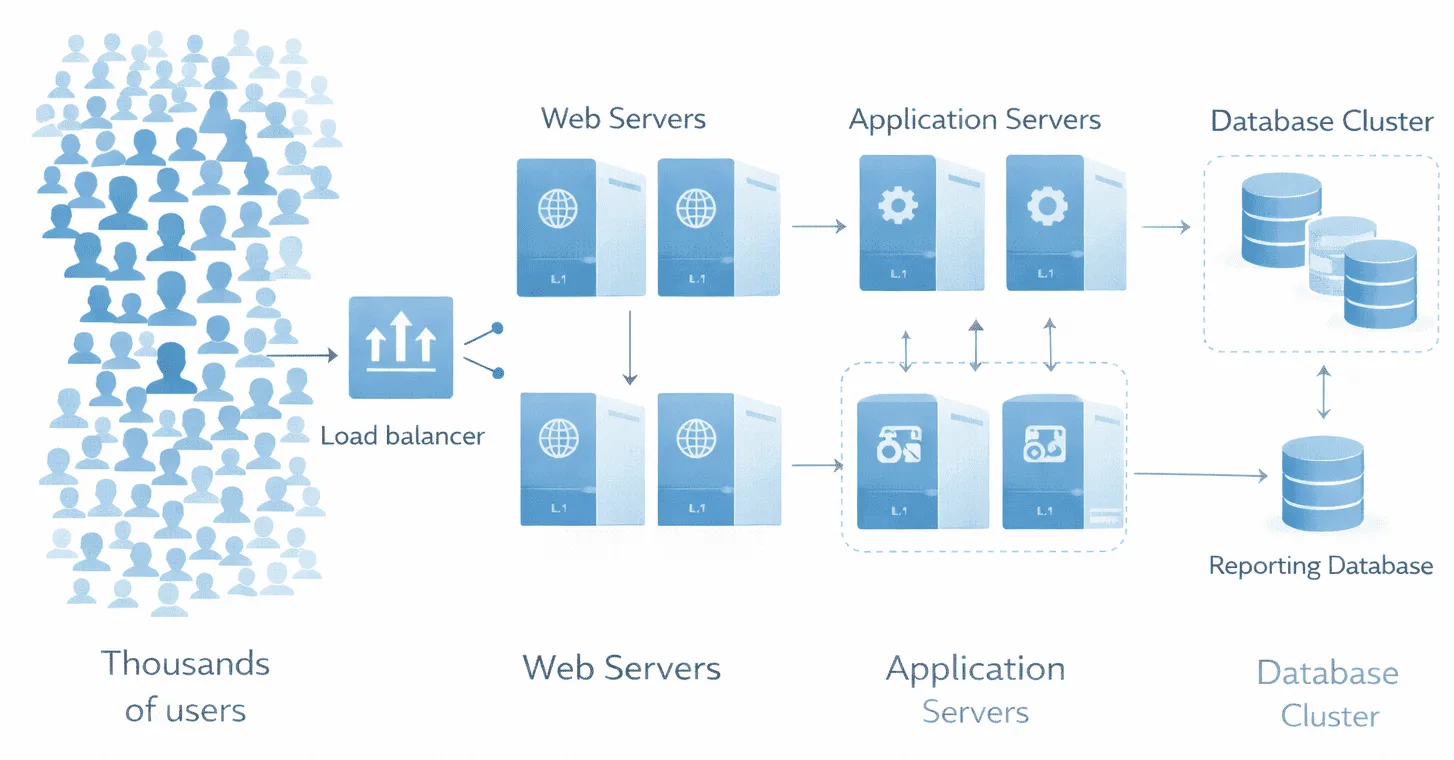
System scalability affects user experience during peak training periods – annual compliance deadlines when thousands of employees access the platform simultaneously.
How LMS handles user load: The frontend (what users see) can typically scale by adding web servers. The backend (processing business logic) scales by distributing requests across application servers. The bottleneck often appears at the database structure level – concurrent database queries slow when too many users request reports or complete assessments simultaneously.
Reporting strain: The reporting and analytics engine performs complex calculations aggregating data across users, courses, and time periods. When 50 managers simultaneously pull team reports during quarterly reviews, poorly architected systems experience slowdowns affecting all users.
Architectures addressing scalability separate read-heavy operations (reporting, dashboard viewing) from write-heavy operations (course completions, assessment submissions) using techniques like database replication and caching layers. Organizations experience scalability limitations when architecture hasn’t accounted for their specific usage patterns, heavy reporting, high concurrency, large file uploads.
The 2026 Shift: AI-Ready Architecture
Modern LMS platform infrastructure must now accommodate AI capabilities that didn’t exist when many platforms were originally architected.
- Vector database layer: Organizations wanting AI tutors that can answer learner questions by “reading” company training materials now require vector databases (Pinecone, Weaviate, Chroma) alongside traditional relational databases. These store embeddings, mathematical representations of content – enabling AI to search across all training materials semantically, not just by keywords.
- AI agent integration: Architectures built before 2024 often struggle integrating AI agents because they lack the necessary API endpoints for real-time content retrieval. Organizations discover they can’t add AI features without architectural upgrades.
- The practical consequence: If your organization might want AI-powered learning assistants within 2-3 years, ask vendors now: “Does your architecture support vector database integration? Can your APIs deliver content to external AI systems in real-time?” Retrofitting AI capabilities into legacy architectures proves expensive.
Advantages and Limitations of Each Architecture Style
Monolithic Architecture
Tends to work well when:
- Organization has straightforward training requirements
- User volume remains relatively stable
- Limited integration with external systems
- Internal IT prefers managing single unified application
- Budget constraints favor predictable, lower operational costs
Introduces operational complexity when:
- Organization attempts to scale specific components independently
- Different business units require isolated customizations
- System must handle unpredictable traffic spikes
- Vendor updates affect unrelated functionality
- AI capabilities need to be added later
Microservices Architecture
Tends to work well when:
- Organization requires independent scaling of components
- Integration ecosystem is complex with many connected systems
- Resilience is critical (component failures shouldn’t crash entire platform)
- Technical team has expertise managing distributed systems
- Budget supports dedicated DevOps resources
Introduces operational complexity when:
- Organization lacks DevOps expertise for orchestrating multiple services
- Debugging issues requires tracing problems across service boundaries
- Network latency between services affects performance
- Coordinating updates across services creates deployment dependencies
- Smaller organizations face operational overhead exceeding benefits
Headless Architecture
Tends to work well when:
- Organization requires custom branded learning experiences
- Multiple frontends serve different audiences (employees, customers, partners)
- Design team wants complete control over user interface
- Omnichannel delivery (web, mobile, kiosk) is priority
- Development resources available to maintain custom frontends
Introduces operational complexity when:
- Organization must maintain separate frontend and backend codebases
- Coordinating frontend/backend changes requires tight collaboration
- Limited development resources struggle managing multiple projects
- Changes affecting both layers create versioning challenges
- Skills to maintain custom code leave the organization
3-Question Checklist for Your Next Vendor Meeting
Before finalizing architecture decisions, clarify:
1. What breaks during our busiest training period? Identify your peak usage scenario (annual compliance deadline, new product launch, merger onboarding). Ask vendors: “Show us load testing data for scenarios matching our peak concurrent users and reporting volume.”
2. Who owns maintenance when integrations fail? When HRIS sync breaks at 2 AM before compliance deadline, who troubleshoots? Establish vendor vs. internal IT responsibilities clearly in contracts.
3. What happens if we outgrow this architecture in 3 years? Understanding migration paths prevents vendor lock-in. Ask: “If we need to move from monolithic to microservices architecture, what does that migration look like in terms of cost, timeline, and data preservation?”
These questions shift conversations from feature demos to architectural realities affecting long-term success.
FAQ
Q1. What is LMS architecture?
LMS architecture is the structural design determining how a learning platform’s components, user management, content delivery, assessments, reporting, integrations, organize and interact. It includes frontend/backend separation, database design, API layers, and infrastructure deployment model (cloud vs. on-premise).
Q2. How does LMS architecture work?
The architecture coordinates multiple layers: users interact with the frontend interface, which communicates with the backend application layer, which retrieves or updates data in databases, and exchanges information with external systems through integration APIs. Each layer has specific responsibilities in the overall system function.
Q3. What are the components of LMS architecture?
Core components include content repository (storing training materials), user management system (authentication and permissions), assessment engine (tests and grading), reporting and analytics engine (data aggregation), integration layer (API connections), and database structure (persistent data storage).
Q4. How does LMS connect with HR systems?
LMS platforms connect with HRIS through the integration layer using REST APIs or file-based data transfers. This enables automated user provisioning, role synchronization, and training data flowing to HR systems for performance reviews and compliance documentation. Quality of integration depends on whether the architecture supports real-time sync vs. batch updates.
Q5. Is LMS architecture cloud-based?
LMS architecture can be cloud-based (vendor-hosted SaaS), on-premise (organization-managed servers), or hybrid. Cloud architecture offers operational simplicity and automatic scaling. On-premise provides infrastructure control and data governance. The choice depends on organizational requirements, technical capacity, compliance constraints, and willingness to absorb hidden maintenance costs in 2026’s security landscape.