
The LMS Process in 60 Seconds
How an LMS works in five steps:

Content Creation
Administrators build or upload training materials packaged in SCORM or xAPI format
Enrollment
System assigns courses manually, automatically via role-based rules, or through self-registration
Delivery
Learners access content via web or mobile, with progress tracked in real-time
Assessment
Built-in quiz engines grade learners; data flows to Learning Record Store (LRS)
Reporting
Dashboards aggregate xAPI statements into completion rates, skill gaps, and compliance status
Technical foundation
Cloud infrastructure + API integrations + standards-based content tracking.
Organizations invest in learning management systems to solve a specific problem: how to deliver consistent training to distributed teams while tracking outcomes and maintaining compliance. Understanding how LMS works, both the user-facing LMS workflow and the underlying technical LMS architecture, helps decision-makers evaluate whether the technology fits their needs and prepares for successful implementation.
The Complete LMS Workflow: How Content Moves from Creator to Learner – Reality Behind How LMS Works
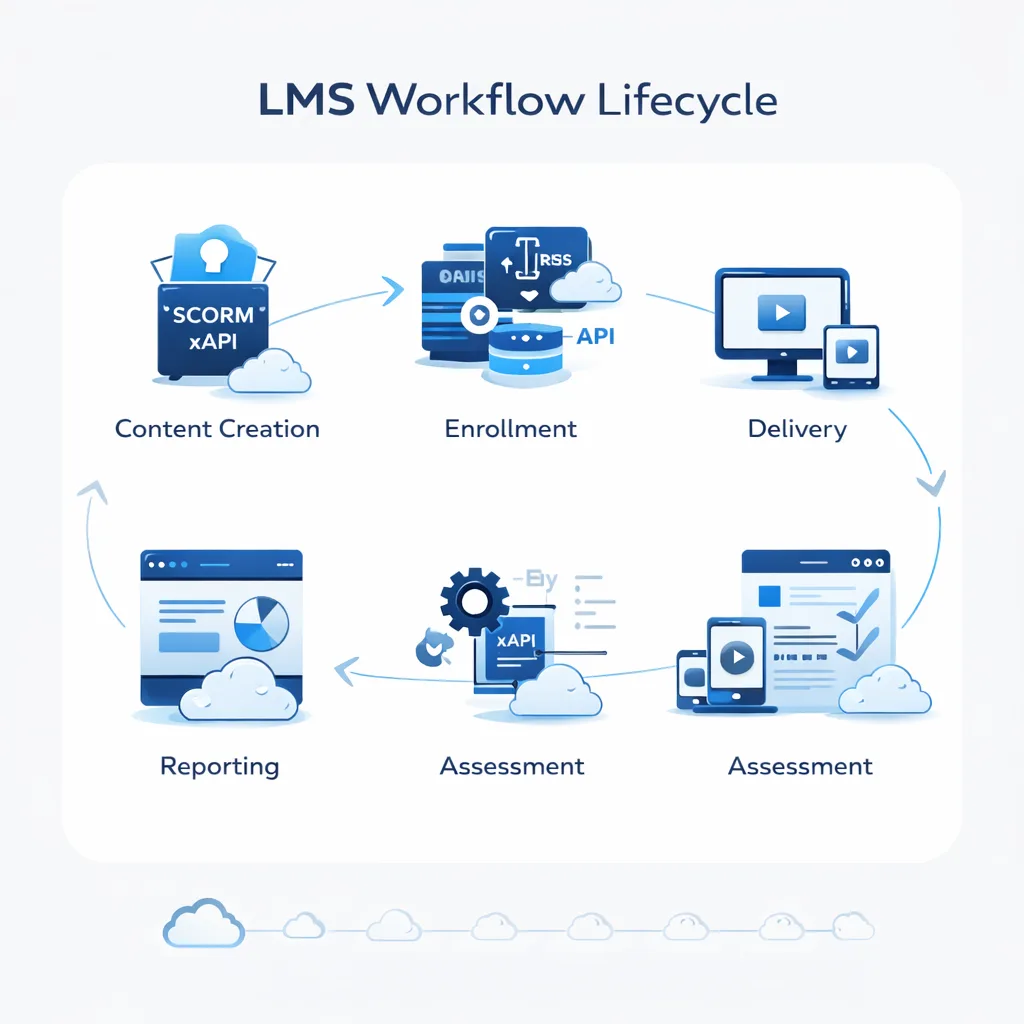
Understanding the LMS workflow requires the following content through the entire system lifecycle, from initial upload to final certification.
Step 1: Content Creation and Standards Compliance
Administrators create courses using built-in authoring tools or upload existing materials. The critical technical requirement: content must be packaged according to interoperability standards.
- SCORM (Sharable Content Object Reference Model): The dominant standard since 2001. SCORM packages contain a manifest file that tells the LMS how to launch content, which assessments to track, and how to report completion. When you upload a SCORM ZIP file, the LMS unpacks it, reads the manifest, and configures tracking automatically.
- xAPI (Experience API / Tin Can): The newer, more flexible standard. Unlike SCORM, which only tracks “completed/incomplete” and test scores. While xAPI provides superior data, it creates a massive ‘Data Noise’ problem. Without a properly configured LRS, you’ll end up with thousands of ‘Jane clicked button’ statements that offer zero business value.
These “xAPI statements” flow to a Learning Record Store (LRS), either embedded in the LMS or hosted separately. The LRS becomes your comprehensive learning activity database.
The SCORM-to-xAPI Migration
In practice, most organizations run hybrid systems, legacy SCORM courses alongside newer xAPI modules. When auditing LMS performance, we prioritize migrating high-stakes compliance training to xAPI first. Why? The granular data reveals exactly where learners struggle, not just pass/fail outcomes.
Step 2: User Enrollment and Integration Complexity
The LMS process for enrollment appears simple on the surface but often creates implementation of headaches.
- Manual enrollment: Admins assign courses to individuals, straightforward but unscalable.
- Auto-enrollment rules: The system enrolls users based on attributes pulled from your HRIS (Human Resources Information System).
Example: “All users with job_code = ‘SALES_REP’ and location = ‘EMEA’ receive Product Training Course 301.”
- The integration challenge: While most systems automate enrollment, the biggest hurdle for IT teams is often synchronizing nested groups from an HRIS like Workday or SAP SuccessFactors. If your org chart shows “Sales > Enterprise Sales > West Region,” but your LMS only imports flat user lists, you’ll spend weeks manually recreating that hierarchy.
- How integration works: The LMS connects to your HRIS via API (Application Programming Interface), typically using SAML 2.0 for Single Sign-On (SSO) authentication and SCIM (System for Cross-domain Identity Management) for user provisioning. Every night (or in real-time, depending on configuration), the API pulls updated employee data, new hires, role changes, terminations, and adjusts course assignments accordingly.
Avoid This Mistake
Don’t assume “API integration” means plug-and-play. During vendor demos, ask: “Can you show us a live sync of a user group change from our test HRIS environment?” Many platforms claim integration capability but require expensive custom development for non-standard data mappings.
Step 3: Content Delivery and the Learner Experience
Once enrolled, learners access the platform through responsive web interfaces or native mobile apps. The LMS functionality adapts based on course design:
- Self-paced courses: Learners start and stop as needed. The LRS tracks where they paused, not just “Module 3” but “3 minutes and 42 seconds into the video”, and resume precisely when they return, even from a different device.
- Blended learning: Combines asynchronous modules with scheduled live sessions. The LMS integrates with video conferencing tools (Zoom, Microsoft Teams, Webex) via API to handle scheduling, access links, and attendance tracking. Post-session, the recording auto-uploads to the course library.
- Microlearning optimization: Modern LMS workflows work best when content is chunked into 3–5-minute segments rather than 40-minute videos. When we analyze drop-off data, courses with videos longer than 8 minutes show 30-40% higher abandonment rates.
Step 4: Assessment and Data Collection
The assessment engine creates quizzes using various question types: multiple choice, fill-in-blank, matching, essay responses. For objective questions (MCQ, true/false), automated grading provides immediate scores. Subjective questions route to instructors for manual review.
What happens behind the scenes: Each learner interaction generates an xAPI statement:
- “Sarah completed Quiz 4 with score 85%”
- “Marcus attempted Question 3 twice before answering correctly”
- “Team Alpha averaged 12 minutes on Simulation B”
These statements populate the LRS, which feeds analytics dashboards showing not just completion rates but behavioral patterns: which questions cause the most confusion, where learners rewatch content, which modules correlate with on-the-job performance improvements.
Step 5: Reporting, Compliance, and Continuous Improvement
Administrators access dashboards aggregating LRS data into actionable insights:
- Completion tracking: Who finished which courses, when, with what scores
- Compliance monitoring: Real-time status on mandatory training, automated alerts for expiring certifications
- Skill gap analysis: Comparison of current employee competencies vs. role requirements
- Content effectiveness: Correlation between training completion and business metrics (sales performance, error reduction, customer satisfaction)
When we audit LMS implementations, we look for “Drop-off Points”, modules where more than 20% of learners stop progressing. This signals content quality issues, excessive length, or prerequisite knowledge gaps.
LMS Architecture: The Technical Components Behind the Workflow – This is How LMS Works
Understanding the LMS architecture explains why certain workflows succeed or fail during implementation.
| Component | Role in the Workflow | Impact on Learner | Integration Dependency |
|---|---|---|---|
| LRS (Learning Record Store) | Stores granular xAPI statements | Enables “resume from where you left off” across devices | Requires xAPI-compliant content |
| API Integration Layer | Connects to Slack, Teams, HRIS, CRM | Sends “training due” alerts where learners already work | Needs SAML 2.0, SCIM, or OAuth 2.0 |
| Content Authoring Tool | Creates SCORM/xAPI packages | Determines if course is interactive or static text | Must export in LMS-compatible standards |
| Assessment Engine | Generates, delivers, grades quizzes | Provides immediate feedback or routes to instructor | Integrated with LRS for score tracking |
| Notification Service | Sends emails, push notifications, in-app alerts | Reminds learners of incomplete courses | Integrates with email servers (SMTP) or messaging platforms |
Cloud Infrastructure and Data Synchronisation
Modern LMS platforms operate as multi-tenant SaaS applications hosted on AWS, Azure, or Google Cloud. This architecture provides:
- Device synchronisation: A learner starts a course on desktop, continues mobile during commute, completes on tablet at home. The LRS continuously syncs progress via API calls whenever the device connects to the internet.
- Offline capability: Mobile apps cache content locally, videos, documents, even quiz questions. When offline, the app stores xAPI statements locally, then bulk-transmits them to the LRS upon reconnection. This “store and forward” pattern prevents data loss.
- Scalability: Cloud infrastructure auto-scales during peak usage (e.g., annual compliance training deadlines when 10,000 employees access simultaneously).
The Role of Single Sign-On (SSO)
SSO eliminates the “forgot password” problem that kills LMS adoption. Instead of managing separate LMS credentials, users authenticate through their organization’s identity provider (Okta, Azure AD, Google Workspace).
Technical process: When a user clicks “Access LMS,” the system redirects to the identity provider, which validates credentials and sends back a SAML assertion confirming identity. The LMS creates a session without ever handling the password.
SSO Is Non-Negotiable for Enterprise Adoption
In practice, organizations without SSO integration see 40-50% lower login rates in the first 90 days. Users resist creating yet another account. During vendor evaluation, test SSO with your actual identity provider; don’t accept “it’s on the roadmap.
What Do LMS Administrators Actually Do Day-to-Day?
Beyond initial setup, LMS administration involves ongoing tasks that determine system success:
- Content curation and updates: Reviewing course feedback, updating materials when products change, archiving outdated content, and importing new modules from third-party providers.
- User management: Processing new hire auto-enrollments, handling exceptions (contractors needing temporary access, executives requesting custom learning paths), troubleshooting access issues.
- Reporting and stakeholder communication: Generating weekly compliance status reports for legal, monthly completion of dashboards for department heads, quarterly ROI analysis for executives.
- Troubleshooting integration failures: When the nightly HRIS sync breaks because IT changed the API endpoint, admins diagnose whether it’s authentication failure, data mapping error, or network timeout.
- Monitoring learner engagement: Identifying courses with high abandonment rates, investigating why certain departments show lower completion than others, A/B testing different content formats.
In practice, effective LMS administration requires 60% technical troubleshooting, 30% content management, and 10% strategic planning.
Common Use Cases: How Different Organizations Apply the LMS Process
The LMS workflow adapts to various contexts while maintaining the same technical foundation.
Corporate Training: Onboarding and Compliance
- Employee onboarding: New hires receive standardized orientation covering company policies, culture, and role-specific skills. The system auto-enrolls based on hire date pulled from HRIS, send welcome emails with access credentials via SSO, and notify managers when onboarding milestones complete.
- Compliance training: The system assigns mandatory safety, regulatory, or policy training based on job roles and location. For GDPR-regulated companies, European employees automatically receive data privacy modules. Healthcare workers get HIPAA training. The LMS maintains audit trails showing who completed which version of which course on what date, critical during regulatory audits.
Extended Enterprise: Customer and Partner Training
- Customer education: SaaS companies train customers on product usage through certification programs. The LMS integrates with the CRM (Salesforce, HubSpot) to auto-enroll new customers post-sale and track which accounts completed training, a leading indicator of retention and expansion revenue.
- Partner training: Franchisees, resellers, and distributors receive brand standards and operational training. The challenge: these external users don’t exist in your HRIS. Solution: The LMS creates separate user pools, often with custom authentication (email-based registration instead of SSO).
Conclusion: The Technical and Operational Reality
An LMS works by connecting content creators, learners, and automated tracking systems through standards-based architecture. Administrators package training materials in SCORM or xAPI format, configure courses within the platform, and enroll learners manually or via HRIS integration. Learners access content through responsive interfaces, with all interactions logged as xAPI statements in the LRS. Administrators monitor progress through dashboards, aggregating this data into completion rates, compliance status, and skill gap analyses.
The underlying LMS architecture, cloud infrastructure, API integration layer, LRS, SSO authentication, enables this workflow while synchronizing progress across devices, connecting with other workplace systems, and scaling to support thousands of simultaneous users.
Successful implementation requires understanding both the user-facing workflow and the technical dependencies. The system’s value lies not in content storage but in automated tracking, integration with existing systems, and actionable insights derived from granular learning data. Organizations evaluating LMS technology should prioritize vendors demonstrating robust API documentation, proven HRIS integration patterns, and native xAPI support, the technical foundation that makes seamless workflows possible.
FAQ
Q1. How does an LMS track learner progress technically?
The system uses xAPI statements to log into every interaction. When a learner clicks “play” on a video, the content player sends: {“actor”: “john@company.com”, “verb”: “played”, “object”: “Module 3 Video”, “timestamp”: “2026-02-06T14:23:00Z”}. These statements accumulate in the LRS. Dashboards query the LRS database to calculate completion percentages, average scores, and time-on-task metrics.
Q2. Can learners access an LMS offline?
Mobile apps support offline access through content caching. The app downloads videos, PDFs, and quiz questions online. Offline, learners consume content and answer questions. The app stores xAPI statements locally in a queue. Upon reconnection, it transmits all queued statements to the LRS. Web browser access requires continuous connectivity, offline capability is mobile-only.
Q3. How does an LMS integrate with other workplace tools?
The integration layer uses REST APIs and webhooks. Example: Slack integration. When a learner completes a course, the LMS sends an HTTP POST request to Slack’s API containing a message payload. Slack displays: “Sarah completed Sales Certification!” in the #team-achievements channel. Common integrations: HRIS (auto-enrollment), CRM (customer training), video conferencing (live sessions), content libraries (third-party course import).
Q4. What happens when a learner fails an assessment?
The administrator configures failure behavior during course setup: allow unlimited retakes immediately, impose a 24-hour waiting period before retrying, require reviewing specific modules before reattempt, or notify manager for intervention. The LRS records all attempts. If someone fails 5 times, that signals content difficulty requiring instructor support.
Q5. Do administrators need technical skills to manage an LMS?
Basic administration, uploading SCORM packages, enrolling users, running standard reports, requires no coding knowledge. Advanced tasks, configuring complex auto-enrollment rules, building custom reports, troubleshooting API integrations, mapping HRIS data fields, benefit from SQL query knowledge and understanding of REST APIs. Most organizations assign a technical admin for system configuration and non-technical admins for content management.
Q6. How does an LMS handle certifications and certifications?
The system tracks which courses contribute to specific certifications, monitors completion of all required components, auto-generates PDF certificates upon fulfillment (often using mail-merge with learner name and completion date), stores certificates in learner profiles, and sends notifications when certifications approach expiration. For recertification, the LMS auto-enrolls learners in refresher courses 30-60 days before expiry.
Q7. What's the difference between an LMS and an LXP?
An LMS is administrator-driven: admins create structured curricula, assign mandatory courses, track compliance. An LXP (Learning Experience Platform) is learner-driven: AI recommends content based on browsing behavior and skill gaps, learners’ self-curate learning paths; content sources are diverse (internal courses + YouTube + articles). Many modern platforms blend both: LMS for compliance and onboarding, and LXP for continuous development.