
Key Takeaways

Academic LMS is not one market. K-12 and higher education platforms solve different problems and should not be evaluated together.
If you’re K-12, prioritize parent portals, safeguarding controls, Ed-Fi/OneRoster support, and teacher usability.
If you’re higher education, prioritize scalability under peak load, LTI 1.3 integration, academic integrity tools, and accreditation reporting.
LTI matters more than SCORM for most academic institutions, it determines which external tools your faculty can realistically use.
Every school, college, and university that delivers any portion of its curriculum online relies on some kind of digital classroom system to make it work. The piece of software at the center of that process, the one handling course content, grades, student communication, and administrative reporting, is the learning management system. But “LMS for education” is not a single product category. A district deploying a platform for fifth graders and a research university managing 50,000 enrolled students across hybrid programs are solving fundamentally different problems, even though both fall under the same label: academic LMS.
This guide explains what an academic learning management system actually is, how it differs from the corporate LMS most professionals encounter first, what separates K-12 from higher education, and how the underlying technical standards tie the ecosystem together.
What Is an Academic LMS?
An academic LMS is a software platform designed to manage the delivery, tracking, and administration of structured learning in educational settings , from elementary schools through postgraduate programs. Gartner defines the K-12 variant specifically as “the core teaching and learning technology environment, with connections to a range of internal and external tools and services that support learning.” TechTarget offers a broader definition: “software used to plan, implement, and assess a specific learning process.”
In practice, an academic learning management system serves as the centralized hub where instructors upload materials, build assessments, and manage gradebooks; students access content, submit work, and participate in discussions; and administrators track institutional performance, manage enrollments, and integrate the LMS with systems like the Student Information System (SIS).
This is what distinguishes an education LMS from a general-purpose content platform. The LMS enforces structure: course timelines, prerequisite chains, role-based access for different LMS user roles, automated grading, and data pipelines that feed institutional reporting.
How an Academic LMS Differs from a Corporate LMS
The core architecture overlaps, both deliver content, track progress, and generate reports. But the feature priorities diverge. An academic LMS includes rubrics for subjective grading, syllabus management, instructor-facilitated discussion boards, degree program mapping, and credit-hour tracking, functionality absent from most corporate systems. A corporate LMS emphasizes compliance certification, rapid course deployment, short-format modules, and HR system integration.
The audience model also differs. In a corporate LMS, the organization assigns training to employees. In an academic LMS, students self-enroll, manage schedules across multiple courses, and interact with the system over semesters or years. And the integration landscape shifts: corporate platforms connect to HRIS and CRM systems, while academic platforms integrate with Student Information Systems (SIS) for roster synchronization, transcript management, and grade passback.
K-12 LMS vs. Higher Education LMS: What Actually Changes
Although the term “LMS for schools and colleges” often appears as a single category, the two environments have meaningfully different requirements. Understanding the distinction matters for anyone evaluating platforms.
What K-12 Systems Prioritize
An LMS in K-12 education is built around four priorities that higher education platforms treat as secondary:
- Parent Portal: Parents and guardians view assignments, grades, attendance, and teacher communications in real time. Multiple sources identify this as the single most cited differentiator between K-12 and higher education LMS platforms.
- Safeguarding and Age-Appropriate Controls: Student data protection and content filtering are built into the platform architecture, with compliance to regulations like COPPA and FERPA.
- Teacher-Friendly Interface: Low learning curves for educators who may not have dedicated IT support.
- Differentiated Instruction: Tools for creating multiple learning paths within a single course, automatically directing students to content appropriate to their skill level.
Gartner notes that in K-12, several vendors now offer the SIS and LMS as a combined product ,a pattern less common in higher education.
What Higher Education Systems Prioritize
In higher ed, scale is the silent killer. When 5,000 students hit “Submit” at 11:59 PM on a Sunday night, the architecture doesn’t just need to be “scalable”, it needs to be bulletproof. That’s the reality an LMS in higher education has to absorb, and it shapes everything else about how these platforms are built.
- Scalability: Large universities manage tens of thousands of concurrent students. Performance under peak load, finals week, registration periods, midnight deadlines, is a non-negotiable.
- Complex Course Architecture: Degree programs require modules, electives, prerequisites, and credit sequencing, structures K-12 platforms do not need.
- Academic Integrity: AI-based proctoring, plagiarism detection, and audit logs are core requirements. Without them, online assessments lack credibility with accreditation bodies.
- Accreditation Compliance: Reporting tools must align with accreditation body requirements, including Outcome-Based Education (OBE) frameworks.
- Hybrid and Asynchronous Delivery: Students access content on their own schedule, across time zones. The flipped classroom model, lectures consumed online, in-person sessions reserved for application, depends entirely on this capability.
Quick Comparison: K-12 vs. Higher Education LMS Features
| Feature Area | K-12 LMS | Higher Education LMS |
|---|---|---|
| Parent/Guardian Portal | Core feature | Rarely present |
| Safeguarding Controls | Built into architecture | Standard data security |
| Course Structure | Grade-level, subject-based | Modules, electives, prerequisites, credit hours |
| Enrollment Model | Administrator-assigned | Student self-enrollment + catalog browsing |
| Assessment Focus | Formative + summative, parent-visible | Academic integrity tools, proctoring, rubric-based |
| SIS Relationship | Often combined into one product | Typically separate, integrated via API |
| Primary Integration Standard | Ed-Fi, OneRoster | LTI (Learning Tools Interoperability) |
| Typical Scale | Hundreds to thousands per district | Tens of thousands per institution |
Core Components of an Academic LMS
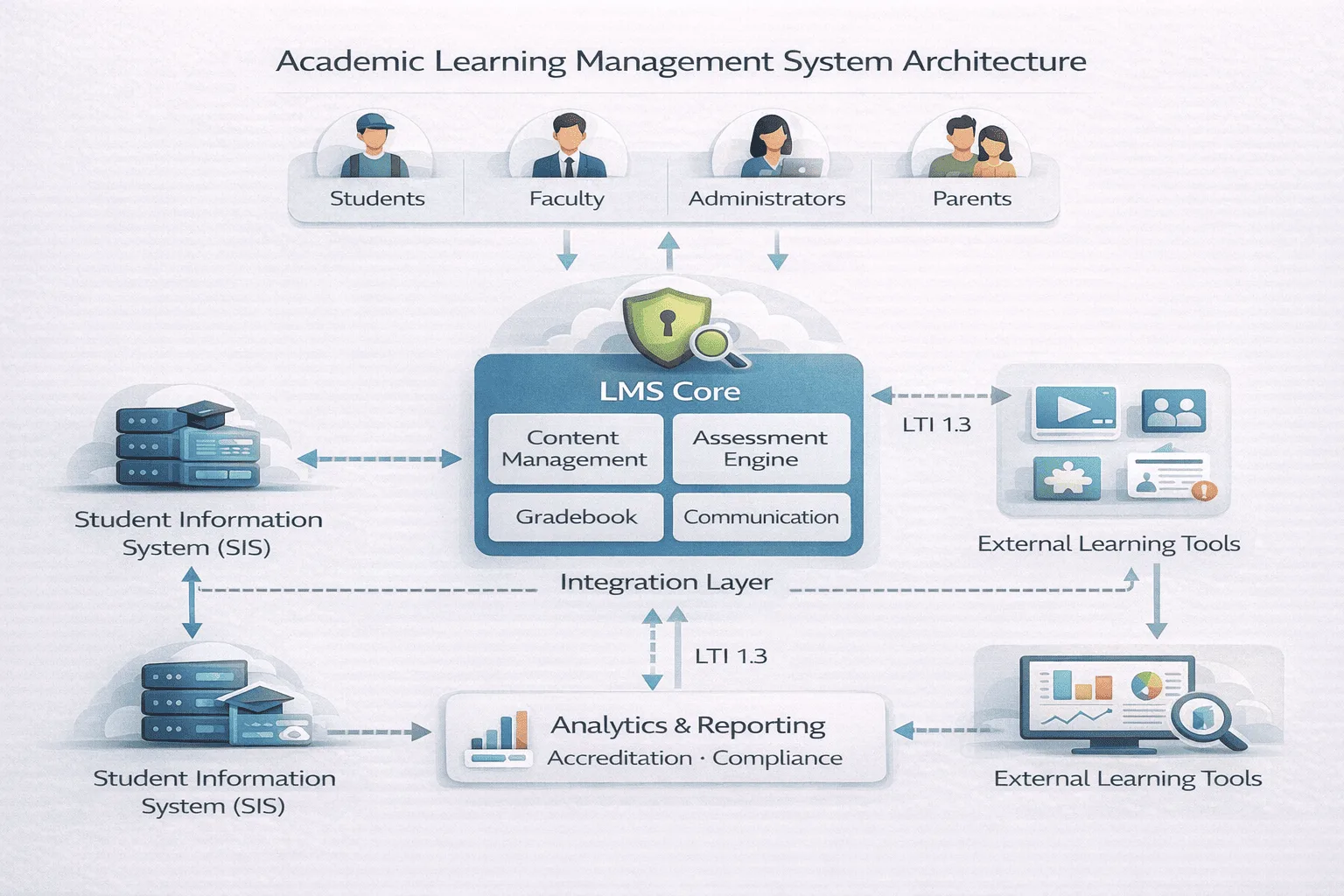
Regardless of whether the platform serves a K-12 district or a research university, academic LMS platforms share a common functional architecture. Every education technology platform in this category contains the following:
- Content Management: Instructors upload, organize, and version course materials, documents, videos, lecture recordings, interactive simulations, in a structured hierarchy with modules, units, and sequencing.
- Assessment Engine: Supports formative assessments (quizzes, polls) and summative assessments (midterms, finals, capstone projects). Objective questions auto-grade; subjective work uses rubrics. This is where the LMS grading and assessments workflow lives.
- Gradebook: Aggregates scores from all assessment types into a single view per student. In K-12, this feeds parent-facing report cards. In higher education, it generates transcripts and GPA calculations.
- Communication Tools: Discussion forums, messaging, announcements, and email integration. Discussion forums serve a pedagogical function in academic settings, they are often assessed activities, not optional channels.
- Reporting and Analytics: Dashboards showing completion rates, quiz performance, engagement patterns, and time-on-task. Newer platforms flag at-risk students based on participation patterns.
- Role-Based Access Control: Different permissions for different LMS user roles, student, instructor, teaching assistant, department head, administrator, and (in K-12) parent/guardian.
- Mobile Accessibility: Responsive design or dedicated apps across devices, including parent-facing apps in K-12.
The Technical Standards That Make Academic LMS Work
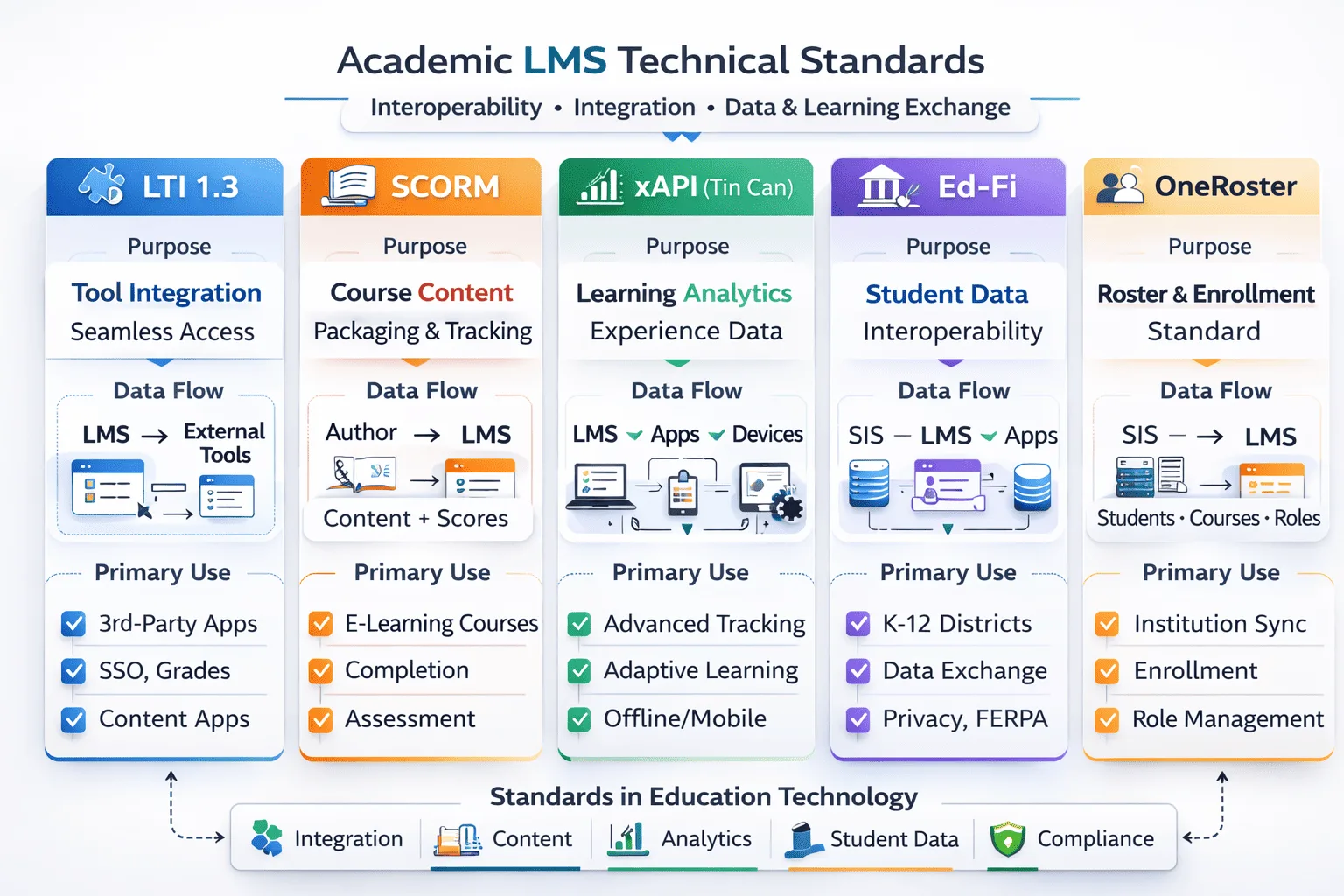
Behind every student learning platform sits a layer of interoperability standards that determine how content, tools, and data move between systems. These standards are not visible to end users, but they fundamentally shape what an academic LMS can and cannot do.
- LTI (Learning Tools Interoperability) is the central standard for academic LMS, particularly in higher education. Developed by the IMS Global Learning Consortium, LTI enables institutions to plug third-party tools , video platforms, simulation engines, assessment applications, digital textbooks, directly into the LMS without custom development. A student clicks a link inside the LMS and is seamlessly authenticated into an external tool. LTI is described across industry sources as the dominant integration paradigm for the academic sector.
- Implementation Reality: LTI 1.3 is the current standard, and on paper it solves most integration problems cleanly. In practice, many legacy tools still run on LTI 1.1 or have incomplete support for “deep linking”, the feature that lets an instructor embed a specific assignment or resource from an external tool directly into a course module. When deep linking breaks, instructors end up manually copying URLs and re-mapping grade columns. Before signing a contract, ask the vendor to demonstrate a live deep-linking workflow with the specific tools your institution uses, not just a marketing-deck screenshot.
Other Technical Standards That Make Academic LMS Work
- SCORM (Sharable Content Object Reference Model) remains the most widely adopted eLearning content packaging standard, but its center of gravity is corporate compliance training, not academia. SCORM ensures that a course package built with one authoring tool can be uploaded to any SCORM-compliant LMS and will track completion, scores, and time spent. Academic institutions still encounter SCORM packages, especially from third-party content publishers, but the sector has largely moved toward LTI for connecting tools and xAPI for tracking richer learning data. The shift is practical, not ideological: SCORM was designed for self-contained courses, and academic environments rarely operate that way.
- xAPI (Experience API) extends tracking beyond the LMS, capturing learning activities from mobile apps, simulations, and real-world exercises in an external Learning Record Store (LRS). This matters for academic programs that include fieldwork, lab simulations, or clinical rotations, any context where learning happens outside the browser window.
- Ed-Fi and OneRoster are K-12-specific standards. Ed-Fi defines data models for over 17 domains in the K-12 space, enabling interoperability between learning applications. OneRoster standardizes the exchange of class roster data between SIS and LMS platforms, a routine but critical data flow in school districts that, when misconfigured, causes students to appear in the wrong classes for the first two weeks of every semester.
The practical takeaway: LTI is the standard that most directly affects the academic LMS buyer, because it determines which external tools can be connected. When evaluating an online education software platform, asking “Do you support LTI 1.3 with deep linking and grade passback?” is more informative than asking “Do you support LTI?” The version and the feature details matter.
Three Questions to Ask a Vendor Before You Sign
Evaluating an academic LMS is not just a feature-comparison exercise. The answers to three specific questions reveal more about long-term fit than any product demo.
1. “Do you support LTI 1.3 with deep linking and grade passback, and can you demonstrate it live with our tools?” This is the integration litmus test. A vendor that supports LTI 1.0 or 1.1 but not 1.3 Advantage is running behind the standard. And “supports LTI” on a spec sheet means nothing if the deep-linking workflow breaks with the specific tools your faculty depends on. Ask for a live walkthrough, not a slide.
2. “Is there a native mobile app for parents and students, or a responsive web wrapper?” This distinction matters more than it appears. A native app sends push notifications, works reliably offline, and handles biometric login. A responsive web page inside a mobile browser does not. For K-12 districts where parent engagement drives adoption, this is a dealbreaker disguised as a technical detail.
3. “What does data export look like if we leave?” Vendor lock-in in academic LMS is real. Can you export SCORM packages, gradebook history, discussion archives, and student activity logs in a portable format? Or does leaving mean rebuilding from scratch? The answer tells you whether you are buying a platform or renting a dependency.
Wrapping Up
An academic LMS is not a monolithic category. It splits into distinct segments, K-12 and higher education, with different feature priorities, different integration standards, and different evaluation criteria. A district administrator looking at an LMS in K-12 education needs parent portals, Ed-Fi compatibility, and combined SIS integration. A university CIO evaluating an LMS in higher education needs LTI support, academic integrity tools, and accreditation reporting. The common ground, content management, assessment, gradebook, analytics, is real, but treating “LMS for schools and colleges” as one decision leads to misaligned purchases.
FAQ
Q1. What does LMS stand for in education?
LMS stands for Learning Management System, software that manages course delivery, assessment, and tracking in schools and universities. It serves as the centralized platform where instructors create and distribute content, students access materials and submit work, and administrators generate performance and compliance reports. The term applies across both K-12 and higher education, though features and scale differ significantly between the two.
Q2. Is an academic LMS different from a corporate LMS?
The core architecture overlaps, but feature sets diverge based on audience needs. Academic LMS platforms include rubrics, syllabus management, discussion boards, degree program tracking, and credit-hour reporting, features absent from most corporate systems. Corporate LMS platforms emphasize compliance tracking, rapid deployment, bite-sized training, and HR/CRM integration.
Q3. What is the difference between an LMS and an SIS?
An LMS manages the learning process; an SIS manages the student record. The SIS handles enrollment, demographics, attendance, and transcripts. The LMS handles course content, assessments, gradebook, and instructor-student communication. The two exchange data, the SIS sends rosters to the LMS, and the LMS sends grades back. In K-12, these are increasingly combined into one product. In higher education, they more commonly operate as separate systems connected through APIs.