

The gap between “this LMS has an API” and “this LMS API is usable” determines integration project timelines more than the API itself. Organizations connecting LMS to HRIS, CRM, analytics pipelines, or SSO providers quickly discover that the LMS API documentation guide is the actual integration blueprint, not marketing claims about connectivity.
Platforms like SimpliTrain, Canvas (Instructure), Moodle, Open edX, Adobe Learning Manager, SAP SuccessFactors, and Cornerstone all publish LMS REST API documentation, but structural models differ substantially, from interactive OpenAPI consoles to static PDFs to narrative integration guides. Each creates different developer friction and long-term maintenance burdens. This article compares those structures and trade-offs without ranking vendors.
What Exactly Is an LMS API Documentation Guide?
An LMS developer documentation resource defines endpoints (URLs accepting programmatic requests), authentication mechanisms, schemas (data structures returned or accepted), and rate limits.
Three layers matter operationally: API reference documentation (lookup tool for parameters and response formats); conceptual integration guides (explains why to call endpoints in a given sequence); and workflow documentation (maps API calls to business processes”to provision a new hire, execute these calls in this order”). Documentation that only provides reference coverage without workflow context forces integration teams to reverse-engineer business logic, adding days or weeks to projects.
What Are LMS APIs Usually Used For?
- Enterprise priorities: User provisioning from HRIS (creating/deactivating accounts when Workday or SAP updates), enrollment automation from role changes, completion tracking flowing back to talent management. SAP SuccessFactors and Cornerstone documentation reflects this, enterprise workflow automation with compliance audit trail requirements.
- Academic priorities: SIS integration for roster sync, grade passback, enrollment management. Canvas API is widely used in higher education for its comprehensive, well-maintained SIS coverage. Moodle’s extensibility allows deeper customization but requires navigating community-maintained docs alongside core platform documentation.
- Cross-context: SSO integration, xAPI extraction to Learning Record Stores, and LTI for content portability apply across both environments.
How Do LMS Platforms Structure Their API Documentation Differently?
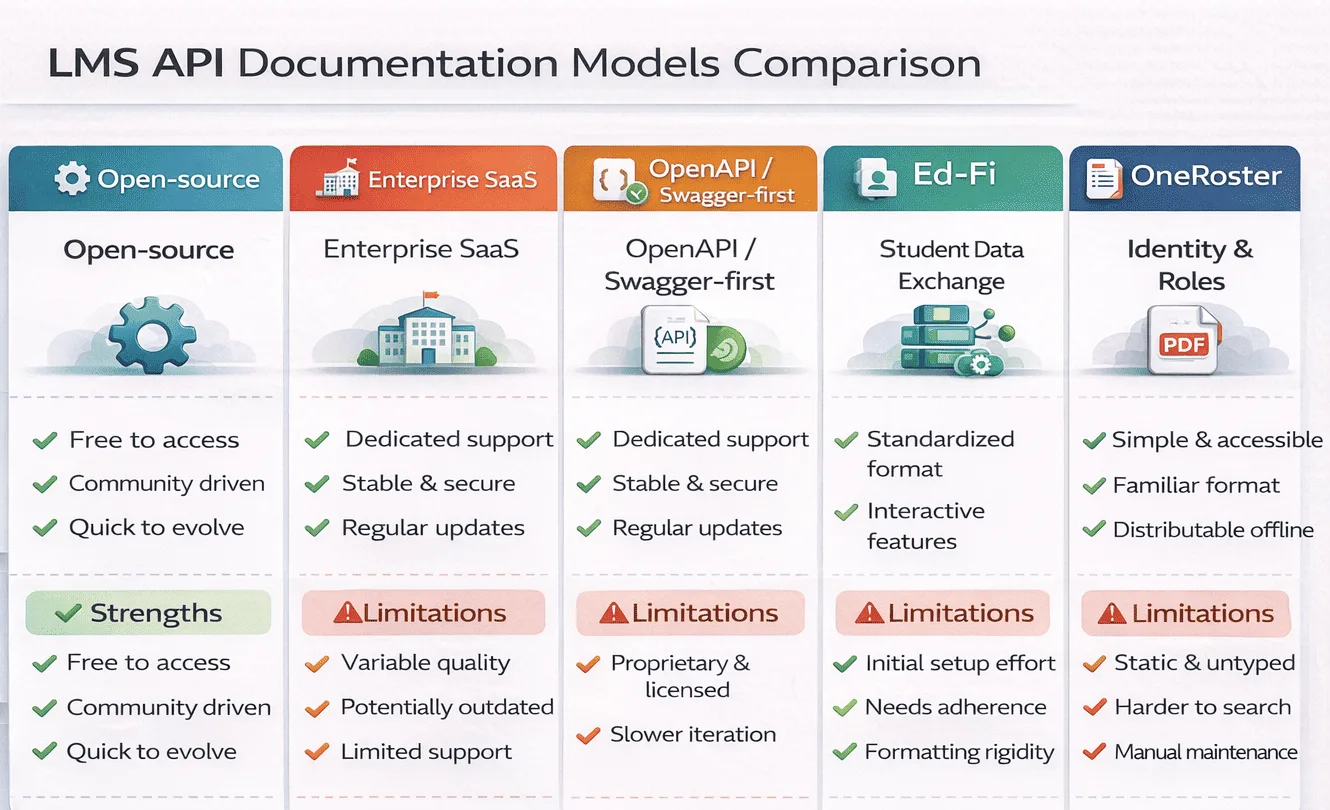
- Open-source platforms (Moodle, Open edX) distribute docs across core reference, plugin wikis, and forums. Completeness varies by module; currency depends on community cadence.
- Enterprise SaaS platforms (SimpliTrain, Adobe Learning Manager, SAP SuccessFactors, Cornerstone) gate advanced documentation behind partner portals. Public docs cover basic operations; enterprise automation patterns require vendor relationship access.
- Academic-first systems (Canvas) often publish complete public documentation with active versioning, example responses, pagination guidance, and workflow context that enterprise platforms omit.
- OpenAPI/Swagger-first documentation is increasingly common in newer releases, enabling SDK generation and interactive consoles, though auto-generated specs sometimes lack the workflow context senior architects need.
Comparison Table: LMS API Documentation Structural Models
| Model Type | Typical Context | Strengths | Limitations | Best Fit |
|---|---|---|---|---|
| Open-source | Moodle, Open edX | Extensible, community-maintained, free access | Inconsistent currency, distributed across sources | Technical teams with capacity to self-serve |
| Enterprise SaaS | SimpliTrain, SAP, Cornerstone, Adobe | Structured, supported, workflow-oriented | Gated access, requires vendor relationship | Enterprise with professional services engagement |
| OpenAPI/Swagger-first | Modern SaaS platforms | Machine-readable, SDK-friendly, interactive | Can lack narrative context, auto-gen gaps | Developer-heavy integration teams |
| PDF/manual-style | Legacy systems | Printable, version-pinned | Stale rapidly, no interactivity | Low-change environments |
| Minimal REST-only | Lightweight SaaS | Simple, fast to learn | Limited scope, incomplete automation coverage | Simple single-purpose integrations |
REST APIs vs Webhooks vs eLearning Standards – What’s the Difference?
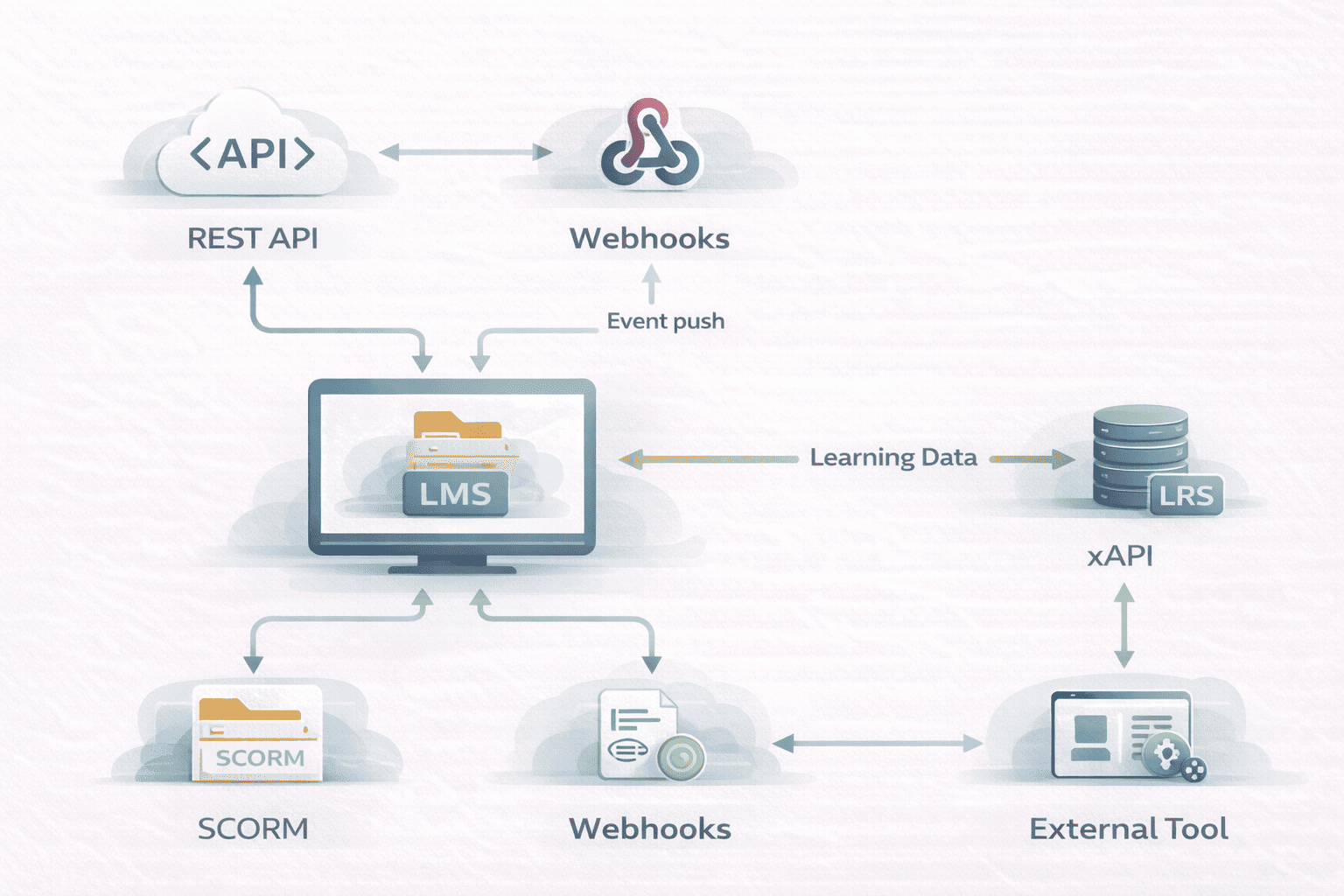
These aren’t competing options, they address different integration architectures and data flow directions.
- REST APIs enable synchronous control: create a user account, enroll a learner, pull a completion report. REST is predictable but “polling” patterns (repeatedly checking for new completions) create unnecessary system load.
- Webhooks are event-driven: the LMS pushes data when something happens, a course completion, certificate issuance, enrollment change. Webhooks eliminate polling overhead but introduce operational complexity. Documentation quality around webhook failure handling (does the LMS queue events, retry, or drop them?) is one of the most reliable indicators of API maturity.
- SCORM packages content and tracks basic interactions (completion, score) within the LMS. Tracking data stays inside the platform. SCORM’s compatibility advantage is significant; its analytics ceiling is low.
- xAPI (Tin Can) captures richer learning records across contexts, simulations, mobile, offline, and sends them to a Learning Record Store (LRS). xAPI enables analytics architectures SCORM cannot, but implementation overhead is substantially higher.
- LTI (Learning Tools Interoperability) enables external tools (assessments, simulations) to integrate without rebuilding authentication and grade passback per tool. Configuration complexity is higher, but the interoperability benefit compounds.
Comparison Table: Integration Models Compared
| Approach | Primary Purpose | Advantages | Constraints | Complexity |
|---|---|---|---|---|
| REST API | Synchronous CRUD operations | Predictable, well-documented patterns | Polling overhead for event-driven needs | Low–Moderate |
| Webhooks | Real-time event delivery | Eliminates polling, enables reactive workflows | Requires reliable endpoint, failure handling | Moderate |
| SCORM | Content packaging + basic tracking | Universal compatibility | Limited analytics, data stays in LMS | Low |
| xAPI | Rich learning record capture | Cross-context analytics, LRS integration | Implementation governance overhead | High |
| LTI | Tool interoperability | Reduces auth/passback complexity per tool | Configuration complexity, version fragmentation | Moderate–High |
OpenAPI/Swagger Specs vs Narrative API Guides – What Helps Developers More?
Machine-readable OpenAPI specifications enable SDK generation, direct import into Postman or Insomnia, interactive “try it now” consoles that reduce time-to-first-call from hours to minutes, and automated testing that catches drift between spec and implementation.
Narrative documentation provides what OpenAPI cannot: intent. What sequence of API calls accomplishes new hire provisioning? Which error codes signal transient failures worth retrying versus permanent failures requiring intervention? Each has a characteristic failure mode. OpenAPI specs auto-generated from code contain every endpoint but lack examples and workflow context junior developers need. Manually maintained narrative documentation drifts from actual API behavior as releases accumulate.
Platforms combining both, a maintained OpenAPI spec for technical reference plus an authored developer guide for workflow context, provide the strongest integration experience. The separation (spec for “what,” narrative for “why and how”) is intentional.
Do SDKs, Sandboxes, and Rate Limits Change the Equation?
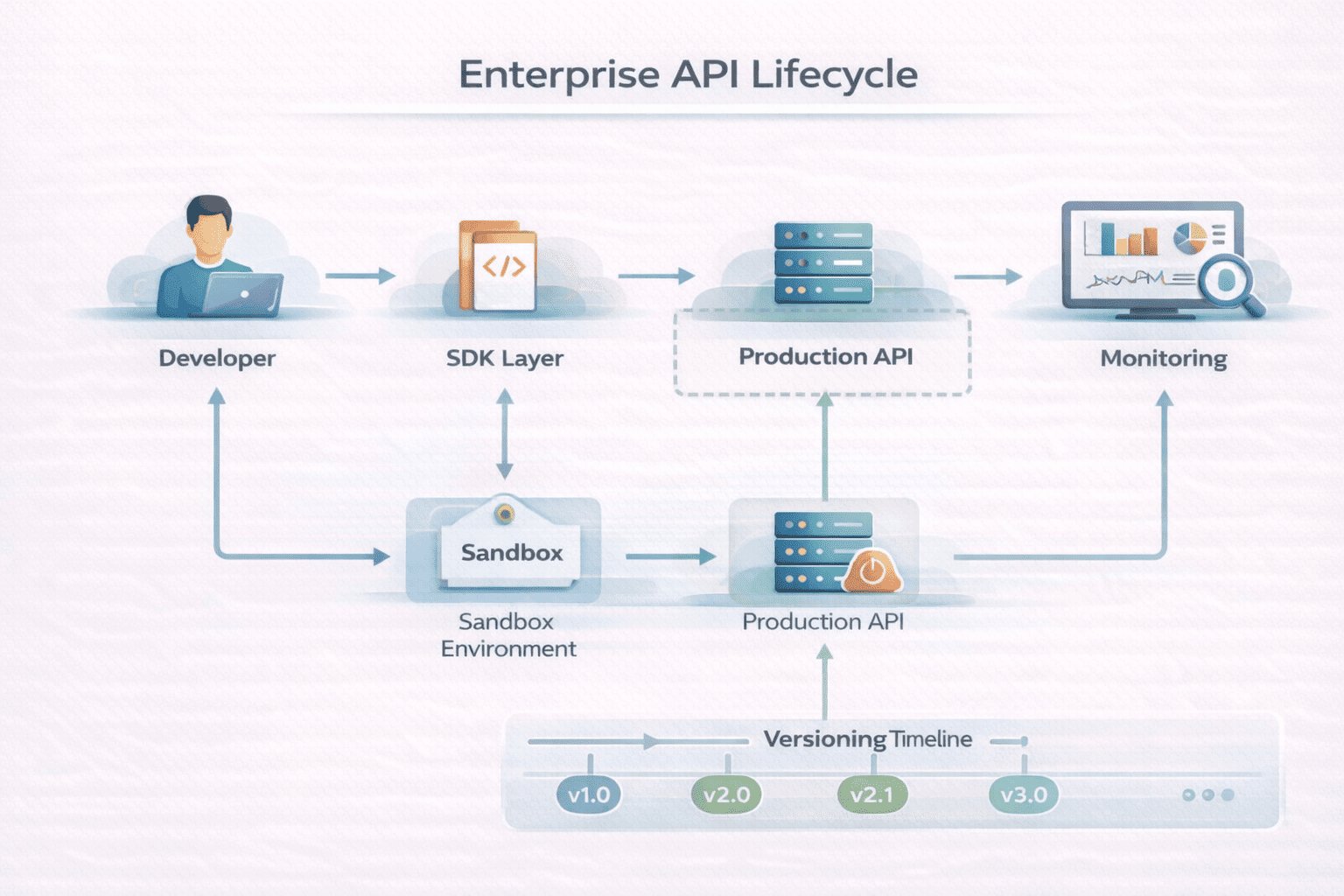
- Official SDKs abstract HTTP mechanics and surface schema violations at development time rather than runtime. Trade-off: each SDK is a maintained dependency requiring version tracking across integration lifetimes.
- Sandbox environments enable development without production risk, but sandboxes that don’t reflect production data volumes or content complexity pass tests that fail under real conditions. Documentation should explicitly describe sandbox limitations.
- Rate limiting is frequently underdocumented. “1,000 requests per minute” is insufficient for bulk provisioning design, integrations need burst allowances, response headers, and back-off strategy guidance. Underdocumented limits surface through production failures.
- API versioning policies determine long-term maintenance cost. Platforms with explicit deprecation timelines and advance notice periods reduce the risk of silent breaking changes compounding into expensive integration rewrites at year two or three.
Where Do LMS API Documentation Guides Often Fall Short?
- Stale documentation that describes parameters no longer matching current behavior, particularly in enterprise platforms where documentation and engineering teams operate independently.
- Missing error code documentation. A 422 Unprocessable Entity tells a developer nothing actionable. Mapping error codes to specific causes (invalid field format, duplicate enrollment, exceeded license limit) and resolution paths reduces support escalations significantly.
- No pagination examples. Endpoints returning list responses require pagination; omitting examples forces developers to experiment with production data retrieval, a risk no one should accept.
- Authentication confusion between API key, OAuth2 client credentials (server-to-server), and OAuth2 authorization code flow (user-delegated access). Platforms using multiple models for different endpoint categories require explicit documentation of which model applies where, undocumented assumptions here account for a disproportionate share of integration delays.
How Should You Think About Choosing an LMS API Documentation Model?
Documentation quality isn’t separable from integration risk. Five dimensions frame the decision:
- What systems must integrate, and in which direction? Inbound HRIS provisioning is architecturally different from outbound BI analytics exports. Verify both directions are documented, not just the primary flow.
- Real-time or batch? Same-day deprovisioning requires reliable webhook documentation. Nightly batch tolerates REST polling with less operational risk.
- Internal developer capacity? A complete OpenAPI spec suits experienced engineers. Teams newer to LMS integration benefit from explicit workflow guides even if the reference coverage is thinner.
- Compliance vs analytics focus? SCORM suffices for completion evidence. xAPI + LRS is required for cross-context learning analytics. These aren’t interchangeable.
- What’s the 3-year maintenance picture? Evaluate deprecation policies and documentation maintenance history. Well-documented today with undocumented breaking changes historically creates compounding integration debt.
FAQ
Q1. What is an LMS API documentation guide?
A structured resource defining how developers interact programmatically with an LMS. Covers authentication (OAuth2, API keys), endpoints (REST operations for users, courses, enrollments), data schemas (JSON response structures), rate limits, and error codes. Quality varies significantly, some platforms provide interactive OpenAPI consoles; others publish static PDF references.
Q2. How do I integrate an LMS with HR software?
Typically via REST API calls triggered by HRIS events: a new hire in Workday triggers an LMS account creation; role changes trigger enrollment updates; termination events trigger account deactivation. SSO via SAML or OIDC handles authentication separately from provisioning. Documentation should include a dedicated HRIS workflow guide, not just endpoint references.
Q3. What's the difference between SCORM and xAPI in LMS APIs?
CORM tracks basic completion/score data within the LMS with limited external API access. xAPI sends learning records in JSON format to external Learning Record Stores, enabling cross-system analytics SCORM can’t reach. xAPI requires implementation governance; SCORM requires almost none. The choice depends on analytics ambition.
Q4. Do all LMS platforms provide OpenAPI/Swagger documentation?
No. Open-source platforms and modern SaaS providers increasingly publish OpenAPI specifications; legacy enterprise platforms often use manual HTML or PDF references. An OpenAPI spec indicates methodology but doesn’t guarantee completeness or narrative workflow coverage.

