

Key Takeaways

LMS implementations fail due to poor adoption, not missing technical steps. Configuring SSO, migrating content, and setting roles does not guarantee success if users don’t understand why the system exists or how it helps them.
Clear success metrics must be defined before technical execution begins. Implementations work best when 3–5 measurable outcomes guide every checklist task, preventing activity without progress.
Integrations increase value, but also complexity and timelines. SSO and HRIS integrations are essential at scale, while real-time sync and custom APIs should be added only when they create clear business impact.
Pilot rollouts reduce risk and improve adoption in complex environments. Testing with a small user group surfaces usability, data, and communication issues that technical validation alone cannot detect.
Realistic timelines require accounting for organizational work, not just setup. Data cleanup, content testing, admin training, and change management often double vendor-estimated implementation timelines.
Across 40+ deployments, ranging from highly regulated healthcare environments (HIPAA compliance, audit trail requirements) to decentralized retail chains (frontline workers without company email addresses), we’ve found launches fail not because organizations skip steps, but because they execute the wrong steps toward unclear objectives. SaaS and Enterprise L&D teams complete 47-item LMS implementation checklist only to discover six months later that adoption hovers at 23% because nobody addressed: “Why are we changing systems?” The checklist problem isn’t lack of tasks, it’s activity (configuring SSO, migrating content) confused with progress toward outcomes (improved compliance, faster onboarding, measurable skills).
The tension: goals versus tasks, speed versus readiness, technical versus human factors. Teams prioritizing technical perfection delay launch by months. Those rushing deployment without testing face post-launch firefighting that tanks user trust. This article examines implementation approaches and trade-offs. It clarifies why some implementations succeed and others create technical debt.
Should You Start With Goals or Jump Straight to Tasks?
Goals-First: Define success metrics before technical work. What problems must the LMS solve? Stakeholder alignment precedes LMS implementation plan development.
- Advantages: Reduces misalignment, supports KPI measurement from day one, prevents feature-first thinking
- Limitations: Slower momentum, requires leadership clarity, can devolve into analysis paralysis
Task-Driven: Immediately begin execution, assemble team, configure platform, upload content, set launch date. LMS rollout strategy focuses on completing activities on schedule.
- Advantages: Faster execution, clear milestone visibility, builds operational momentum
- Limitations: Strategic disconnect risk, feature-first thinking, tactical misalignment compounds
Comparison Table: Goals-First vs Task-Driven Implementation
| Dimension | Goals-First Model | Task-Driven Model |
|---|---|---|
| Starting Point | Business outcomes | Project activities |
| Speed | Moderate | Faster |
| Primary Risk | Abstract planning delays action | Misses strategic alignment |
| Best For | Strategic orgs with clear objectives | Smaller teams, replacements |
| Blind Spot | Delayed action | Outcome clarity emerges post-launch |
Most successful implementations blend both: start with 3-5 clear success metrics, then execute structured task list aligned to those outcomes.
What Should Be on a Realistic LMS Implementation Checklist?
Phase 1: Planning & Governance (Weeks 1-2)
- Define implementation objectives with measurable outcomes
- Identify stakeholders and decision authority
- Assign single project owner
- Set success metrics and measurement cadence
⚠️ What to Ignore in Month 1: Custom UI skinning, advanced gamification leaderboards, third-party marketplace integrations, and branded mobile app development. These are “Polish,” not “Foundation.” Organizations that prioritize aesthetic customization before functional validation create 4-6 week delays addressing features that don’t impact adoption. Get users successfully logging in, finding training, and completing courses before investing in cosmetic enhancements. Use LMS RFP Template for better understanding of the system if you are outsourcing the development.
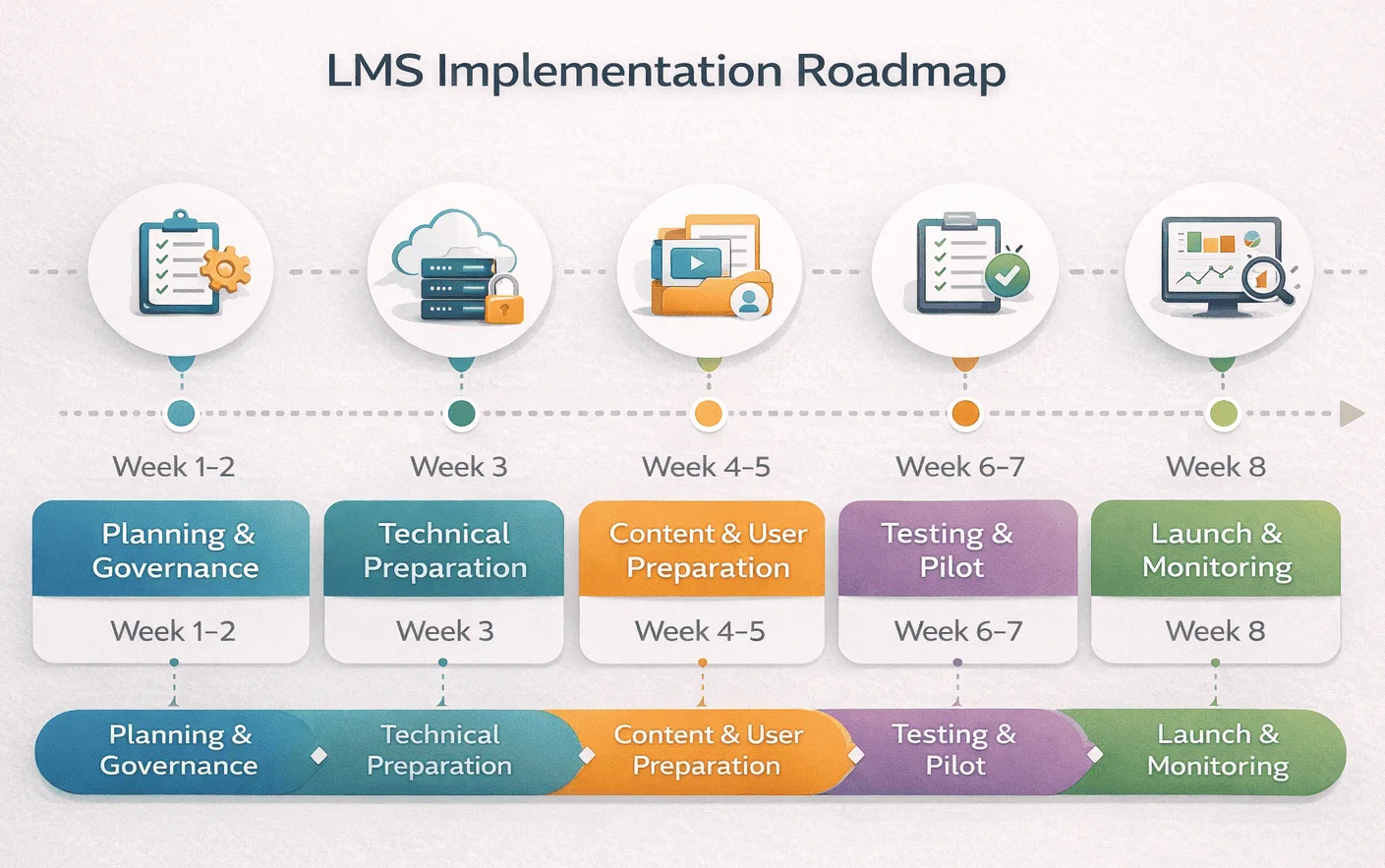
Phase 2: Technical Preparation (Weeks 2-4)
- SSO configuration with identity provider testing
- HRIS integration setup with data field mapping
- API rate limit audit: Ensure your identity provider (Okta, Azure AD) won’t throttle the LMS during bulk user syncs, we’ve seen organizations discover rate limit constraints only during production cutover when provisioning 5,000 accounts simultaneously triggers authentication failures
- Role permissions structure (admin, creator, viewer roles)
- Data migration mapping from legacy systems
⚠️ What to Ignore in Phase 2: Real-time HRIS synchronization if batch nightly sync suffices for your use case. Real-time adds 3-5 weeks of webhook development and error handling complexity. For most organizations, overnight batch sync provides adequate data freshness without the technical overhead. Reserve real-time for scenarios where immediate user provisioning creates measurable business value (new hire onboarding on day one, termination-triggered immediate access revocation for security).
Enterprise vendors like SimpliTrain, Docebo, or Cornerstone structure implementation around defined project phases with professional services. Smaller SaaS platforms provide self-service templates.
Phase 3: Content & User Preparation (Weeks 3-6)
- Content audit, catalog, test SCORM/xAPI compatibility
- User segmentation by role, location, technical proficiency
- Administrator training (15-20 hours before launch)
- Communication plan per user segment
Healthcare Example: A 12-hospital system discovered during content audit that 60% of their nursing compliance training used Flash-based simulations that wouldn’t work in modern browsers. The “quick 3-week migration” became a 10-week content rebuild because nobody validated technical compatibility before committing to launch dates. Test SCORM packages in target platform during Week 3, not Week 7.
Retail Chain Example: Frontline associates in 400 stores had no company email addresses. The communication plan assumed email announcements, which reached store managers but not the 8,000 associates who would actually use the platform. Solution required in-store posters, manager-led huddles, and SMS-based launch notifications. User segmentation isn’t just demographics, it’s communication channel accessibility.
Phase 4: Testing & Pilot Rollout (Weeks 5-7)
User Acceptance Testing (UAT) with “Frustration Log”: IT and L&D validate SSO, permissions, reporting, but critically, document every moment of confusion or friction. Where did testers pause? What did they click expecting X but got Y? The “Frustration Log” captures usability problems that technical validation misses. In one healthcare deployment, UAT revealed that nurses expected “My Training” navigation but platform used “Learning Dashboard”, a terminology mismatch causing 40% of pilot users to request support for “I can’t find my courses.”
- Limited user pilot (50-100 users) collecting usability feedback
- Integration stress testing under load conditions
- Feedback incorporation before full launch
Phase 5: Launch & Monitoring (Weeks 8+)
- Phased rollout vs full deployment decision
- Adoption monitoring, login rates, enrollment, completion velocity
- Support escalation tracking
- Success metric baseline comparison
How Important Are Integrations and Technical Dependencies?
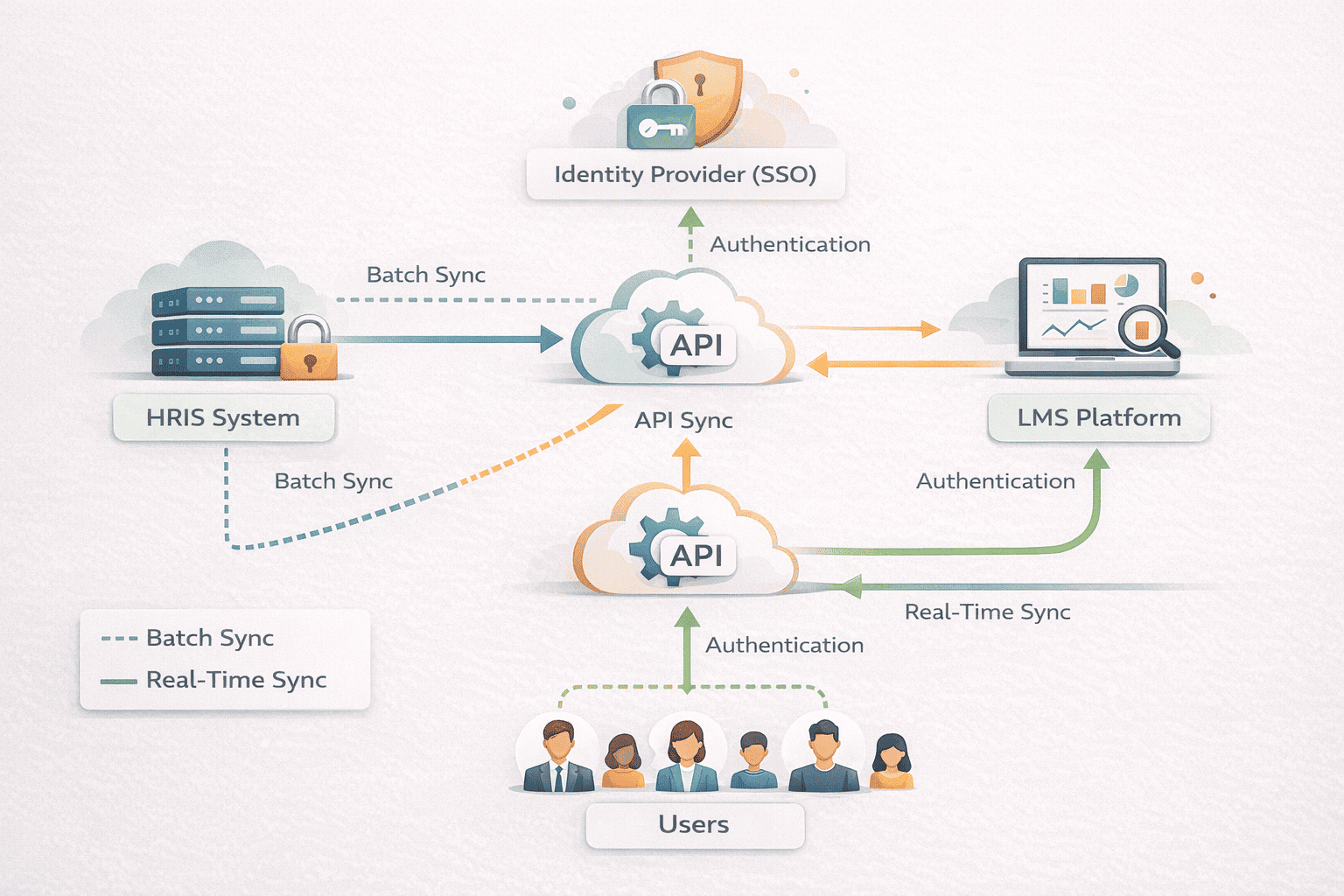
- Identity systems (SSO): Non-negotiable for centralized identity management. Separate credentials reduce adoption by 15-20% in our implementations.
- HRIS synchronization: Automates user provisioning. Manual account creation works under 200 employees; beyond 500, HRIS integration prevents administrative burden.
- CRM alignment: Relevant only for sales enablement, partner training, customer education. Compliance-focused implementations don’t need CRM complexity.
- API connectivity: Enables powerful automation but creates technical dependencies and maintenance burden.
Trade-offs:
- Technical complexity vs operational automation
- Real-time vs batch sync (batch suffices for most with lower overhead)
- IT dependency risk (custom integrations create institutional knowledge reliance)
We’ve seen 4-month delays building perfect HRIS integration when 80% of value came from monthly manual imports. Conversely, rushing launch without SSO in 5,000-employee organizations created authentication chaos requiring expensive remediation.
Comparison Table: Pilot Rollout vs Direct Launch
| Dimension | Pilot Approach | Direct Launch |
|---|---|---|
| Risk Mitigation | High – issues surface with limited user impact | Lower- problems affect entire user base |
| Implementation Speed | Slower – pilot adds 2-4 weeks | Faster – immediate full deployment |
| Feedback Quality | Detailed – pilot users provide specific usability insights | Limited- feedback arrives slowly across large population |
| Resource Demand | Higher – managing pilot group plus full deployment prep | Lower- single launch execution |
| Suitable For | Enterprise deployments, high-risk changes, complex integrations | Small organizations (<500 users), simple configurations, system replacements |
| Support Burden | Concentrated during pilot, manageable at full launch | Concentrated at launch, potentially overwhelming support |
| Cost of Failure | Low- pilot issues affect 50-100 users, fixable before full rollout | High- production issues require emergency patches while 5,000+ users experience broken functionality, creates trust erosion lasting months |
What Are the Most Common LMS Implementation Mistakes?
- Underestimating timeline by 50-100%: Vendors quote 6-8 weeks. Actual deployment requires 4-6 months including stakeholder alignment, data cleanup, content migration, testing, training. The gap creates pressure forcing teams to skip critical steps.
- Ignoring change management: Teams focus on technical configuration while overlooking human adoption. Employees resist unexplained changes to workflows. Without clear communication about value, adoption languishes regardless of technical quality.
- Overlooking data migration complexity: Legacy systems have 10 years of inconsistent data, duplicates, obsolete IDs. Organizations assume simple export/import. Reality: 40-60 hours of cleanup and validation.
- Skipping integration testing under load: SSO works with 5 test users. Production with 3,000 simultaneous Monday morning logins reveals bottlenecks. Load testing prevents post-launch firefighting.
- Not training administrators: L&D teams learning the platform alongside end users create support bottlenecks. Administrator training 2-3 weeks before launch builds internal expertise.
- Launching without baseline metrics: Can’t prove success without pre-launch data. Establish measurement baseline before migration.
How Long Does LMS Implementation Actually Take?
- Size: 100 users, minimal customization: 4-6 weeks. 5,000 users, HRIS integration, extensive content: 4-8 months.
- Integration complexity: SSO adds 1-2 weeks. HRIS sync adds 2-4 weeks. Custom APIs add 4-8 weeks each.
- Content migration: 50 courses: 2-3 weeks. 500 courses requiring testing and rebuilds: 8-12 weeks.
- Stakeholder readiness: Clear objectives and executive sponsorship accelerate. Consensus-building and part-time ownership extend timelines 2-3x.
Vendor estimates reflect technical configuration only. Add 50-100% for organizational work, data cleanup, stakeholder alignment, administrator training.
Pros and Cons: Implementation Methodologies
Structured Project Plan
- Advantages: Clear milestones, accountability structure, risk tracking, aligned stakeholder communication
- Limitations: Requires PM expertise, slower decisions, rigid structure, documentation overhead
Flexible / Agile
- Advantages: Faster iteration, adaptive to feedback, lower documentation burden, team autonomy
- Limitations: Scope creep risk, documentation gaps, difficult executive communication, coordination challenges
Most organizations benefit from structured planning (Phase 1-2) transitioning to adaptive execution (Phase 3-5) once core architecture is locked.
How to Think About Your LMS Implementation Strategy
A checklist is useless if the platform is wrong fit. Ensure you’ve completed your LMS needs analysis and vendor evaluation before committing to Phase 2 technical preparation. Attempting to implement a platform that doesn’t align with organizational requirements creates 6-12 months of configuration effort compensating for fundamental misalignment. Platform selection determines 70% of implementation success; the checklist optimizes the remaining 30%.
- Are we solving a technical or adoption problem? If current system works but nobody uses it, better configuration won’t solve adoption.
- Who owns the project? Single accountability prevents bottlenecks and drives momentum.
- What integrations are critical vs nice-to-have? SSO and HRIS matter for enterprises. CRM only for revenue-tied training.
- How will we measure success? Define metrics before implementation, not post-launch.
- What risks are acceptable? Define acceptable known issues versus blocking problems requiring resolution before launch.

