

Key Takeaways

LMS selection fails most often due to misalignment, not poor technology. Organizations choose platforms that don’t match their operational reality, governance capacity, or long-term scale requirements.
Business goals should drive LMS evaluation, not feature checklists.
Feature-heavy comparisons overlook workflow fit, adoption risk, and whether the platform actually solves priority training problems.
Total Cost of Ownership matters more than list pricing. Implementation effort, integrations, support tiers, internal labor, and scalability costs often exceed subscription fees over a 36-month horizon.
Integrations and identity management determine success at scale. HRIS, SSO, and API capabilities directly affect adoption, administrative workload, and data reliability as organizations grow.
The “right” LMS depends on context, constraints, and risk tolerance. Cloud vs on-premise, native connectors vs APIs, and speed vs scalability all involve trade-offs that must be evaluated explicitly.
In our experience across 30+ LMS implementations, buying decisions fail most frequently not because organizations choose “bad” platforms, but because they choose platforms misaligned with operational reality. Feature-rich demos showcase capabilities never used. Pricing models affordable in year one compound into budget strain by year three. The central tension: goals versus features, speed versus scalability, cost versus capability. Organizations approaching how to choose right LMS with pure feature checklists discover 18 months later they purchased sophistication they can’t operationalize. Those prioritizing speed find themselves locked into platforms that don’t scale. This article examines vendor evaluation approaches and trade-offs. It does not rank vendors or recommend specific methods. Instead, it clarifies why selection decisions matter and what questions reveal platform-need alignment.
Why Business Goals Must Drive Your Evaluation (Not Feature Checklists)
Goal-First: Define training objectives first. What problems must learning solve? Stakeholder alignment precedes LMS requirements gathering.
Process: Identify priorities → Map capabilities → Filter vendors → Evaluate feasibility
Strengths: Prevents feature distraction, ensures buy-in
Risks: Abstract planning delays decisions
Feature-Checklist: Compare capabilities using standardized matrices. SCORM? Mobile? Analytics? LMS features comparison drives decisions.
Process: Build checklist → Score vendors → Select highest scorer
Strengths: Structured, faster, objective
Risks: Surface analysis misses workflow fit
Comparison Table: Goal-First vs Feature-Checklist Approach
| Dimension | Goal-First | Feature-Checklist |
|---|---|---|
| Starting Point | Business objectives | Feature matrix |
| Primary Risk | Planning delays | Misses strategic fit |
| Best For | Strategic orgs | Fast evaluation |
| Complexity | Moderate | Lower |
| Blind Spot | Delayed technical clarity | Goal misalignment |
What Should Be on an LMS Vendor Evaluation Checklist?
Foundation Tier (Must-Haves)
These capabilities are non-negotiable for any functional LMS deployment. Without these, the platform cannot serve its core purpose:
1. Learning Experience & Usability (Foundation)
- Intuitive learner interface requiring minimal training
- Mobile compatibility (responsive design minimum; native apps ideal for frontline workers)
- WCAG 2.1 AA accessibility compliance
2. Administration & Governance (Foundation)
- Role-based permissions with granular control
- Automated user provisioning (manual account creation doesn’t scale beyond 100 users)
- Compliance tracking with certification expiry workflows and audit trails
3. Reporting & Analytics (Foundation)
- Completion tracking (who finished what by when)
- Export capabilities for regulatory audits and stakeholder reports
Optimization Tier (Nice-to-Haves)
These capabilities enhance effectiveness but aren’t blocking deployment. Evaluate based on strategic priorities:
Reporting & Analytics (Optimization)
- Advanced engagement analytics (time-on-task, drop-off heatmaps, assessment item analysis)
- Real-time dashboards vs scheduled reports
- API access for custom BI tool integration
Integrations & Technical Fit (Optimization)
- HRIS integration (Workday, ADP, SAP SuccessFactors), becomes Foundation Tier for organizations >500 employees
- REST APIs for custom workflows and event-driven automation
- CRM compatibility (Salesforce, Dynamics), critical only for sales enablement or partner training use cases
Vendor & Operational Factors (Varies)
- Support SLAs (24/7 vs business hours depends on global operations)
- Implementation timeline expectations (vendor-led vs self-service)
- Data security certifications (SOC 2, ISO 27001), become Foundation Tier for regulated industries
- Pricing transparency and TCO visibility
Vendor positioning matters: Moodle community discussions emphasize open-source flexibility and deployment model choice (cloud vs self-hosted), appealing to organizations with technical capacity and customization priorities. Docebo frames evaluation around AI-powered learning experiences and KPI-driven analytics, targeting organizations prioritizing engagement optimization. TalentLMS highlights deployment speed and ease of use, serving organizations that need functional platforms quickly without extensive configuration.
Cloud vs On-Premise – Does Deployment Model Still Matter?
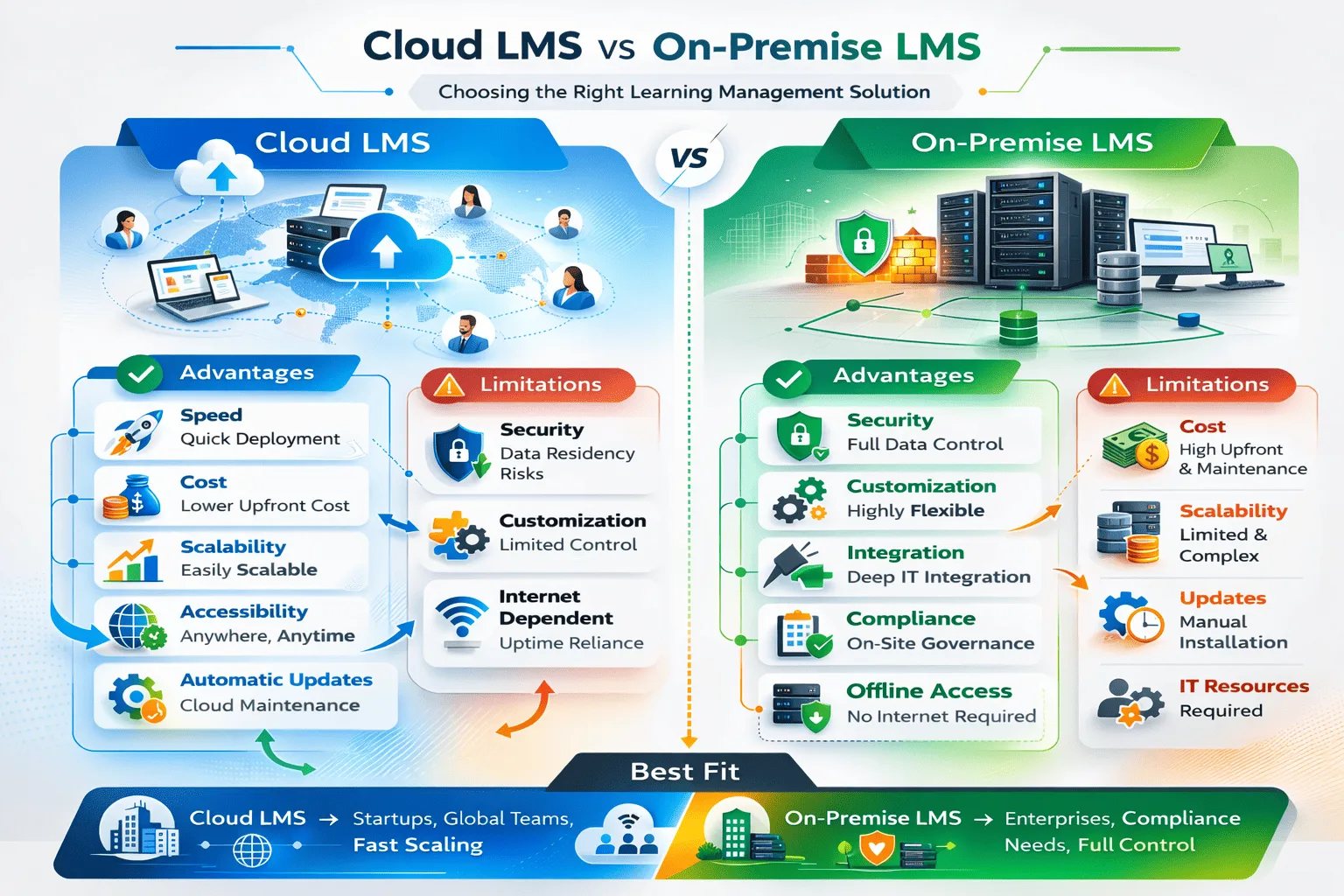
SaaS (Cloud):
Advantages: Faster deployment, lower upfront cost, reduced IT burden, vendor manages infrastructure and updates
Limitations: Less customization control, vendor dependency, potential data residency concerns
On-Premise (Self-Hosted):
Advantages: Greater customization, complete data control, long-term cost predictability
Limitations: Higher maintenance cost, slower feature adoption, and scalability complexity
| Dimension | Cloud (SaaS) | On-Premise |
|---|---|---|
| Deployment Speed | Days to weeks | Weeks to months |
| Maintenance | Vendor-managed | Internal IT team |
| Cost Model | Recurring subscription | Upfront + IT labor |
| Security Control | Vendor-managed compliance | Full control, full responsibility |
| Scalability | Automatic | Manual provisioning |
| Customization | Vendor-limited | Unlimited with expertise |
| The Deal-Breaker | Non-negotiable if you lack a dedicated 24/7 DevOps team or need <2 week deployment for urgent compliance mandates | Only viable if data privacy laws (specific defense contracts, GDPR with strict residency) forbid third-party hosting OR you need deep customization impossible in SaaS (custom authentication, proprietary workflow engines) |
For most small to mid-sized organizations, cloud removes infrastructure barriers. Large enterprises with strict data residency, complex customization needs, or existing IT infrastructure may justify on-premise. “Cloud is always better” ignores regulatory, security, or customization contexts where self-hosting is rational.
Integrations: Why HRIS and SSO Are Non-Negotiable at Scale
Integration requirements scale with organizational complexity and directly impact user adoption success:
HRIS integration automates employee lifecycle, new hire accounts, role-based training, termination deactivation. Manual management works under 100 employees; beyond 500, automation becomes necessary to prevent the administrative burden that tanks user adoption when L&D teams spend 40% of their time on account management instead of program development.
SSO compatibility with Okta, Azure AD eliminates password management friction. Critical for centralized identity management and user adoption, employees resist systems requiring separate credentials. Every additional login is a barrier to engagement.
CRM integration connects learning to revenue, sales enablement triggered by opportunity stages, partner certifications in account records. Relevant for sales-driven organizations where training directly impacts revenue; overhead for compliance-only training.
API flexibility enables custom workflows, BI dashboard integration, event-driven certifications, content synchronization. Essential for complex automation like legacy system migration where historical training records must flow from sunset platforms into the new LMS while maintaining audit trail integrity.
The migration complexity factor: Organizations with 5+ years of training history in legacy systems face non-trivial legacy system migration challenges. Does the new LMS provide data import APIs that preserve completion dates, assessment scores, and certification timestamps? Can historical records maintain audit trail continuity for regulatory purposes? We’ve seen organizations discover 6 months into implementation that the new platform can’t import legacy completion data, forcing them to maintain dual systems indefinitely for historical compliance reporting.
Small organizations prioritize simplicity. Enterprises require identity synchronization and orchestration. Context determines whether integration sophistication is strategic necessity or unnecessary complexity that delays user adoption by introducing configuration dependencies.
How Do You Evaluate Vendor Stability and Support?
Customer service SLAs define response commitments. Evaluate whether 24/7 support, business-hours assistance, or dedicated account management matches operational risk.
Documentation depth determines self-service capability. Organizations with technical capacity benefit from comprehensive docs; others need vendors emphasizing support availability.
Implementation support includes data migration, integration setup, admin training. Vendor-led implementations de-risk deployments but increase costs. Self-implementation reduces fees but demands project management expertise.
Community ecosystem provides peer support through forums, user groups, integrations, content marketplaces. Moodle benefits from open-source communities; Cornerstone operates within HR technology ecosystems.
Check stability through market presence (years operating, customer count), roadmap transparency (public releases, advisory boards), and migration complexity (data export, alternative vendors).
The Weighted Scoring Model: Moving from Subjective to Objective Evaluation
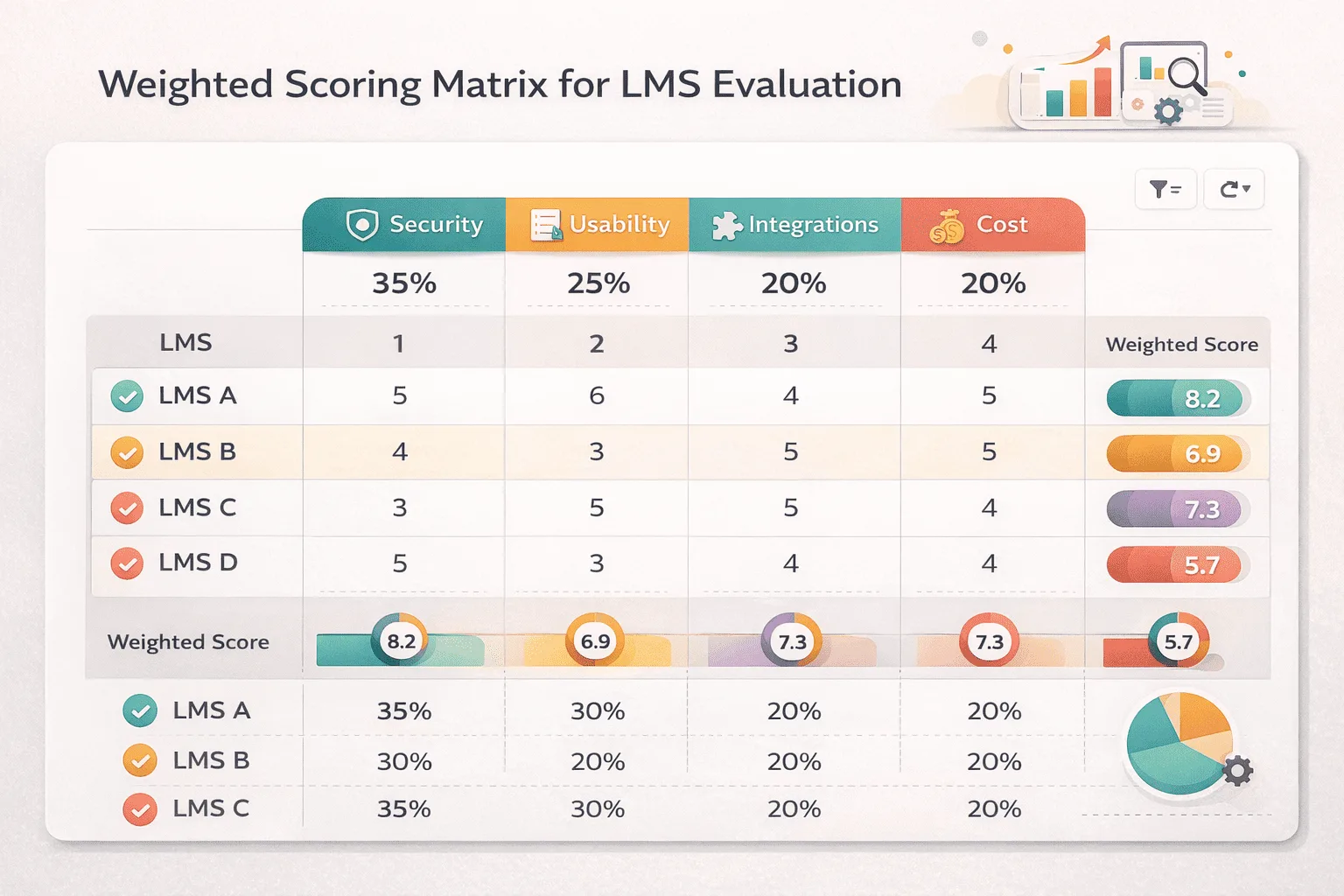
Weighted scoring assigns numerical values to criteria based on priorities. Security 20% for regulated industries, usability 30% for frontline workforces, integration 25% for complex environments.
Pros: Structured comparison, quantified multi-stakeholder input, RFP process formalization, objective justification
Cons: False precision (scoring 7.3 vs 7.8 implies non-existent accuracy), hides qualitative issues, gaming risk, weights may shift post-implementation
Pros and Cons: Evaluation Approaches
Checklist-Heavy Evaluation
Advantages: Organized framework, facilitates vendor comparison, clear stakeholder documentation
Limitations: Can ignore strategic alignment, encourages feature-count optimization over workflow fit
Strategy-Led Evaluation
Advantages: Aligns LMS to outcomes, prevents overbuying unused features, ensures stakeholder consensus
Limitations: Slower decision process, may overlook platform innovations reshaping training strategy
What Mistakes Do Buyers Make When Choosing an LMS?
The “Sales Gap” Underestimating Implementation Complexity
This is the most common pitfall we’ve encountered. Vendors quote 4-6 weeks because they only account for technical platform setup, spinning up the cloud instance, configuring SSO, creating admin accounts. They completely ignore the 3-4 months of internal work that actually stops a launch:
- Content migration: Migrating 200+ SCORM packages from legacy systems, discovering 40% don’t work in the new platform, rebuilding or replacing them
- Data cleanup: HRIS has 15,000 employee records with inconsistent job titles, duplicate accounts, and outdated manager hierarchies that must be cleaned before sync
- Stakeholder training: L&D admins need 20+ hours learning the new system; content creators need authoring tool training; managers need reporting dashboard orientation
- User adoption: Rolling out to 5,000 employees requires phased communication, training sessions, help desk preparation, and change management
Real timeline from our implementations: Simple cloud deployments (minimal legacy data, <500 users): 6-10 weeks. Mid-complexity (HRIS integration, 500-2,000 users, moderate content migration): 3-5 months. Enterprise (custom integrations, >5,000 users, extensive content library migration): 6-12 months.
Prioritizing demos over workflows: Demonstrations showcase best-case scenarios. Actual implementation involves messy data and edge cases. Request pilots or reference calls with organizations in your industry facing similar constraints.
Ignoring scalability: Platform performs well with 100 users but becomes slow at 5,000, requiring expensive infrastructure upgrades initial pricing didn’t reveal. Ask vendors: “Show me performance benchmarks at 3x our current user count.”
Overvaluing feature count: Platform advertises 200+ features; organization uses 15-20. We’ve seen organizations pay premium pricing for AI-powered adaptive learning when 90% of their training is mandatory compliance that doesn’t benefit from adaptation. Focus evaluation on must-have capabilities, not comprehensive feature inventories.
Not involving stakeholders early enough: IT selects technically sound platform but L&D finds content authoring unusable. L&D chooses user-friendly platform IT can’t integrate with existing identity management. Compliance discovers reporting doesn’t generate audit-ready evidence in required formats. Cross-functional evaluation with representatives from each user group prevents expensive post-implementation friction.
How to Choose the Right LMS? or Think About It
- What problem are we solving? If the answer is “our current LMS is old” rather than “we can’t track compliance” or “onboarding takes too long,” dig deeper. Platform replacement without clear problem definition replicates existing issues.\
- Who will use the system daily? Administrators, content creators, learners, and managers experience platforms differently. Evaluation should include representatives from each group.
- What integrations are mission-critical? Differentiate “would be nice” from “operationally necessary.” HRIS integration might be critical for 5,000-employee organizations but optional for 100-person teams.
- What does scalability mean in our context? User growth, course volume, geographic expansion, or feature complexity? Clarify which dimensions matter for your trajectory.
- What risks are we willing to accept? Vendor lock-in, implementation complexity, change management burden, budget uncertainty, every platform choice involves trade-offs. Explicit risk acknowledgment prevents post-implementation surprise.
Context, constraints, and consequences determine platform fit, not feature counts, market share, or pricing alone.
FAQ
Q1. How do I choose the right LMS vendor?
Start with business objectives, what training problems must the platform solve? Build evaluation criteria reflecting those objectives. Score vendors against weighted criteria, prioritize must-have capabilities, validate through reference calls with similar organizations.
Q2. What features should an LMS have?
Depends on use case. Compliance-focused organizations need certification tracking and audit trails. Sales enablement requires CRM integration and analytics. Employee onboarding prioritizes ease of use and HRIS integration. Evaluate features relative to primary use case.
Q3. What questions should I ask LMS providers?
Implementation timeline with similar organizations, integration complexity with your specific HRIS/CRM, pricing scalability (500 vs 5,000 users), data migration support, customer references facing comparable challenges. Avoid generic “tell me about your platform” questions.
Q4. Is cloud LMS better than on-premise?
For most organizations, yes, faster deployment, lower IT burden, automatic updates. Exceptions: strict data residency requirements, existing infrastructure investments, deep customization needs beyond SaaS vendor support.
Q5. How long does LMS implementation take?
Simple cloud deployments: 4-8 weeks. Mid-complexity with HRIS integration: 2-4 months. Enterprise with custom integrations and content migration: 4-9 months. Verify estimates against customer references.

