

Key Takeaways
What You'll Learn

The 6 Essential LMS Components
Content management, user management, assessments, tracking, communication, and user interface, plus which technical layers make them work together.
Critical Evaluation Insight
Choosing components that don’t align with your use case can lead to 40% lower learner engagement and wasted platform investment.
Real-World Implementation Gaps
What vendors promise vs. what actually requires custom configuration, especially around HRIS integration, reporting customisation, and mobile feature parity.
When evaluating a learning management system, understanding its LMS components helps you determine whether a platform can actually meet your organisation’s training needs. Rather than relying on vendor marketing materials that list dozens of features, it’s more useful to understand which LMS system components are essential, which are optional, and how they work together.
This guide breaks down the functional modules and technical elements that make up a complete LMS, explaining what each component does and why it matters.
What Are LMS Components?
LMS components are the core functional modules and technical layers, such as content management, user tracking, and integration of APIs, that work together to deliver, manage, and measure digital training programs within a unified learning management system. Different sources use terms like “components,” “features,” “modules,” and “elements” somewhat interchangeably. For clarity: components typically refer to major functional areas (like user management or assessment tools), while LMS features describe specific capabilities within those components (like automated grading or bulk user upload). The distinction matters because understanding components helps you evaluate system architecture and integration points; while understanding features helps you assess day-to-day usability.
The Essential LMS Components Every Platform Needs
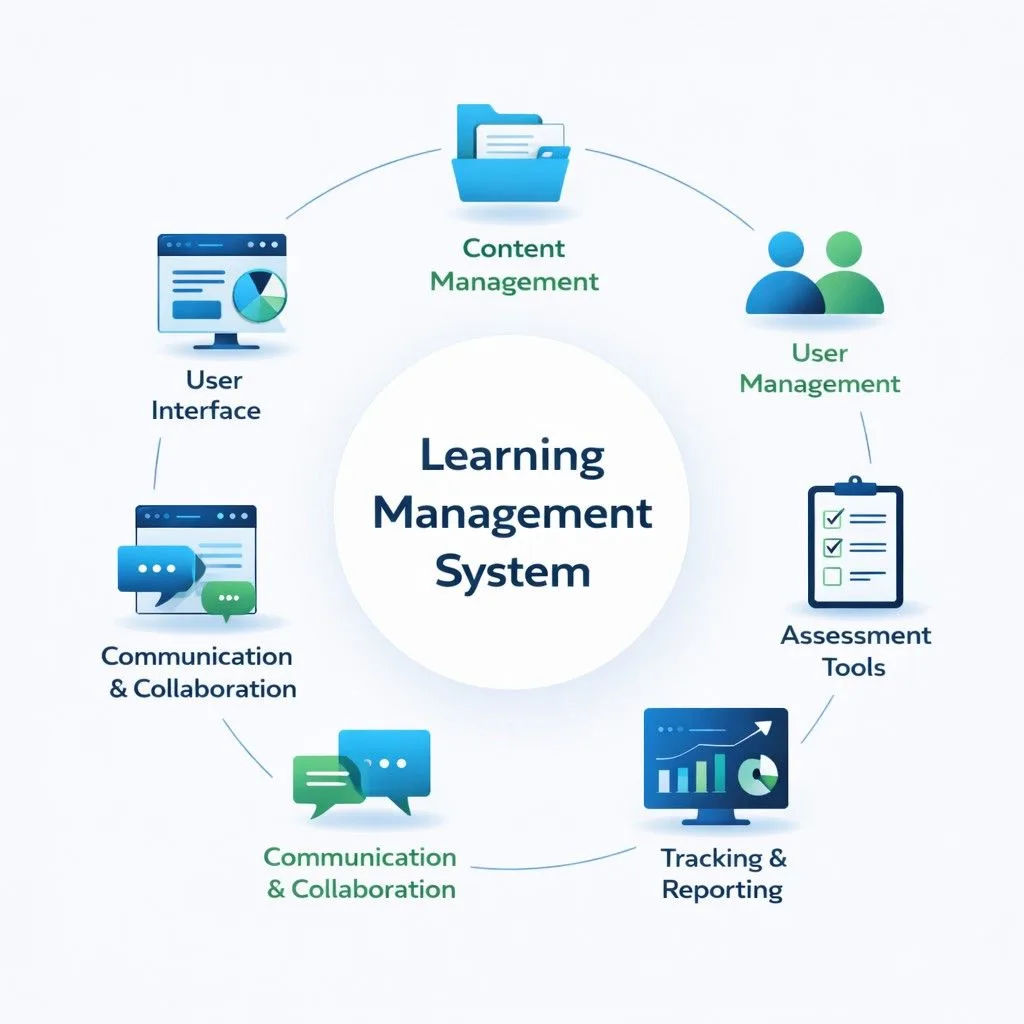
Certain LMS system components appear in virtually every platform because they address fundamental requirements: creating content, managing users, assessing learning, and tracking outcomes.
1. Course Creation and Content Management
This component handles everything related to building and organizing learning materials. What it includes:
- Tools for creating courses directly in the platform (course builders or authoring tools)
- Upload capabilities for externally created content
- Support for multiple formats: video, PDF, presentations, SCORM packages, xAPI modules, audio files, documents
- Content library or repository for storing and organizing materials
- Version control for updating content without breaking existing enrollments
- Ability to structure content into modules, lessons, chapters, or learning paths
Why it matters: Because LMS and LCMS platforms handle content authoring differently. Without a robust content management, you’ll struggle to keep training materials current or organized. The difference between platforms often lies in how intuitive the authoring tools are and whether they support standards like SCORM (Sharable Content Object Reference Model) or xAPI for content portability.
In practice, organizations with dedicated instructional designers may prefer external authoring tools (Articulate, Adobe Captivate) and use the LMS primarily for hosting. Smaller organizations benefit from platforms with built-in course builders that don’t require specialized skills.
2. User Management and Enrollment
This component controls who has access to the platform and what they can do. Core functions:
- User registration and profile management
- Role-based access control (defining permissions for learners, instructors, administrators)
- Bulk user upload and management
- Group or cohort organization (by department, location, role, or course)
- Integration with HR systems or student information systems for automated user provisioning
- Enrollment workflows: manual assignment, automated rules-based enrollment, or self-registration
The enrollment challenge: The gap between what’s promised and what’s delivered often appears here. While vendors demonstrate seamless auto-enrollment during demos, implementing this with your actual HRIS, especially when dealing with nested organizational structures or matrix reporting, frequently requires more configuration than initially expected.
Single Sign-On (SSO)
SSO authentication, while technically part of user management, deserves special attention. Systems supporting SAML (Security Assertion Markup Language) or OAuth protocols allow users to access the LMS with their existing corporate credentials, eliminating password management friction that kills adoption.
Expert Warning: The HRIS Integration Trap
Don’t just check for “HRIS Integration” during demos. Ask vendors if their API supports delta-syncs (incremental updates). Without it, your system might crash every time you try to update 5,000 user records at once. Also verify how they handle nested organizational groups, many platforms claim to sync org charts but fail when departments have matrix reporting structures. Request a test sync with your actual HRIS structure during the trial period.
3. Assessment and Testing Tools
Assessment components enable you to measure whether learners actually acquired knowledge or skills. Standard capabilities:
- Quiz and test builders
- Multiple question types: multiple choice, true/false, fill-in-blank, essay, matching, drag-and-drop
- Question banks for reusing assessment items across courses
- Automated grading for objective questions
- Manual grading workflows for subjective responses
- Randomization of questions or answer order to prevent cheating
- Time limits and attempt restrictions
- Immediate feedback or delayed score release
- Certification upon passing thresholds
Beyond basic quizzes: More sophisticated platforms support adaptive assessments that adjust difficulty based on learner responses, though this requires significant content development investment and isn’t universally available.
The practical consideration: automated grading works well for knowledge checks but doesn’t measure skill application. Organizations training for complex competencies need platforms supporting project submissions, peer review, or instructor evaluation workflows
4. Progress Tracking and Reporting
This component captures what learners do in the system and presents that data to stakeholders. What gets tracked:
- Login activity and time spent
- Which modules accessed, in what order
- Completion status (not started, in progress, completed)
- Assessment scores and attempts
- Certification and credential status
- Compliance training deadlines and overdue alerts
How data gets presented:
- Learner dashboards showing personal progress
- Administrator dashboards with organizational overview
- Customizable reports or report builders
- Pre-built reports for common needs (completion rates, compliance status, engagement metrics)
- Export capabilities (CSV, PDF, Excel)
- Analytics identifying trends, drop-off points, or struggling learners
SCORM vs. xAPI: Understanding Tracking Standards
| Standard | What It Tracks | Best For | Limitations |
|---|---|---|---|
| SCORM | Completion status, final scores, time spent | Simple compliance training, legacy content | Limited granularity; can’t track mobile app or offline activities |
| xAPI (Tin Can) | Granular learning activities (“watched 3 min of video,” “failed quiz on 2nd attempt”) | Advanced analytics, mobile learning, performance support | Requires LRS; more complex to implement |
The reporting reality: While all platforms claim robust reporting, the depth varies significantly. Basic systems provide completion percentages and test scores. Advanced systems incorporate learning analytics, examining patterns like which content correlates with improved job performance or where learners consistently struggle. Behind the scenes, modern platforms use a Learning Record Store (LRS) to capture granular xAPI statements about learner activity. This enables more sophisticated analysis than older SCORM-based tracking, which only records “completed/incomplete” and final scores.
Test Reporting Before You Buy
During vendor evaluation, request sample reports matching your actual compliance or business intelligence needs. Many organizations discover post-purchase that promised “customizable dashboards” require SQL knowledge or expensive professional services to configure. Ask: “Can we see a live demo of creating a custom report showing completion rates by department, filtered by hire date, with manager escalation rules?” If they can’t demonstrate this in 5 minutes, you’ll be paying for consulting later.
5. Communication and Collaboration Tools
Learning doesn’t happen in isolation. These components facilitate interaction between learners, instructors, and administrators. Common features:
- Announcements and notifications (email, in-app, push notifications to mobile)
- Discussion forums or message boards
- Direct messaging between users
- Comments on courses or lessons
- Calendar for scheduling live sessions or deadlines
- Integration with video conferencing tools (Zoom, Microsoft Teams, Webex)
- Automated email alerts for assignments, approaching deadlines, or completed certifications
The collaboration spectrum: Basic platforms provide announcement capabilities and email notifications. More collaborative systems incorporate social learning features, user-generated content, peer knowledge sharing, course ratings and reviews—though these require active moderation and organizational culture supporting knowledge exchange.
6. User Interface and Learner Portal
This is what users actually see and interact with daily. Essential elements:
- Dashboard showing assigned courses, progress, and recommendations
- Course catalog for browsing available training
- Search functionality to locate specific courses
- Personalized homepage displaying relevant content based on role or past activity
- Responsive design adapting to different devices and screen sizes
- Mobile application (native app or mobile-optimized web interface)
The mobile consideration: “Mobile-optimized” means different things across platforms. Some offer responsive web designs that adapt to smaller screens. Others provide native mobile apps with offline content download. Feature parity between desktop and mobile versions varies, some mobile apps lack administrative functions or advanced assessment types. In practice, organizations with field workers, retail employees, or healthcare staff require true mobile-first design with offline capability. Desk-based employees may find responsive web interfaces sufficient.
Supporting LMS Components That Enhance Functionality
Beyond the core six, several LMS modules appear frequently but aren’t universally considered essential.
Administration and Configuration
System-level controls:
- Branding customization (logos, colors, custom domains)
- Language and localization settings
- Time zone configuration
- Permission templates for different admin roles
- Audit logs tracking system changes
- Notification templates and scheduling rules
Integration Layer and APIs
Technical connectivity:
- APIs (Application Programming Interfaces) allowing data exchange with other systems
- Pre-built connectors for common platforms (HRIS, CRM, video conferencing)
- Webhooks sending automated messages when specific events occur
- Support for industry standards (SCORM, xAPI, LTI for tool integration)
The integration reality: all platforms claim integration capabilities. The difference lies in whether they provide pre-built connectors for your specific systems or whether integration requires custom API development.
Certification Management
Credential handling:
- Automated certificate generation upon course completion
- Digital badge issuance
- Expiration tracking and recertification reminders
- Integration with third-party credentialing platforms
Gamification Engine
Engagement mechanics:
- Points, badges, leaderboards, achievements
- Progress bars and completion visualizations
- Challenges or competitions between learners
The gamification caveat: While vendors emphasize these features, research shows mixed results. Initial novelty effects wear off, and not all learners respond positively to competitive elements. Gamification works best when designed around specific learning objectives rather than applied superficially.
E-Commerce Module
Revenue generation tools:
- Payment processing for paid courses
- Shopping cart and checkout workflows
- Revenue tracking and financial reporting
- Coupon codes and promotional pricing
Relevant primarily for organizations offering customer training, professional development to non-employees, or continuing education programs.
How LMS Components Work Together: A Technical View
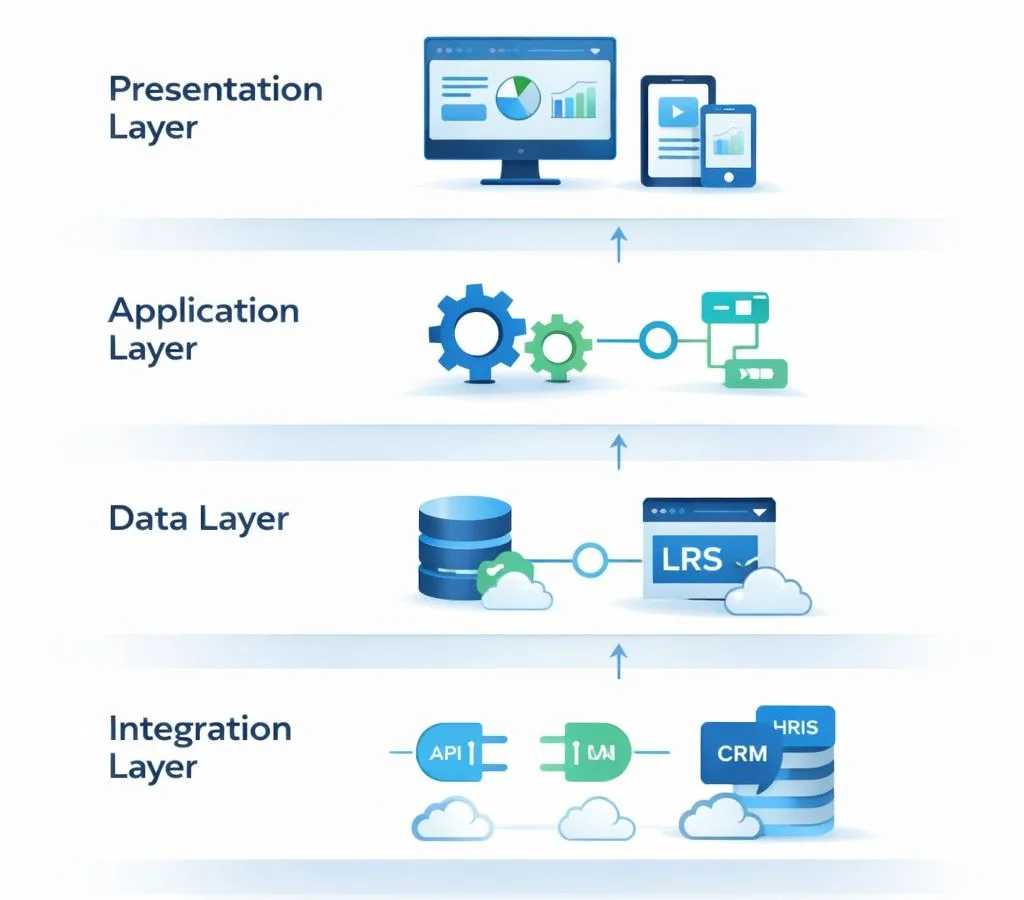
Understanding the technical architecture helps explain how these components interact. The LMS operates on four interconnected layers:
| Technical Layer | What It Does | Components Involved |
|---|---|---|
| Presentation Layer (Frontend) | What users see and interact with | User interface, learner portal, admin console, mobile app |
| Application Layer (Backend) | Business logic and processing | Enrollment rules, grading algorithms, notification engine, workflow automation |
| Data Layer | Information storage and retrieval | Database (user data, course content, progress records), LRS (xAPI statements), file storage |
| Integration Layer | Connections to external systems | APIs, SSO connectors, webhooks, third-party tool integrations |
Step-by-Step: How Data Flows When You Upload a SCORM Package
- Content Upload → You upload a SCORM ZIP file through the Presentation Layer (user interface)
- Package Processing → Application Layer unpacks the file, reads the manifest.xml, extracts metadata (title, structure, completion rules)
- Data Storage → Database stores course structure; file storage hosts videos/assets; content becomes available in catalog
- Learner Access → When learner clicks “Start Course,” Presentation Layer launches SCORM player
- Activity Tracking → As learner progresses, SCORM runtime API sends statements to Application Layer: “set completion status,” “record score”
- Data Recording → Application Layer writes progress data to Database; if xAPI-enabled, also sends granular statements to LRS
- Notification Trigger → When learner completes, Application Layer checks enrollment rules, triggers notification engine
- Manager Alert → Integration Layer sends webhook to email system or Slack: “Jane completed Safety Training”
- Reporting Update → Data Layer aggregates completion data; admin dashboard updates in real-time via Presentation Layer
This architecture explains why certain vendor promises prove challenging. “Seamless HRIS integration” requires the integration layer to map data fields correctly between systems, handle nested organizational structures your LMS database may not natively support, and maintain synchronization when employee data changes. The technical complexity often exceeds what sales demonstrations suggest.
The Hidden Scalability Issue
When evaluating technical architecture, ask about concurrent user limits and database read/write speeds. We’ve audited systems that performed beautifully with 500 users but experienced 30-second page load times when 5,000 employees accessed compliance training during the same deadline week. Request load testing data for user volumes 3x your current size, growth happens faster than you expect.
LMS Components to Prioritize Based on Your Use Case
Not all LMS features matter equally across different contexts.
Decision Matrix: Which Components to Prioritize
| If Your Goal Is… | Prioritize These Components | Avoid Paying Extra For… | Critical Integration |
|---|---|---|---|
| Compliance Training | Automated assignment, expiration tracking, audit trails, certification management, manager dashboards | Gamification, social learning, advanced content authoring | HRIS (for role-based assignment), SSO |
| Employee Development | Learning paths, personalized recommendations, skills tracking, social learning, content variety | E-commerce, public course catalog, multi-tenancy | Performance management systems, HRIS |
| Customer Training | Multi-tenancy, e-commerce, certification issuance, public catalog, advanced branding | Academic gradebooks, internal HRIS connectors | CRM (Salesforce, HubSpot), payment gateways |
| Academic Delivery | Gradebook integration, semester scheduling, SIS connectivity, discussion forums, assignment submission | E-commerce (unless offering paid courses), advanced gamification | Student Information System, video conferencing |
| Sales Enablement | Mobile + offline access, microlearning support, just-in-time content, video hosting, integration with sales tools | Academic-style gradebooks, lengthy certification programs | CRM, communication platforms (Slack, Teams) |
How LMS Components Impact Total Cost of Ownership (TCO)
Understanding LMS system components helps predict long-term costs beyond initial licensing fees.
Modular architecture benefits:
- Add components (e-commerce, advanced analytics) only when needed rather than paying upfront
- Easier upgrades, replace one component without rebuilding entire system
- Better vendor negotiation, pay for actual usage rather than bundled packages
Monolithic system risks:
- Forced upgrades of entire platform when only one feature needs updating
- Vendor lock-in, difficult to switch systems when all components are tightly coupled
- Higher maintenance costs, changes to one area create ripple effects
Hidden cost factors tied to components:
- API call limits: Some vendors charge per integration transaction, syncing 10,000 users daily adds up
- Storage overages: Video hosting in content management component often has caps; exceeding requires premium tier
- Professional services: “Customizable reporting” often means “we’ll build it for you at $200/hour”
- User licensing models: Check if pricing is per registered user (includes inactive accounts) or active user (monthly logins)
The interoperability standards, SCORM, xAPI, LTI (Learning Tools Interoperability), directly impact TCO. Platforms supporting these standards allow you to move content between systems, reducing vendor lock-in and future migration costs.
Conclusion: LMS Components Matter More Than Feature Lists
Understanding LMS components helps you move beyond vendor marketing claims to evaluate whether a platform’s architecture actually supports your requirements. The core six components, content management, user management, assessments, tracking, communication, and user interface, form the foundation every platform needs. How well they’re implemented and how seamlessly they integrate determines whether the system becomes a valuable training infrastructure or an under-utilised administrative burden.
The technical components, database architecture, APIs, LRS, integration layers, explain why certain vendor promises (like “seamless HRIS integration” or “instant custom reports”) often require more configuration than initially suggested. Asking detailed questions about these underlying elements during evaluation prevents post-purchase surprises.
FAQ
Q1. What are the most important components of an LMS?
The five essential LMS components are: (1) course creation and content management, (2) user management and enrollment, (3) assessment and testing tools, (4) progress tracking and reporting, and (5) communication tools. These enable the core LMS functions of delivering training, managing learners, measuring outcomes, and tracking progress.
Q2. What is the difference between LMS features and LMS components?
Components refer to major functional areas or modules within the system, like “user management” or “reporting.” Features are specific capabilities within those components, like “bulk user upload” (a user management feature) or “custom report builder” (a reporting feature). Components provide structure; features provide functionality.
Q3. What are LMS modules?
LMS modules are functional units or add-ons that extend platform capabilities. The term is sometimes used interchangeably with “components,” but typically refers to optional or specialized functionality like e-commerce modules, gamification modules, or advanced analytics modules that may require separate licensing.
Q4. Do all LMS platforms have the same components?
All platforms include the core components (content management, user management, assessments, tracking, communication, user interface). They differ in: (1) which advanced components are included vs. require add-on purchases, (2) sophistication level of each component, (3) how components integrate with each other, and (4) ease of use for non-technical administrators.
Q5. What is an LRS and is it part of the LMS?
An LRS (Learning Record Store) is a database that stores xAPI statements, granular records of learning activities like “user watched video for 3 minutes” or “user failed quiz on second attempt.” Some LMS platforms have embedded LRS capabilities; others require integration with external LRS systems. LRS enables more detailed tracking than older SCORM-based systems.
Q6. How do LMS components integrate with other workplace systems?
The integration layer uses APIs (Application Programming Interfaces) to exchange data with external systems. Common integrations include: HRIS for automated user provisioning, CRM for customer training data, SSO for authentication, video conferencing for live sessions, and content libraries for third-party courses. Quality varies, some platforms offer pre-built connectors; others require custom development.
Q7. What components support compliance training specifically?
Compliance-focused LMS system components include: automated course assignment based on role/location, expiration tracking and recertification reminders, audit trails documenting who completed what and when, manager visibility dashboards, escalating notifications for overdue training, and detailed compliance status reporting with export capabilities for regulatory audits.
Q8. How do LMS components impact the total cost of ownership (TCO)?
Modular components allow for more cost-effective scaling, add e-commerce or advanced analytics only when needed rather than paying for bundled packages upfront. Components supporting interoperability standards (SCORM, xAPI, LTI) reduce vendor lock-in and future migration costs. Hidden costs often appear in: API call limits for integrations, storage overages for video content, professional services for “customisable” features, and whether pricing is per registered vs. active users.

